
Stan`
-
Posts
18675 -
Joined
-
Last visited
-
Days Won
615
Everything posted by Stan`
-
Could be the folder where it is not extracted ?
-
That's peculiar...
-
@Freagarach introduced that they might have an idea When does it crash? When you open the menu ? If so you might have a corrupted savegame https://trac.wildfiregames.com/ticket/5911
-
@Gurken Khan Were you saving ? @wraitii VCRUNTIME140.dll!6da1cf5e() Inconnu Code non-utilisateur. Impossible de trouver ou d'ouvrir le fichier PDB. VCRUNTIME140.dll![Les frames ci-dessous sont peut-être incorrects et/ou manquants, aucun symbole chargé pour VCRUNTIME140.dll] Inconnu Aucun symbole n'a été chargé. zlib1.dll!6d942dcd() Inconnu Code non-utilisateur. Le fichier binaire n'a pas été généré avec les informations de débogage. pyrogenesis.exe!CodecZLibStream::CallStreamFunc(int(*)(z_stream_s *, int) func=0x6d942680, int flush=0, const unsigned char * in=0xff00d040, const unsigned int inSize=44, unsigned char * out=0x0000002c, const unsigned int outSize, unsigned int & inConsumed=8847338, unsigned int & outProduced=0) Ligne 151 C++ Les symboles ont été chargés. pyrogenesis.exe!Compressor_ZLib::Process(const unsigned char * in=0xff00d040, unsigned int inSize=7756565, unsigned char * out=0x0000002c, unsigned int outSize=8847338, unsigned int & inConsumed=8847338, unsigned int & outProduced=0) Ligne 218 C++ Les symboles ont été chargés. pyrogenesis.exe!Stream::Feed(const unsigned char * in=0xff00d040, unsigned int inSize=7756565) Ligne 124 C++ Les symboles ont été chargés. [Cadre en ligne] pyrogenesis.exe!StreamFeeder::operator()(const unsigned char *) Ligne 126 C++ Les symboles ont été chargés. pyrogenesis.exe!ArchiveWriter_Zip::AddFileOrMemory(const CFileInfo & fileInfo={...}, const Path & pathnameInArchive={...}, const std::shared_ptr<File> & file={...}, const unsigned char * data=0xff00d040) Ligne 711 C++ Les symboles ont été chargés. pyrogenesis.exe!ArchiveWriter_Zip::AddMemory(const unsigned char * data=0xff00d040, unsigned int size=7756565, __int64 mtime=1630118041, const Path & pathnameInArchive={...}) Ligne 658 C++ Les symboles ont été chargés. pyrogenesis.exe!SavedGames::Save(const CStrW & name={...}, const CStrW & description={...}, CSimulation2 & simulation, const std::shared_ptr<JSStructuredCloneData> & guiMetadataClone={...}) Ligne 130 C++ Les symboles ont été chargés. pyrogenesis.exe!SavedGames::SavePrefix(const CStrW & prefix={...}, const CStrW & description={...}, CSimulation2 & simulation, const std::shared_ptr<JSStructuredCloneData> & guiMetadataClone={...}) Ligne 53 C++ Les symboles ont été chargés. pyrogenesis.exe!JSI_SavedGame::SaveGamePrefix(const ScriptRequest & rq={...}, const std::wstring & prefix={...}, const std::wstring & description={...}, JS::Handle<JS::Value> GUIMetadata={...}) Ligne 54 C++ Les symboles ont été chargés. [Cadre en ligne] pyrogenesis.exe!std::_C__Invoker_functor::_Call(void(*)(const ScriptRequest &, const std::wstring &, const std::wstring &, JS::Handle<JS::Value>) &&) Ligne 330 C++ Les symboles ont été chargés. [Cadre en ligne] pyrogenesis.exe!std::_C_invoke(void(*)(const ScriptRequest &, const std::wstring &, const std::wstring &, JS::Handle<JS::Value>) &&) Ligne 330 C++ Les symboles ont été chargés. [Cadre en ligne] pyrogenesis.exe!std::_Apply_impl(void(*)(const ScriptRequest &, const std::wstring &, const std::wstring &, JS::Handle<JS::Value>) &&) Ligne 1233 C++ Les symboles ont été chargés. [Cadre en ligne] pyrogenesis.exe!std::apply(void(*)(const ScriptRequest &, const std::wstring &, const std::wstring &, JS::Handle<JS::Value>) &&) Ligne 1241 C++ Les symboles ont été chargés. [Cadre en ligne] pyrogenesis.exe!ScriptFunction::call(void *) Ligne 195 C++ Les symboles ont été chargés. pyrogenesis.exe!ScriptFunction::ToJSNative<&JSI_SavedGame::SaveGamePrefix,0>(JSContext * cx=0x00e5e810, unsigned int argc=3, JS::Value * vp=0x3a4c41f0) Ligne 336 C++ Les symboles ont été chargés. mozjs78-ps-release.dll!js::InternalCallOrConstruct(JSContext * cx, const JS::CallArgs & args={...}, js::MaybeConstruct construct=NO_CONSTRUCT, js::CallReason reason=Call) Ligne 585 C++ Les symboles ont été chargés. mozjs78-ps-release.dll!InternalCall(JSContext * cx=0x00e5e810, const js::AnyInvokeArgs & args={...}, js::CallReason reason=Call) Ligne 648 C++ Les symboles ont été chargés. mozjs78-ps-release.dll!Interpret(JSContext * cx, js::RunState & state) Ligne 3312 C++ Les symboles ont été chargés. mozjs78-ps-release.dll!js::RunScript(JSContext * cx=0x00e5e810, js::RunState & state={...}) Ligne 465 C++ Les symboles ont été chargés. mozjs78-ps-release.dll!js::InternalCallOrConstruct(JSContext * cx, const JS::CallArgs & args={...}, js::MaybeConstruct construct=NO_CONSTRUCT, js::CallReason reason=Call) Ligne 620 C++ Les symboles ont été chargés. mozjs78-ps-release.dll!InternalCall(JSContext * cx=0x00e5e810, const js::AnyInvokeArgs & args={...}, js::CallReason reason=Call) Ligne 648 C++ Les symboles ont été chargés. mozjs78-ps-release.dll!js::Call(JSContext * cx=0x00e5e810, JS::Handle<JS::Value> fval, JS::Handle<JS::Value> thisv, const js::AnyInvokeArgs & args={...}, JS::MutableHandle<JS::Value> rval, js::CallReason reason=Call) Ligne 665 C++ Les symboles ont été chargés. mozjs78-ps-release.dll!JS_CallFunctionValue(JSContext * cx=0x00e5e810, JS::Handle<JSObject *> obj, JS::Handle<JS::Value> fval, const JS::HandleValueArray & args={...}, JS::MutableHandle<JS::Value> rval={...}) Ligne 2777 C++ Les symboles ont été chargés. pyrogenesis.exe!IGUIObject::ScriptEventWithReturn(const CStr8 & eventName={...}, const JS::HandleValueArray & paramData={...}) Ligne 417 C++ Les symboles ont été chargés. [Cadre en ligne] pyrogenesis.exe!IGUIObject::ScriptEventWithReturn(const CStr8 &) Ligne 398 C++ Les symboles ont été chargés. [Cadre en ligne] pyrogenesis.exe!IGUIObject::ScriptEvent(const CStr8 &) Ligne 388 C++ Les symboles ont été chargés. pyrogenesis.exe!IGUIObject::SendEvent(EGUIMessageType type=GUIM_PRESSED, const CStr8 & eventName={...}) Ligne 352 C++ Les symboles ont été chargés. > pyrogenesis.exe!IGUIButtonBehavior::HandleMessage(SGUIMessage & Message={...}) Ligne 100 C++ Les symboles ont été chargés. pyrogenesis.exe!CButton::HandleMessage(SGUIMessage & Message={...}) Ligne 80 C++ Les symboles ont été chargés. pyrogenesis.exe!IGUIObject::SendMouseEvent(EGUIMessageType type=GUIM_MOUSE_PRESS_LEFT, const CStr8 & eventName={...}) Ligne 366 C++ Les symboles ont été chargés. pyrogenesis.exe!CGUI::HandleEvent(const SDL_Event_ * ev=0x009efa34) Ligne 209 C++ Les symboles ont été chargés. pyrogenesis.exe!CGUIManager::HandleEvent(const SDL_Event_ * ev=0x009efa34) Ligne 316 C++ Les symboles ont été chargés. pyrogenesis.exe!gui_handler(const SDL_Event_ * ev=0x009efa34) Ligne 55 C++ Les symboles ont été chargés. pyrogenesis.exe!in_dispatch_event(const SDL_Event_ * ev=0x009efa34) Ligne 63 C++ Les symboles ont été chargés. pyrogenesis.exe!PumpEvents() Ligne 262 C++ Les symboles ont été chargés. pyrogenesis.exe!Frame() Ligne 407 C++ Les symboles ont été chargés. pyrogenesis.exe!RunGameOrAtlas(int argc=1, const char * * argv=0x00b60008) Ligne 701 C++ Les symboles ont été chargés. pyrogenesis.exe!SDL_main(int argc=1, char * * argv=0x00b60008) Ligne 753 C++ Les symboles ont été chargés. pyrogenesis.exe!main_getcmdline() Ligne 74 C Les symboles ont été chargés. [Cadre en ligne] pyrogenesis.exe!invoke_main() Ligne 90 C++ Code non-utilisateur. Les symboles ont été chargés. pyrogenesis.exe!__scrt_common_main_seh() Ligne 288 C++ Code non-utilisateur. Les symboles ont été chargés. pyrogenesis.exe!CallStartupWithinTryBlock() Ligne 365 C++ Les symboles ont été chargés. kernel32.dll!76e36a14() Inconnu Code non-utilisateur. Binaire correspondant introuvable. ntdll.dll!7786a9ef() Inconnu Code non-utilisateur. Binaire correspondant introuvable. ntdll.dll!7786a9ba() Inconnu Code non-utilisateur. Binaire correspondant introuvable.
-
@Freagarach @Angen
-
As the author of the no blood mod, can confirm.
-
Hey there make sure to reset the teams. Usually what happens is the the players get set to the same team.
-
 https://github1s.com/0ad/0ad/blob/HEAD/source/ps/VideoMode.cpp#L85-L86 @vladislavbelov added a hidpi mode for windows https://code.wildfiregames.com/D4076
 -
Not that I know of. But it's alway hard to estimate the impact of such a bug from the reports. According to the people developing the spring engine AMD dropped support for compatibility profiles for GL < 3.0
-
@vladislavbelov noted it seems that sadly the manifest hidpi settings only support Windows 10 https://docs.microsoft.com/en-us/windows/win32/sbscs/application-manifests
-
Seems like some kind of autoformating where it added one space before each bullet point
-
I'm not exactly sure what the reasoning is for this but I believe you can't install a more recent Apple compiler (e.g XCode versions are only for specific mac versions) so you'd need to install the Clang compiler from brew or macports, which usually comes with another set of issues. @wraitii might know more. What's the hack it replaces? Yeah definitely; I chatted a bit with @smiley about it. I suppose the fork went that route. Honestly I never found it so bad. Maybe stockholm syndrome. Meson was an absolute pain for me to setup and I didn't even get a working build :/
-
That's just a vscode browser online. It's convenient to me Point was just showing the line.
- 517 replies
-
- 1
-

-
- hotkeys
- autoassign civ
- (and 9 more)
-
Any help in that area is welcome @vladislavbelov didn't have enough time in A25. @wraitiihad some patches. https://code.wildfiregames.com/D1923 https://code.wildfiregames.com/D1924 That has some issues with macOS and its sdk https://code.wildfiregames.com/D3185 https://code.wildfiregames.com/D4225 I'd like to help with that. Seemed a bit annoying with premake https://code.wildfiregames.com/D1338 A lot of maintainers are annoyed that. I personally hate cmake gui but if it can be done transparently why not. https://trac.wildfiregames.com/ticket/1104 I tried with meson but never got a working executable... And a lot of features we used were missing.
-
Plans yes, what will happen may vary, as they were supposed to be included in A24 (had to fix the innacuracies, didn't make it in time), A25 with the fixes didn't get there in time, so who knows
-
0 A.D. release names start with the letter of the alphabet that corresponds to the release version. Alpha 22 was Venustas, Alpha 23 was Ken Wood, Alpha 24 was Xšayaṛša, Alpha 25 was Yaunā and Alpha 26 will start with a Z ! As with previous releases, we give everyone the opportunity to propose release names. Let us hear your best proposals!
-
Wildfire Games, an international group of volunteer game developers, is happy to announce the re-release of 0 A.D. Alpha 25 “Yaunā”, the twenty-fifth alpha version of 0 A.D., a free, open-source real-time strategy game of ancient warfare. This version is a maintenance release. Gameplay remains untouched and both versions of Alpha 25 remain multiplayer-compatible. We strongly advise you however to upgrade to benefit of the following fixes: Ranked matches did not longer grant points in the lobby. Mod installation no longer require restart. Mod installation no longer prints errors when installing mods by double-clicking Mod installation now overwrites the existing mods to allow for easier updates. Fishes are now easier to spot on lowest settings with the addition of seagulls. The team wishes to apologize for the inconvenience and hopes you will be enjoying your time playing 0 A.D: Empires Ascendant.
-
@Freagarach @wraitii @Angen know better than me. I suspect it's this code https://github1s.com/0ad/0ad/blob/HEAD/binaries/data/mods/public/simulation/components/UnitAI.js#L2668-L2669
- 517 replies
-
- 2
-

-
- hotkeys
- autoassign civ
- (and 9 more)
-
I guess it could require town phase yeah.
-
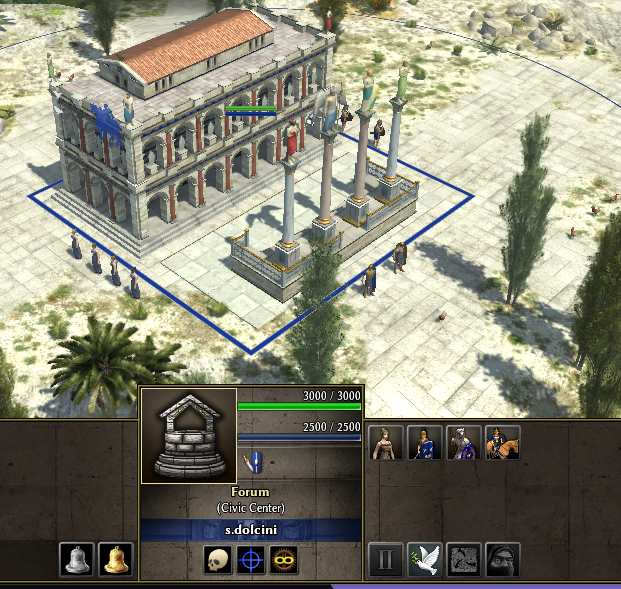
Well it's researchable on phase 1 ?
-
Didn't we add new ones I saw new metal and new stone models ?
-
Well if you want to make new textures. I thought the yellow veins were enough. @wowgetoffyourcellphone thoughts ?
-
Batch Training (The Good, The Bad and The Ugly)
Stan` replied to Micfild's topic in Gameplay Discussion
Might be more visible when game is laggy? -
Batch Training (The Good, The Bad and The Ugly)
Stan` replied to Micfild's topic in Gameplay Discussion
One could add a debug in production queue to see how often it gets called in practise -
Nothing here ? https://trac.wildfiregames.com/wiki/Rmgen_Library Would be nice to expand it Ping @FeXoR