Leaderboard



Popular Content
Showing content with the highest reputation on 2026-03-30 in all areas
-
I think I may have found the issue, the new version of the game seems to have trouble running Vulkan rendering, I disabled it and enabled OpenGL, restarted the game a few times, enabled Delenda, no issues, disabled it, no issues. Will keep you guys informed, thank you guys. @Stan`@guerringuerrin@Deicide4u@Obelix3 points
-
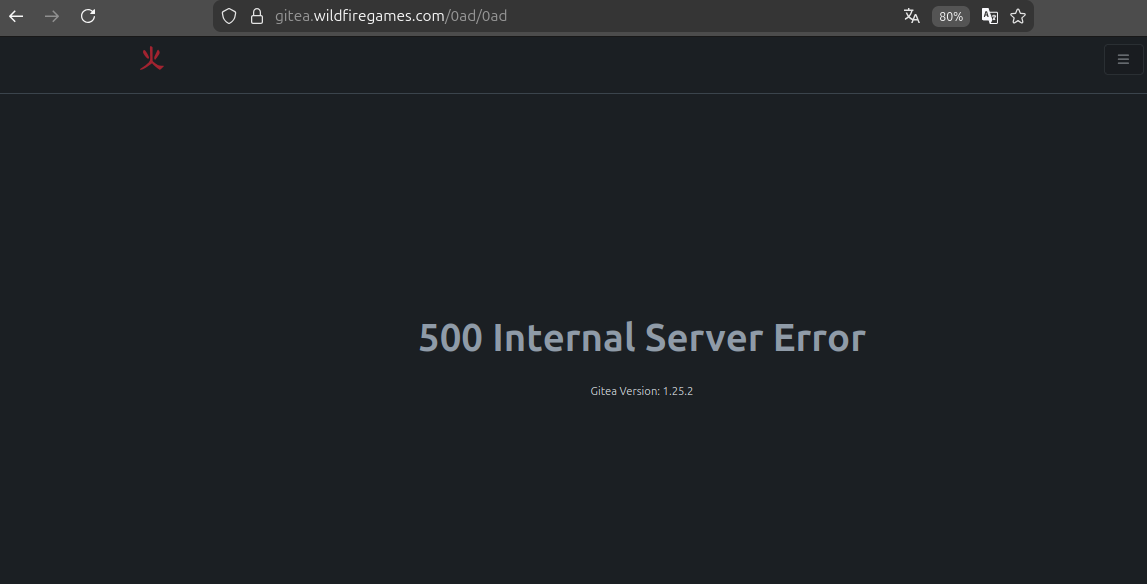
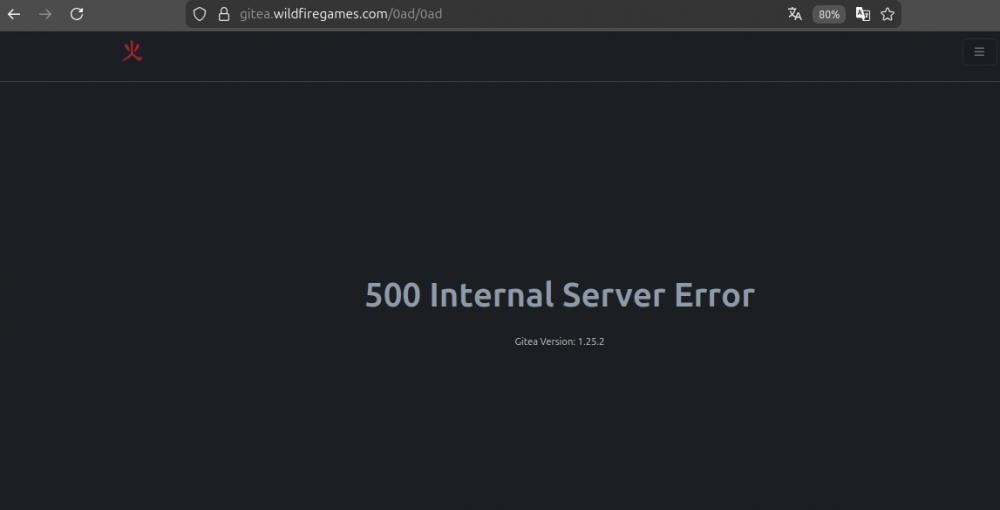
I don't know if it's related, but this message appears when I access the website.
 2 points
 -
I totally forgot how to export, but maybe @Stan` can help you with the file: 0.A.D_Attack_Ranged_Throw_Rock.dae2 points
-
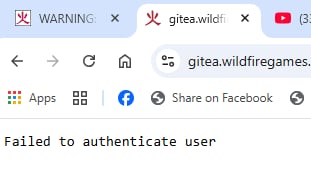
When trying to open https://gitea.wildfiregames.com/ in my web browser, a " Failed to authenticate user " message appears. Also, when attempting to verify the SSH connection, I get the following error: Are there any known issues related to this? Thanks
 1 point
 -
The in-game manual is very detailed about hotkeys and manual control, which is great, but maybe it could be complemented with a very short 'quick-start' section for absolute beginners? Something like: 'First steps: gather food, build houses, train workers. Unit roles: Spearmen vs Cavalry, etc.' I think it would make the game much more approachable. Thoughts? Something like that ----------------- A Beginner's Guide to 0 A.D. Welcome to 0 A.D.! This open-source historical Real-Time Strategy (RTS) game can seem deep at first, but by understanding its core principles, you'll quickly learn to build thriving empires and crush your enemies. The key is to not be afraid to experiment and learn from each match. 0. Optimal Settings for the Best Experience Before jumping in, it's worth checking the game options to ensure a smooth and comfortable experience. Graphics: If the game feels sluggish, navigate to Options > Graphics and disable "High-quality water effects" and "Shadows". This will provide the most noticeable performance boost on older or less powerful hardware . Camera Controls: By default, you can pan the camera with the WASD keys or arrow keys. Rotate the view with Ctrl + Arrow Keys or Shift + Mouse Wheel . All of these can be customized to your liking in the settings menu. Essential Hotkeys: I highly recommend familiarizing yourself with these key shortcuts right away. You can also view and customize them in Options > Hotkeys . H — Stop the currently selected units. . (period) — Select the next idle worker. , (comma) — Select the next idle soldier. Shift + Left Click on a unit's icon in a production building — Train a batch of 5 units . This is a huge time-saver! Please note, that batch size can be adjusted in settings. 1. Starting a Match and Choosing the Difficulty From the main menu, click Single-player to begin. Map Type: Skirmish map : The best choice for beginners. These maps are pre-designed and balanced, but you are free to choose your own civilization. Random map : The map layout and resources are procedurally generated. This is great for variety but can sometimes lead to unbalanced starting positions. Adding Opponents: Add one or more computer players (AI). For your first game, it's best to start with just one opponent. AI Difficulty Level: The AI in 0 A.D. is named Petra . For a new player, the choice is simple: Sandbox : This difficulty level is designed for learning. The AI opponent will not attack or expand its territory . Very Easy : Once you're ready for a bit of a challenge, this is the next logical step. Be aware that on higher difficulties, the Petra AI receives economic bonuses to its resource gathering and trade efficiency . 2. Choosing a Civilization, Match Settings, and Matchups Your choice of civilization largely dictates your strategic options. There are several unique ancient cultures from Europe, Africa, the Middle East, and Asia to choose from. Recommended Civilizations for Beginners: Athenians: A well-rounded civilization with a strong navy and an economic bonus to metal mining. They also have a unique ability to build long walls in neutral territory . Romans: Focused on a powerful and disciplined infantry. They can construct army camps in enemy territory and have access to some of the best siege weapons in the game . Some civilizations have special mobile units that can act as rally points or resource dropsites to increasing the speed of resource collection without building storehouse in the neighborhood end fast economic development. The Mauryas have the Worker Elephant, which can collect resources anywhere on the map and act as builder. The Germanic Tribes have the Supply Wagon, which acts as a mobile dropsite and increase population cap (as a house) and on the further stages can even be upgraded to train workers . The Persians excel at long-term economic gain. Their unique Ice House and the upgraded Winter Palace function as passive income generators, periodically granting you a free trickle of resources without any additional effort. Try out different factions and find the one whose playstyle interests you most! Match Settings: Population Cap: The default limit is usually 300. You can leave it as is or lower it for faster, more intense matches. Victory Condition: The most common and straightforward is Conquest . To win, you must eliminate all enemy units and buildings. Other options include building and holding a Wonder for a set amount of time . Civilization Matchups: There's no strict "rock-paper-scissors" rule for entire civilizations. Instead, the counter system is based on unit types. For example, cavalry archers are strong against slow-moving infantry, while heavily armored spearmen (like those of Sparta) excel against enemy cavalry . 3. Controlling Your Units The entire game is built on a simple principle: "Select – Command" . Left Mouse Button (LMB) — Select a unit or building. Right Mouse Button (RMB) — Issue a command (move, attack, gather resources) . Advanced Control Tips: Double-click LMB on a unit to select all units of the same type currently visible on your screen. Ctrl + Double-click to select all units of the same type on the entire map . Hold Shift while issuing commands (e.g., Shift+RMB on a tree, then Shift+RMB on a guard post) creates an action queue. Your units will perform the tasks in sequence. 4. Developing Your Economy A strong economy is the foundation of a powerful army. Here's a simple 5-minute plan to get started: Scout the Map: Send your starting cavalry scout in a spiral pattern around your base to locate resources (berry bushes, animals, forests, mines) and your enemy. Start Gathering: Send all your Civilians to the nearest berry bushes (RMB). They are the fastest gatherers of fruit . Send all your Infantry Citizen-Soldiers to chop down the nearest trees (RMB). They are the best lumberjacks . Send your Cavalry Citizen-Soldier to hunt nearby animals (RMB). They are the only unit type that can effectively hunt for meat . Set a Rally Point: Select your Civic Center and then right-click on a tree. All newly trained units will automatically begin gathering wood. Train More Workers: Hold Shift and left-click on the Civilian icon in the Civic Center's production panel. Train a batch of 5. Build a House: Once you have 100 wood, select a couple of free workers, click the House icon in the bottom panel, and place it near your Civic Center. Houses increase your population limit . Build a Storehouse: When you have several workers on wood, select them and build a Storehouse right next to the forest. This drastically reduces their travel time and speeds up gathering. Key Economic Principles: Build Storehouses near resources. This is the single most important rule for efficient gathering. Don't forget food. When berry bushes run out, build a Farmstead and then place Fields on the open land nearby . Keep an eye on your population limit. The counter in the top panel (e.g., 15/30) shows how many more units you can train. If you can't train more, you need more Houses. 5. Developing Your Military Once your economy is stable, it's time to think about defense and conquest. Build a Military Structure: Your first military building is usually the Barracks. It allows you to train basic infantry. Learn Unit Counters: Spearmen are strong against cavalry. Swordsmen are strong against other infantry. Slingers and Archers are strong against slow, heavily armored units but are vulnerable in melee combat . Don't Neglect Defenses: Walls and Towers are crucial for holding off early enemy raids. Garrisoning soldiers inside towers will significantly increase the number of arrows they fire . 6. Essential Technologies to Research Researching technologies is a long-term investment. Early game technologies in the Farmstead and Storehouse that improve gathering rates should be researched as soon as you have the spare resources. Top Priority Technologies for Beginners: Conscription in the Barracks. This reduces the batch training time for infantry . Wheelbarrow and Horse-drawn Carts in the Storehouse. These increase the amount of resources a worker can carry, which is a massive boost to gathering efficiency. Advancing to the next phase ( Town Phase , City Phase ) in the Civic Center. This unlocks more powerful units, buildings, and technologies. 7. Basic Tactics and Strategies Scouting: Always know what your enemy is doing. Use fast units to probe their base and keep an eye on their army's movement. Use the Terrain: Forests can block or slow down enemy movement. Hills and high ground can provide range bonuses for your archers. Don't Forget Your Heroes: In the later phases of the game, you can recruit unique Heroes—legendary figures like Alexander the Great or Julius Caesar, Ashoka, Boiorix or King Darius (unique for selected civilization). They possess powerful auras that significantly boost the stats of nearby allied units . Hit-and-Run: Gather a small, fast force (like cavalry archers) and use them to raid enemy workers and undefended resource-gathering operations, disrupting their economy. 8. Navy Don't ignore the fleet, as it provides a strategic advantage if there is a large body of water nearby — a sea, gulf, lake, or major river. Dock — shipyard, dropsite (accepts fish from fishing boats and all resources from citizens), and a trading hub for both sea and land traders. Technologies for ships are researched here. Fishing Boat — gathers food from the sea. Train it to speed up food production. Scout Ship — fast, with a large vision range. Good for coastal reconnaissance and raiding lone enemy units on water or shore Merchant Ship — generates profit by trading between your own or allied docks (or markets on land). The longer the route, the higher the profit. Available from the Town Phase. Arrow Ship — basic warship. Good against ramming ships. Available from the Town Phase. Ramming Ship — powerful melee attack. Effective against siege ships. Vulnerable to arrow ships. Available from the City Phase for some civilizations (mostly Mediterranean). Fire Ship — deals fire damage in melee combat. Available to Britons, Gauls, and Iberians from the City Phase. Siege Ship — long-range combat. Destroys buildings on the shore. Available from the City Phase for a limited number of civilizations. Unique technologies: Athenians ("Iphicratean Reforms" on Town Phase) — docks and triremes can train marines (Epibates) and Cretan mercenary archers. Persians ("Equine Transports" on City Phase) — Phoenician triremes can train cavalry. 9. Strategic Playstyles: Rush, Boom, and More RTS games have a few classic strategic archetypes that work perfectly in 0 A.D. Rush: An aggressive, early-game strategy. You prioritize military production over economic development to launch a swift attack, hoping to cripple or defeat your enemy before they can build up their defenses. Best on small maps. Boom: An economic-focused strategy. You aim to grow your economy as fast as possible, securing multiple resources and building a strong economic base before switching to full-scale military production to overwhelm your opponent with sheer numbers. Turtle: A defensive strategy. You focus on building strong defenses like walls and towers, protecting your economy while you advance through the phases and build up a powerful, unstoppable army for a single, decisive strike. The Romans, with their army camps, are particularly good at this . Remember, 0 A.D. is a game where mastery comes with practice. Don't be afraid to lose, experiment with different civilizations and strategies, and discover your own unique playstyle. Good luck on the battlefield!1 point
-
Tried all that. Silhouttes is only way to see my units on this chaos of graphics - so I must have it turned on. I tried to install ModernGui mod , maybe texts are weird (and I think they are, especially when UI zoom to 125%). Will see and experiment with everything a bit more. But I kinda lost motivation. I am struggling with this game for few years, comming, going away and returning. Thanks to all one more time. If anyone has ideas, feel free to post. And if someone can develop mod, it'd be great too1 point
-
Fixed, sorry for the downtime.1 point
-
iirc that was the tickets with the beta keywords.1 point
-
Itms has been notified, he's the only one who can fix it.1 point
-
It depends on a platform so generally we just provide options to control quality. About the first screenshots you could do the following: Disable Post-processing Disable Shadows Disable Unit silhouettes Disable Particles Set Model quality to Low Move the Shader rffects slider to the left Disable Water effects Set Texture quality to Low Set Texture anisotropic filter to 1x Also you could try to test different combinations of OpenGL/Vulkan (Renderer backend) + GPU skinning on/off1 point
-
Is that a boar tusk helmet?1 point
-
Sure, here you go I've been quite generous with it, hope it's not too much player colour now. temple_athena_nike_3.zip1 point
-
Only happens when you're pointing on a building so it's that one causing the issue, but yeah what the other said. Had a fun time fixing those for millenium too.1 point
-
I’ve had this happen, what’s causing this is that you have both Town and City phase specified as requirements for a unit/building, which causes this error message to appear (it only wants either Town or City as a requirement). Most likely one of the templates has a requirement for a phase, you need to remove it with something like “-phase_town” or “-phase_city” to fix this. @wowgetoffyourcellphone @Lopess.1 point
-
Yes. The look is literally what this mod is about. It removes almost all the textures and replaces some entities with some simplified shapes. It does look futuristic but could be not to the taste of everyone. If you still like it, it's also awesome for performances. Pretty sure that's only because the repo isn't updated or I gave you the wrong one. @Seleucids1 point
-
I thought that was quite clear after only a short while. lol1 point
-
Actually there is. But it mostly remove textures. https://github.com/Yekaterina999/EnhancedGUI1 point
-
1 point
-
Then it's probably a temporary issue Thanks, @Lopess!1 point
-
I made a gitea issue about this, but gitea is down for me, else I'd link it.1 point
-
Try disabling Post Processing, it also affects the picture.1 point
-
1 point
-
Could you try enabling VSync? It disables screen tearing and ignores FPS limiting, though it won't go over your monitor frequency (typically 60Hz).1 point
-
In my case, I don’t feel like 0 A.D. causes eye strain or headaches directly. I’ve always associated that more with blue light from screens, which is why I’ve been using anti-glare / blue-light blocking glasses for a few years now, and they’ve worked quite well for me. At night, I also enable night mode to reduce blue light intensity. However, one thing I have noticed in 0 A.D. is that the lack of contrast makes me strain a bit more to distinguish certain units—especially when some player colors are too similar to the environment. I think this mod could help reduce that visual strain. I’ve used it for a while and it makes unit differentiation much easier. It might be worth giving it a try. Regarding FPS, there’s no real benefit in going beyond 60 FPS for this kind of game. Unlocking the frame rate will only make your hardware work harder (especially the GPU) without providing any meaningful gameplay advantage. It just increases power consumption and heat output for no practical gain.1 point
-
Aristeia bronze age mod1 point
-
Finally!!! The germanic tribes are here, I will enjoy playing with this faction. I just want to say thank you!1 point
-
temple_athena_nike_02.zip new ao, with downwards faces scaled down by half. I also fixed the shading issue at the top of the outer columns and closed some minor gaps1 point
-
I'm updating the mod this weekend. I hope to finish soon, so it will be available for the community to use and update Mod.io. https://github.com/0ADMods/aristeia1 point
-
I don't know what the circumstances behind their ban is, or where they got banned from, but what I do know is that this game's dedicated multiplayer community is quite small, and a big part of it is due to the massive disproportionate amounts of skill between active MP players and new people trying to play the game. And, If I'm to gauge this correctly, and assume that they got banned due to slinging racial slurs and generally being a nuisance, I really don't see why allowing someone to go around ruining the experience for people through actively toxic behavior is benefiting the already quite small community in any way, since across pretty much every metric, a highly toxic community is something that draws people AWAY from a lot of games. I also find it incredibly silly to act like them being banned was some sort of overstep. Not to mention, playing 0 AD Multiplayer means you agree to the ToS and ToU of Wildfire Games, and your description of why they were banned clearly shows that they've violated Rule 3 and 4. So what's the point of having a ToS and ToU if those rules aren't going to get enforced?1 point
-
I am not convinced by the idea that players must protect themselves by downloading and activating third-party tools such as the AutoCiv Mod. I am in favour of clear and strict moderation. Maybe sometimes ... in most cases, a community suffers punishment because bullies are not banned.1 point
-
Does anyone know of other video´s that show the new A28 changes? I am curious.1 point
-
To your discharge, it's a bit hard to know when version come out, there is always a RB lurking in the corner causing huge delays.1 point
-
Since mods are maintained by "private" users, who are not necessarily into the details of 0 A.D. development, any missing update to mods (or faulty code, or unclear installation instructions, or whatever can be related to mods) is solely a modder's responsibility. In this sense, I don't think this is something 0 A.D. (as a project) is lacking. I know it can be frustrating not to have our favourite mod promptly installed the same day a new 0 A.D. version is released, but as a user... just be patient, updates will come. I find that 0 A.D. devs are doing a good job to signal the changes that may impact mods from one version to another. Maybe modders (I totally include myself here) should be more alert to release dates. And of course, be clear on installation instructions, care about cross-compatibility with other mods, and other stuff that sometimes is done without precise or established guidelines.1 point
-
That is why I prefer Conquest Civic Centre mode. However, it would be nice to make demands of your opponent, like requesting tribute before agreeing to an alliance or demanding a surrender.1 point
-
i like to play rome, but i never seem to get it to work. i see the potential and so i keep trying. i can proudly say i beat the very easy bot in a 1v1 match, currently hopping to defeat the easy bot but currently at 17 losses , no wins seeming to appear in the near future.0 points