Leaderboard




Popular Content
Showing content with the highest reputation on 2026-03-21 in Posts
-
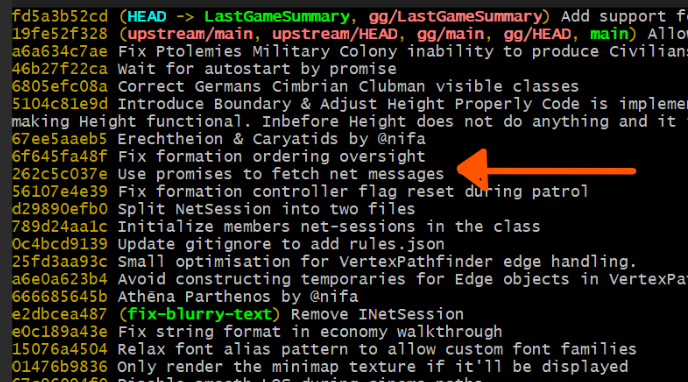
@DesertRose Use a commit before 67ee5aaeb5, which is the one that introduced those files. I think you can use: 262c5c037e, Use promises to fetch net messages
 2 points
 -
When I checked for the unusual high sniping activity I came to the conclusion that its a auto-clicker. There are a lot of games where this is prohibited and reason for bans. It's definitely the case that some players are using such mice and see no harm in it and it's the case that some players would like that such mice/features were not used. I don't like the current balance where one is incentivized to target the ranged units at the back (because they have less armor and deal much damage). Besides that, even if the balance were changed to my liking and melee were a high priority target, I think the feature of the target area could still be beneficial in situations. To take out healers, elephants, heroes or so. I think "sniping upgrade" could be a interesting upgrade. That doesn't upgrade any stat. but how well the army acts together in later games. Upgrade 1: Target the unit which requires the least amount of attacks within your range Upgrade 2: Be aware of where the other soldiers shoot and don't shoot more arrows on a unit than necessary. I know some game that had these as upgrades. Should be priced high though, as they are quite valuable.2 points
-
And, if dropping your commits doesn’t work for some reason, you can also try resetting your local branch to a few commits earlier in the history. Then try steps 2 and 3 again. View the history to choose where to go with: git log --oneline Then: git reset --hard <commit-hash> Then:2 points
-
Ah, you edited the main branch of your repo.... The classical workflow would be to not make any of your edits there but on dedicated branches. Assuming we still want to use your main to rebase all local branches --since @guerringuerrin confirmed this worked for him, I'm guessing this was indeed due to something, probably rights, preventing you to pull lfs assets from 0AD's main repo storage-- here is what you could do: Drop all commits you did on main locally Force push your own main branch Try again to sync your main with 0AD's main using the web UI2 points
-
Wildfire Games, an international group of volunteer game developers, proudly announces the release of 0 A.D. Release 28: “Boiorix”, the twenty-eighth version of 0 A.D., a free, open-source real-time strategy game of ancient warfare. The release is named after the king of the Cimbri Germanic tribe Boiorix. Easy download and install Download and installation instructions are available for Windows, Linux, and macOS. 0 A.D. is free software. This means you can download, redistribute, modify and contribute to the application under the same licenses: GNU Public Licence version 2 (GPL v2) for code and Creative Commons Attribution Share-Alike 3.0 (CC-BY-SA 3.0) for artwork. Although you might find some people selling copies of 0 A.D., either over the internet or on physical media, you will always have the option to download 0 A.D. completely gratis, directly from the developers. No “freemium” model, no in-game advertising, no catch. Don’t forget to deactivate every mod before updating the game to avoid any risk of conflict. If you’re a mod creator, please look at this page on how to port your mod to the new version. As always, feel free to reach out to us for assistance. Now is the time to contribute! The Release 28 is our first release without the Alpha label: our development process has matured, our releases are more frequent, and our commitment to quality has never been higher. Now is the time to join us and place 0 A.D. in the spotlight. We need your help to make the game flourish and to bring new features to life. As you can see, this release unfortunately comes without a video trailer. It is difficult for the current team to spread the word about our beloved game. We are in sore need of contributors in the following areas: Video Editing Social Media Management Website Design Of course, we are also always looking for, and providing a welcoming contribution environment, for: Testers and Quality Assurance enthusiasts Translators (get started right away on Transifex) and of course, Developers and Artists - the team will gladly welcome contributions in all areas. You can also support us by simply donating. This allows us to pay the server hosting fees for our multiplayer, websites, and development environments. A new faction: the Germans Terror Germanicus, the fear of the Germanic tribes migrating south, from the Jutland region, towards the Roman Republic, is coming to 0 A.D. in Release 28. The Cimbri were a large group of Germanic peoples originally from the north of modern-day Denmark. In the late 2nd century BC, their migration south into Italy and France would spark the decade-long Cimbrian War against the Roman Republic. Accompanied by powerful armies and seeresses, Germanic convoys, in long trains of wagons, brought livestock, shelter and goods. The Cimbri placed great importance on animals for religious sacrifices. In 0 A.D., we represent the nomadic coalition formed between the Cimbri, the Teutones, the Ambrones, and other Celto-German tribes simply as the "Germans". The Germans are a semi-nomadic civilization with a flexible economy owing to Supply Wagons and Wagon Encampments, which can be fortified. The unique technologies "Wagon Trains" and "Migratory Resettlement" lean into this flexibility, reducing dependence on territorial boundaries. The Germans also feature an aggressive lineup of siege units, with a crush-dealing unit available in each phase. Between their economic flexibility and unique military units, Cimbrian raiders, Log Rams, and Seeresses, the Germans are a mysterious force to be reckoned with. Play with this new faction, against their historical Roman foes, or turn history around by making them battle the 14 other factions of the game. Many other novelties await you in the new release of 0 A.D.! Top new features of Release 28 Gendered Civilians Direct Font Rendering Support for JavaScript Modules New Game-Setup Options Lobby improvements Engine upgrades and updated platform support New quotes and tips Various balancing improvements ... and much more! Gendered Civilians In an effort to improve historical consistency, we have replaced the visual appearance of civilian units. Previously described as a "female citizen", the basic economic unit is now called the "civilian" and has male and female models. This enhancement was made possible by incremental improvements of the engine, which now allows a unit to have variants not only in its appearance, but also in its voice and in other gendered characteristics. In the civilizations displayed in the game, women did not usually hold citizenship, which was a prized social status. The "female citizen" was a misnomer. It was also incorrect to display all men as soldiers, and most women as servants. Instead, we want to describe the armies of 0 A.D. as followed by a group of minions of lower social status, able to support the soldiers in the army camp, but not on the battlefield. Those are the new Civilians. Citizens, on the other hand, were soldiers, able to wage war as well as working, which we have always been accurately describing in the game with the citizen-soldier concept. The ambiguity of the term "citizen" is removed: this word now only describes citizen soldiers. This change does not touch the balance of the game at all. The so-called "female citizens" keep all their statistics, only their appearance and name have changed. The citizen soldiers are not touched at all. Direct Font Rendering In order to display text, we used to pre-render fonts and load them into memory when starting the game. In order to display scripts such as Chinese, we needed to load a large atlas of thousands of characters into memory, which could overwhelm the players' RAM. As a consequence, we were forced to provide East Asian languages as mods, which was an accessibility issue for non-English speaking users of these languages. On top of memory management improvements, we now use the Freetype library in the engine to render fonts on the fly when the game runs. Modding the fonts also becomes far easier with this new feature. This new rendering system also improves the text display with GUI scaling, for users with Hi-DPI screens or who simply wish to use a larger interface. In the future, we hope to also use this feature to render ancient scripts, such as hieroglyphs and cuneiform. New Game-Setup Options New personalization options are available in the game setup screen. You can remove some players entirely (removing all of the initial buildings and units in their starting zone) in Skirmish and Scenario games. It is also possible to set the population limit per team: Lastly, some code refactoring allowed us to fix outstanding bugs in the game setup. For instance, in Alpha 27, a recurring issue would create an unwanted flood event in games where the user had previously played a flood game. This issue has been fixed. Lobby improvements The multiplayer lobby received some quality of life improvements. Verifying TLS certificates is now enabled by default when connecting to the multiplayer lobby, reducing the risk of man-in-the-middle attacks. A secure connection to the lobby will become mandatory in future releases, so please check that TLS encryption and certificate verification are not disabled in your settings, and report any issue you may encounter. It is also more straightforward now to host matches, as there is no need to decide whether to use STUN or not; and a bug causing freezes when joining a match got fixed. We have decided to rename the main menu entry for playing with friends over LAN or by direct IP: now called Multiplayer > Connect by IP, it is still the same system for direct matchmaking without using the lobby. Engine upgrades and updated platform support In Release 28, we have upgraded the SpiderMonkey JavaScript engine to version 128. This upgrade drops support for Windows 7 and 8.1, and for macOS below 10.15. Windows 10 and 11 are now the only supported Windows versions, and we will try our best to keep supporting Windows 10 as long as possible. Still on Windows, we now provide a long-awaited 64-bit build, which should address infrequent out-of-memory errors. The 64-bit version will become the default one for the next release, and the 32-bit build will eventually be deprecated in the future. On Linux distributions, special care is always given to release bundles for package maintainers, but we also walked the extra mile to provide an AppImage in official releases, starting with Release 28. We are also working close together with maintainers of the Snap and Flatpak versions, so that you can enjoy the latest release as soon as we get it out. New quotes and tips Our contributor manowar has brought gifts for the history nerds among you with a dozen new quotes in the game load screen, and, together with Vantha, they have added new tips for both beginners and seasoned players. Balancing improvements General Capturing Structure, Civil Center, and Fortress default (ungarrisoned) capture resistance increased from 0.5, 5, 10, to 5, 30, and 45, respectively. Civilians (formerly Women) given a capture attack of 1.0. Naval Warfare Naval technology tree simplified. Scout ships made available in Village phase. Ship balancing: Ram ships, scout ships nerfed; Fire ships, arrow ships buffed. Scout ships range 37 (from 45). Fire ships 175 wood, 50 food, 50 metal -> 100 wood, 0 food, 50 metal. Arrow ships 120 wood, 100 metal -> 100 wood, 100 metal. Acceleration increased by 25%. Ram ships 350 hack, 70 crush damage -> 320 hack, 50 crush damage. Group Movement Units' destinations are distributed around the endpoint, allowing groups to move cohesively without colliding and forming long lines. Champion Cavalry Melee Champion Cavalry HP decreased from 300 to 260. Cataphract Champion Cavalry +2 Hack and Pierce armor, but speed decreased from 17.1 to 14.4. Miscellaneous 3 traders are no longer required for researching Diaspora. Fortress accuracy increased from 2.0 to 1.25. Elephants +1 pierce armor, +0.5m splash range. Longsword champions +2 splash hack damage damage, but -2 direct hack damage. Faction-specific Carthage New civilization bonus: Stone gathering storehouse technologies are free and instant with each phase. Mercenary refactoring and differentiation: Celtic embassy: trains sword cavalry and infantry. Iberian embassy: trains unique ranged infantry mercenaries. Italic embassy: trains spear cavalry and infantry. New civilization bonus: Numidian cavalry +10% movement speed. Han - Minister rework Minister attack removed. Minister garrison aura and ministry garrison aura removed. Minister economy and building auras increased from 2% to 10%, but ranged reduced from 40 meters to 20 meters. no longer stackable. Minister health and armor reduced to 50 HP, 2 hack, 2 pierce armor. Ministers and Ministry available in village phase instead of town phase. Ministry cost reduced from 200 stone, 200 metal to 50 wood, 200 stone, 50 metal. Reduced cost of ministry technologies. Ministry resource trickle removed. Mauryas Mauryan maiden archers and swordsmen differentiation. Maiden archers increased movement speed, decreased range, decreased damage, increased poison damage, cost reduced to 100 wood 90 metal. Maiden guard increased movement speed, decreased health, decreased pierce armor, increased hack armor, cost reduced to 100 food 90 metal. Full list of changes The full list of changes can be found at the changelog page of the wiki. Team Changes After numerous contributions in many areas of the game, especially the user interface and the game simulation, Vantha has joined the team at the beginning of the preparation of Release 28. We are extremely happy to welcome him! Reporting issues If you experience a technical problem with the game, please report it at gitea.wildfiregames.com. This is also the first address to visit when you wish to dedicate some of your time to help patch the code. Got any further questions or suggestions? Discuss them with other players and developers at the forum or talk with us directly in the IRC chat rooms: #0ad and #0ad-dev on QuakeNet. Subscribe See our LinkTree. For press/media inquiries, please DM play0ad@mastodon.social on Mastodon, or email webmaster at wildfiregames dot com.1 point
-
The in-game manual is very detailed about hotkeys and manual control, which is great, but maybe it could be complemented with a very short 'quick-start' section for absolute beginners? Something like: 'First steps: gather food, build houses, train workers. Unit roles: Spearmen vs Cavalry, etc.' I think it would make the game much more approachable. Thoughts? Something like that ----------------- A Beginner's Guide to 0 A.D. Welcome to 0 A.D.! This open-source historical Real-Time Strategy (RTS) game can seem deep at first, but by understanding its core principles, you'll quickly learn to build thriving empires and crush your enemies. The key is to not be afraid to experiment and learn from each match. 0. Optimal Settings for the Best Experience Before jumping in, it's worth checking the game options to ensure a smooth and comfortable experience. Graphics: If the game feels sluggish, navigate to Options > Graphics and disable "High-quality water effects" and "Shadows". This will provide the most noticeable performance boost on older or less powerful hardware . Camera Controls: By default, you can pan the camera with the WASD keys or arrow keys. Rotate the view with Ctrl + Arrow Keys or Shift + Mouse Wheel . All of these can be customized to your liking in the settings menu. Essential Hotkeys: I highly recommend familiarizing yourself with these key shortcuts right away. You can also view and customize them in Options > Hotkeys . H — Stop the currently selected units. . (period) — Select the next idle worker. , (comma) — Select the next idle soldier. Shift + Left Click on a unit's icon in a production building — Train a batch of 5 units . This is a huge time-saver! Please note, that batch size can be adjusted in settings. 1. Starting a Match and Choosing the Difficulty From the main menu, click Single-player to begin. Map Type: Skirmish map : The best choice for beginners. These maps are pre-designed and balanced, but you are free to choose your own civilization. Random map : The map layout and resources are procedurally generated. This is great for variety but can sometimes lead to unbalanced starting positions. Adding Opponents: Add one or more computer players (AI). For your first game, it's best to start with just one opponent. AI Difficulty Level: The AI in 0 A.D. is named Petra . For a new player, the choice is simple: Sandbox : This difficulty level is designed for learning. The AI opponent will not attack or expand its territory . Very Easy : Once you're ready for a bit of a challenge, this is the next logical step. Be aware that on higher difficulties, the Petra AI receives economic bonuses to its resource gathering and trade efficiency . 2. Choosing a Civilization, Match Settings, and Matchups Your choice of civilization largely dictates your strategic options. There are several unique ancient cultures from Europe, Africa, the Middle East, and Asia to choose from. Recommended Civilizations for Beginners: Athenians: A well-rounded civilization with a strong navy and an economic bonus to metal mining. They also have a unique ability to build long walls in neutral territory . Romans: Focused on a powerful and disciplined infantry. They can construct army camps in enemy territory and have access to some of the best siege weapons in the game . Some civilizations have special mobile units that can act as rally points or resource dropsites to increasing the speed of resource collection without building storehouse in the neighborhood end fast economic development. The Mauryas have the Worker Elephant, which can collect resources anywhere on the map and act as builder. The Germanic Tribes have the Supply Wagon, which acts as a mobile dropsite and increase population cap (as a house) and on the further stages can even be upgraded to train workers . The Persians excel at long-term economic gain. Their unique Ice House and the upgraded Winter Palace function as passive income generators, periodically granting you a free trickle of resources without any additional effort. Try out different factions and find the one whose playstyle interests you most! Match Settings: Population Cap: The default limit is usually 300. You can leave it as is or lower it for faster, more intense matches. Victory Condition: The most common and straightforward is Conquest . To win, you must eliminate all enemy units and buildings. Other options include building and holding a Wonder for a set amount of time . Civilization Matchups: There's no strict "rock-paper-scissors" rule for entire civilizations. Instead, the counter system is based on unit types. For example, cavalry archers are strong against slow-moving infantry, while heavily armored spearmen (like those of Sparta) excel against enemy cavalry . 3. Controlling Your Units The entire game is built on a simple principle: "Select – Command" . Left Mouse Button (LMB) — Select a unit or building. Right Mouse Button (RMB) — Issue a command (move, attack, gather resources) . Advanced Control Tips: Double-click LMB on a unit to select all units of the same type currently visible on your screen. Ctrl + Double-click to select all units of the same type on the entire map . Hold Shift while issuing commands (e.g., Shift+RMB on a tree, then Shift+RMB on a guard post) creates an action queue. Your units will perform the tasks in sequence. 4. Developing Your Economy A strong economy is the foundation of a powerful army. Here's a simple 5-minute plan to get started: Scout the Map: Send your starting cavalry scout in a spiral pattern around your base to locate resources (berry bushes, animals, forests, mines) and your enemy. Start Gathering: Send all your Civilians to the nearest berry bushes (RMB). They are the fastest gatherers of fruit . Send all your Infantry Citizen-Soldiers to chop down the nearest trees (RMB). They are the best lumberjacks . Send your Cavalry Citizen-Soldier to hunt nearby animals (RMB). They are the only unit type that can effectively hunt for meat . Set a Rally Point: Select your Civic Center and then right-click on a tree. All newly trained units will automatically begin gathering wood. Train More Workers: Hold Shift and left-click on the Civilian icon in the Civic Center's production panel. Train a batch of 5. Build a House: Once you have 100 wood, select a couple of free workers, click the House icon in the bottom panel, and place it near your Civic Center. Houses increase your population limit . Build a Storehouse: When you have several workers on wood, select them and build a Storehouse right next to the forest. This drastically reduces their travel time and speeds up gathering. Key Economic Principles: Build Storehouses near resources. This is the single most important rule for efficient gathering. Don't forget food. When berry bushes run out, build a Farmstead and then place Fields on the open land nearby . Keep an eye on your population limit. The counter in the top panel (e.g., 15/30) shows how many more units you can train. If you can't train more, you need more Houses. 5. Developing Your Military Once your economy is stable, it's time to think about defense and conquest. Build a Military Structure: Your first military building is usually the Barracks. It allows you to train basic infantry. Learn Unit Counters: Spearmen are strong against cavalry. Swordsmen are strong against other infantry. Slingers and Archers are strong against slow, heavily armored units but are vulnerable in melee combat . Don't Neglect Defenses: Walls and Towers are crucial for holding off early enemy raids. Garrisoning soldiers inside towers will significantly increase the number of arrows they fire . 6. Essential Technologies to Research Researching technologies is a long-term investment. Early game technologies in the Farmstead and Storehouse that improve gathering rates should be researched as soon as you have the spare resources. Top Priority Technologies for Beginners: Conscription in the Barracks. This reduces the batch training time for infantry . Wheelbarrow and Horse-drawn Carts in the Storehouse. These increase the amount of resources a worker can carry, which is a massive boost to gathering efficiency. Advancing to the next phase ( Town Phase , City Phase ) in the Civic Center. This unlocks more powerful units, buildings, and technologies. 7. Basic Tactics and Strategies Scouting: Always know what your enemy is doing. Use fast units to probe their base and keep an eye on their army's movement. Use the Terrain: Forests can block or slow down enemy movement. Hills and high ground can provide range bonuses for your archers. Don't Forget Your Heroes: In the later phases of the game, you can recruit unique Heroes—legendary figures like Alexander the Great or Julius Caesar, Ashoka, Boiorix or King Darius (unique for selected civilization). They possess powerful auras that significantly boost the stats of nearby allied units . Hit-and-Run: Gather a small, fast force (like cavalry archers) and use them to raid enemy workers and undefended resource-gathering operations, disrupting their economy. 8. Navy Don't ignore the fleet, as it provides a strategic advantage if there is a large body of water nearby — a sea, gulf, lake, or major river. Dock — shipyard, dropsite (accepts fish from fishing boats and all resources from citizens), and a trading hub for both sea and land traders. Technologies for ships are researched here. Fishing Boat — gathers food from the sea. Train it to speed up food production. Scout Ship — fast, with a large vision range. Good for coastal reconnaissance and raiding lone enemy units on water or shore Merchant Ship — generates profit by trading between your own or allied docks (or markets on land). The longer the route, the higher the profit. Available from the Town Phase. Arrow Ship — basic warship. Good against ramming ships. Available from the Town Phase. Ramming Ship — powerful melee attack. Effective against siege ships. Vulnerable to arrow ships. Available from the City Phase for some civilizations (mostly Mediterranean). Fire Ship — deals fire damage in melee combat. Available to Britons, Gauls, and Iberians from the City Phase. Siege Ship — long-range combat. Destroys buildings on the shore. Available from the City Phase for a limited number of civilizations. Unique technologies: Athenians ("Iphicratean Reforms" on Town Phase) — docks and triremes can train marines (Epibates) and Cretan mercenary archers. Persians ("Equine Transports" on City Phase) — Phoenician triremes can train cavalry. 9. Strategic Playstyles: Rush, Boom, and More RTS games have a few classic strategic archetypes that work perfectly in 0 A.D. Rush: An aggressive, early-game strategy. You prioritize military production over economic development to launch a swift attack, hoping to cripple or defeat your enemy before they can build up their defenses. Best on small maps. Boom: An economic-focused strategy. You aim to grow your economy as fast as possible, securing multiple resources and building a strong economic base before switching to full-scale military production to overwhelm your opponent with sheer numbers. Turtle: A defensive strategy. You focus on building strong defenses like walls and towers, protecting your economy while you advance through the phases and build up a powerful, unstoppable army for a single, decisive strike. The Romans, with their army camps, are particularly good at this . Remember, 0 A.D. is a game where mastery comes with practice. Don't be afraid to lose, experiment with different civilizations and strategies, and discover your own unique playstyle. Good luck on the battlefield!1 point
-
Some of you might remember my previous posts about the North and Central America, South America and World maps. I've now bundled all three of my continental maps into a single mod and submitted it to mod.io (currently pending approval) The mod includes: North and Central America: four biomes (polar, temperate, desertic, tropical), with special landmarks like buildable zones in Yucatan and Cuba. South America: the main South American rivers (including the Amazon), four biomes, and access to the Pacific through Chile. A full world map using a sinusoidal projection to preserve continent areas, with biomes as faithful to reality as the engine allows. Designed for epic, resource-rich battles. All maps are also available on GitHub if you want to take a look at the files or contribute: https://github.com/Baelish03/0ad-maps I'll update this thread once the mod is live on mod.io. Feedback and suggestions are always welcome — hope you enjoy them! P.s. For further details the thread for each project can be found on this forum. On those threads there were some suggestion, I will implement it! I want to remake better all these maps and to expand to all continents, so I will appreciate your help earth_maps.zip1 point
-
and also Accuracy depends on the parameter one intends to measure. I assume the comments above refer to "chances of victory" as the parameter that LR is supposed to measure. And I agree, LR is not accurate for that parameter, for the reasons below. The optimal predictor for victory is, trivially, victory/defeat ratio. Take this number, and you will have the highest possible accuracy. But LR does not even include the outcome of the game as a parameter, so it cannot accurately measure how good a player is at winning. Instead, the parameters that LR can measure (and therefore: the parameters LR can be accurate for) are the weights (see "Score Weights" in the LocalRatings Options menu) and any combination of those weights. or "Fortunately I can only see this"1 point
-
LocalRatings 0.28.1 is now available for installation via the game menu: Settings > Mod Selection > Download Mods Enjoy!1 point
-
Hi @Caterina, welcome to the forums. If you'd upload your logs the problem could possibly be resolved. Here's how to find them: https://gitea.wildfiregames.com/0ad/0ad/wiki/GameDataPaths1 point
-
Endpoint=https://gitea.wildfiregames.com/0ad/0ad.git/info/lfs (auth=basic) Endpoint (upstream)=https://gitea.wildfiregames.com/0ad/0ad.git/info/lfs (auth=basic) Yeah, but I have only those two. Everything seems to work now.1 point
-
Well my point wasn’t to copy design decisions that aoe2 makes, but to highlight how automated features should be left unoptimized for better gameplay results. Aoe2 is just a good example of this. I agree that in general aoe2 has a much higher skill level than 0ad at the top level, but that doesn’t at all mean that we need “easier” mechanics, there should be no skill ceiling. Just because high apm can help players win the game, doesn’t mean apm is “demanded” by the game. A good game is one where a bad player can learn a lot of a certain mechanic, win more as a result, and still have a lot left to improve in that same mechanic.1 point
-
Ok, but it looks like you’re making progress now. Check where your LFS URL is pointing, bc it looks like it is missconfigured because: So, check the LFS URL endpoints with: git lfs env And check for the Endpoint values: They should look like this (note they are none of them are pointing to my remote but official repo instead): If you see bad urls here you can: git lfs uninstall git lfs install git config lfs.url https://gitea.wildfiregames.com/0ad/0ad.git/info/lfs git lfs pull If this pull still fails you can try: GIT_LFS_SKIP_SMUDGE=1 git pull git lfs pull Now, I’m not entirely sure how GIT_LFS_SKIP_SMUDGE works internally besides that it basically skips downloading LFS files during pull, but it has helped me before when I had issues updating my local repo due to LFS errors.
 1 point
 -
@DesertRose Ok, your remote now looks good. So instead of git pull try doing this: git fetch git clean -fd git reset --hard origin/main. This should remove those files and bring you an exact copy of your remote repo1 point
-
I'm not sure what could happen if you remove them manually. Instead of that I would use git clean to delete untracked files: git clean -fdn To preview what files will be removed, and then: git clean -fd edit: at first glance those are the same files I have problems with some days ago. After cleaning the untracked files, I would suggest the following steps, which worked for me last time: Check where you are in the commit history: git log --oneline --graph Reset your branch to a known good commit (you just need to pick the right one): git reset --hard <commit> Update your remote branch with your local state: git push --force-with-lease your-remote-repo-name <your-main-branch> Then, update/sync the branch using the Gitea web UI (to avoid Git LFS-related issues). Then, git pull1 point
-
1 point
-
@DesertRose I had the same issue. I think I fixed it by doing a git lfs pull as recommended by @Stan`, but it would only work doing so from my own fork. Sync your main branch's fork from the web UI, then use it to re-base any local branches.1 point
-
Gracias por la info. Puse el mod pero... No me ejecuta, o eso creo1 point
-
I don't know about this part. I haven't played AOE2 in so long that I can't say anything about it. AFAIK borg and Valihrant were also good AOE2 players. I don't think one should change the complexity based on the current skill of the lobby users. I think it would be interesting to see statistics of nr. of players over the time. How a releases draws in players, how it may go down over time. Maybe with elo ranges. For myself I can say that I don't have as much of a competitive drive as before "enhancement mods" were around.1 point
-
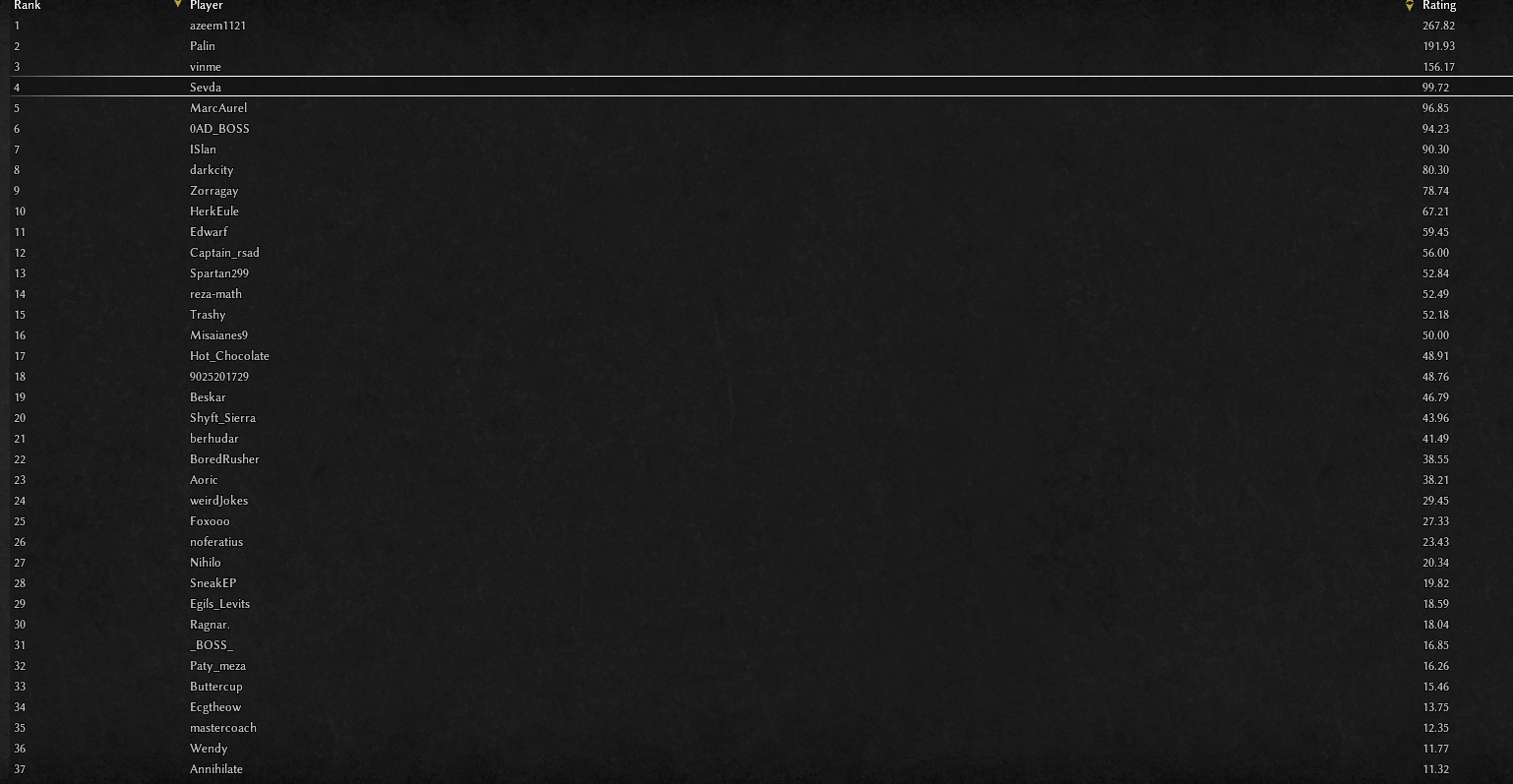
@Mentula could you explain to me exactly how the ratings are calculated from the weights? I would like a mathematical understanding of your algorithm as it currently spits out some rather unexpected results. Setting everything to 0 except the number of units killed, which is set to 1: (the top killer) It would seem that azeem1121 is the top killer, however, he is nowhere near as effective as vinme or Palin in game. In the matche I played with him, he had a very high kill death ratio because he surprise rushed a few inexperienced players in nomad mode. The total number of kills was less than 100 although he lost very few. The game ended in a crash instead of a proper finish so I think there is something to be fixed here. If you can explain to me how your algorithm works, perhaps I can propose a better mathematical model. The top resource gatherers: This is much closer to reality based on what I have seen from these players.
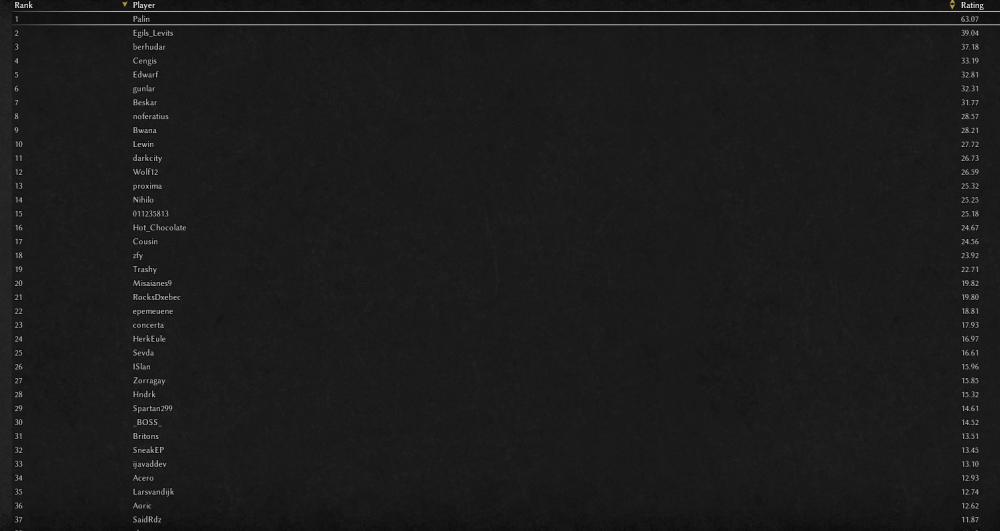 1 point