
All Activity
- Today
-
Adding storylines to scenarios and campaigns
Vantha replied to Vantha's topic in Game Development & Technical Discussion
When cutscene mode is enabled, then no, that's kinda the whole point of cutscene mode. When it's not enabled, on other hand, you can, but only to some extent since the HUD (selection panels etc.) is hidden. You can give gather and attack orders, for example, but not train units or research techs. Admittedly, this is a limitation, but it's the best solution I managed come up with, the in-game HUD itself is already pretty cramped in my opinion. Yeah, as shown in the second half of the demo video, this is possible. Currently, the unit's displayed name (e.g. "Champion Infantry Pikeman") is used in combination with its in-game portrait. Would be possible, though, to extend it to allow customising those too. -
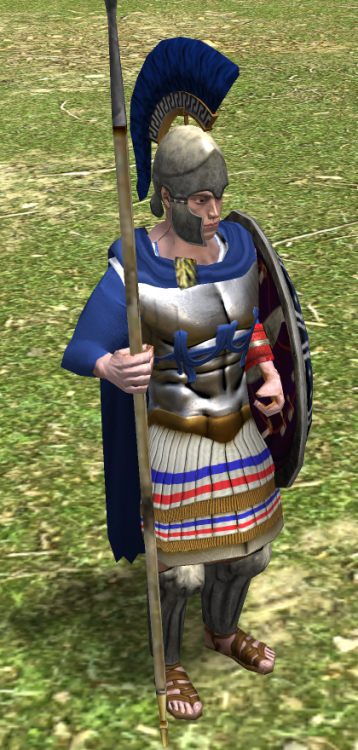
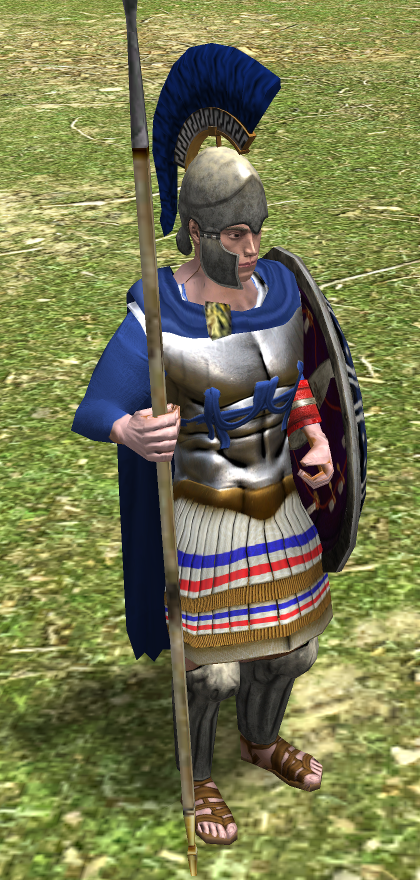
On these cuirasses, I think the armor would have gone a little higher over the clavicles. I know the existing ones aren't really consistent on this or are consistently wrong.
-
Ah yes, the current body mesh does have some odd distortions.
-

Batch Training (The Good, The Bad and The Ugly)
noxafy replied to Micfild's topic in Gameplay Discussion
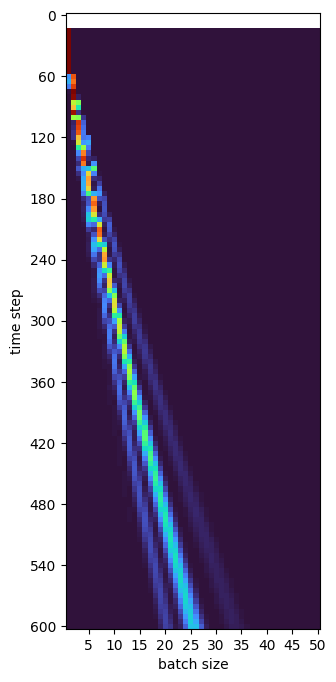
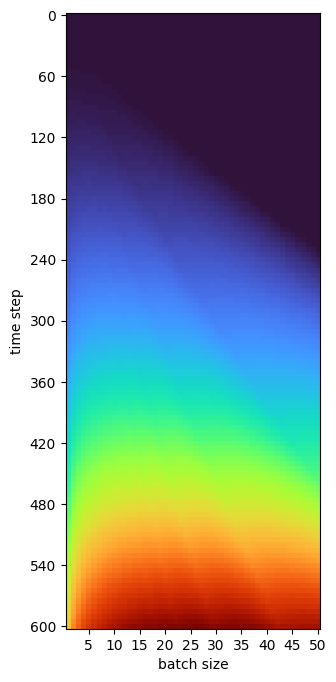
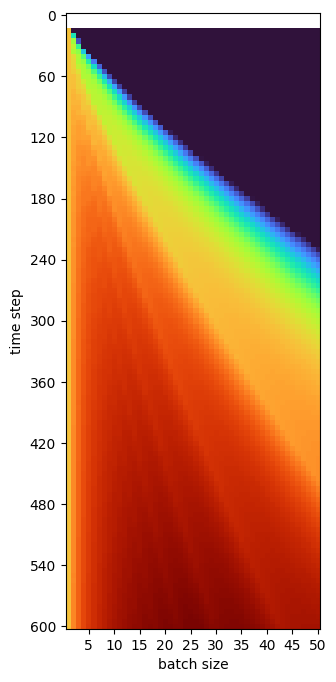
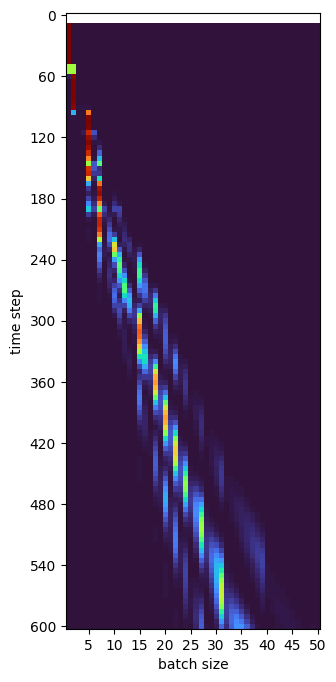
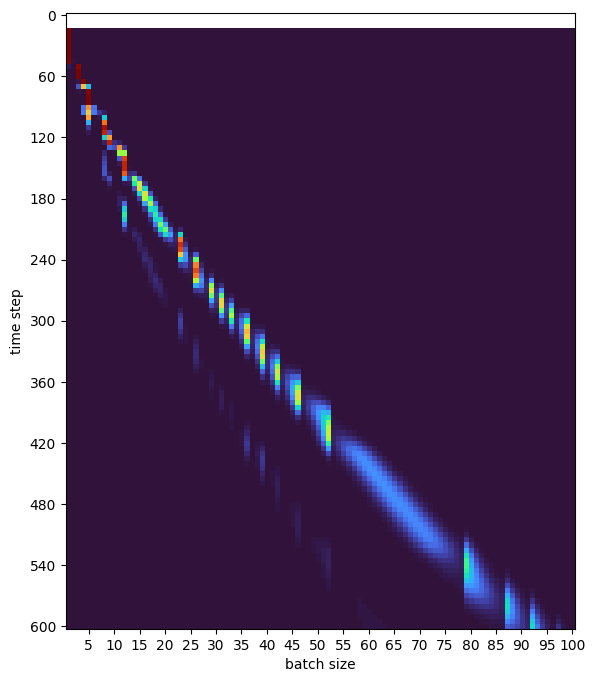
Here is my attempt at the question what batch size is optimal for a given maximum time batches are running. I wrote a little script to calculate the total alive time of units, based on the batch time formula in the original post (ignoring the auto-queue rounding at first). Let's start with base training rate 10 and modifier 0.8. Plotting it as a heatmap looks like this This doesn't tell too much yet, as more time means more units have spent more time alive. No surprise here. But you can already see interesting irregularities at the lower end, which hints at that there are optima. So, to make them more visible, I normalize each time step by the 1-by-1 alive time The first 10 time steps are now shown white because it's dividing by 0. The upper right corner is black, because the larger the batch, the longer there is no unit yet to accumulate alive time. Makes sense so far. However, it is still a bit mushy, so to really highlight the optimal batch size for each target time, I apply a softmax. You see the result on the left below (notice these interesting secondary modes). In the right figure, I have included that auto-queue rounds up the batch train time, giving it a more jagged shape. That jagged behavior is at least nice to determine some optimal batch size values. I'll leave some here for future reference: With auto-queue active, for base rate 10 and modifier 0.8, until about 90s target duration 1-by-1 is optimal (without auto-queue the cross over to batch size 2 is around 59s). Then in short window 90s-102s batch size 2 is optimal, followed by a somewhat longer optimum for batch size 4 at 102s-122s. Interestingly, 3 seems to never be optimal, 5 only very shortly. However, batch size 6 is good 136s-240s, surprisingly versatile! Similarly, batch size 9 is useful 240s-340s. Keep in mind that I used a quite strong inverse temperature for these plots, so if there shows some color means it is already close-to-optimal. Similar to batch size 3, the sizes 7 and 10-12 seem generally useless. For other base rates or modifiers the optima are different. With base rate 8 (laborers), 1-by-1 is optimal up to 46s, batch size 2 for 46-93s, 5 for 94-161s (or even down to 200s), and 7 is useful from 130s down to 260s (though in the shortest and longest times only close-to optimal). Batch sizes 3, 4, 6 and 9 are never good here. For Romans the base rate 9 favors batch sizes 1 up to ~70s, 3 for ~70-140s and 6 for ~125-225. Avoid batch size 4. Longer base rates tend to favor smaller batch sizes (though you don't necessarily wanna maximize alive time with these ones), while a smaller modifier favors larger batch sizes. Here is the plot for base rate 10 and modifier 0.7: The graphs without auto-queue are very similar, but look more smoothly and do not have such batch size preferences. Code is attached to play around yourself Cheers! batch.py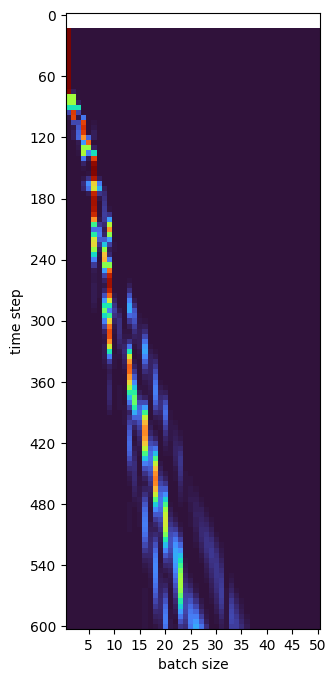
-
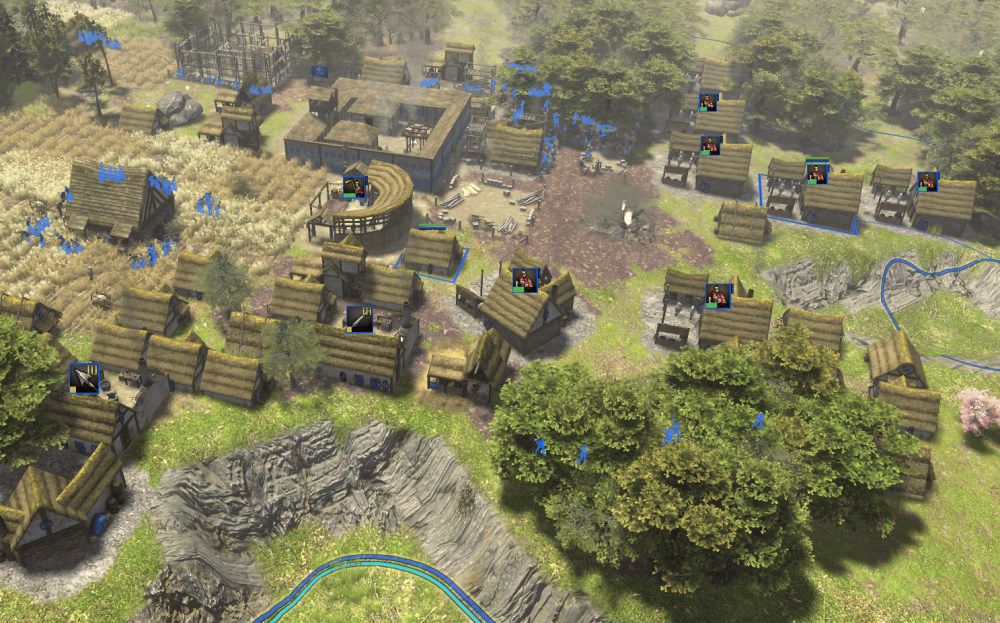
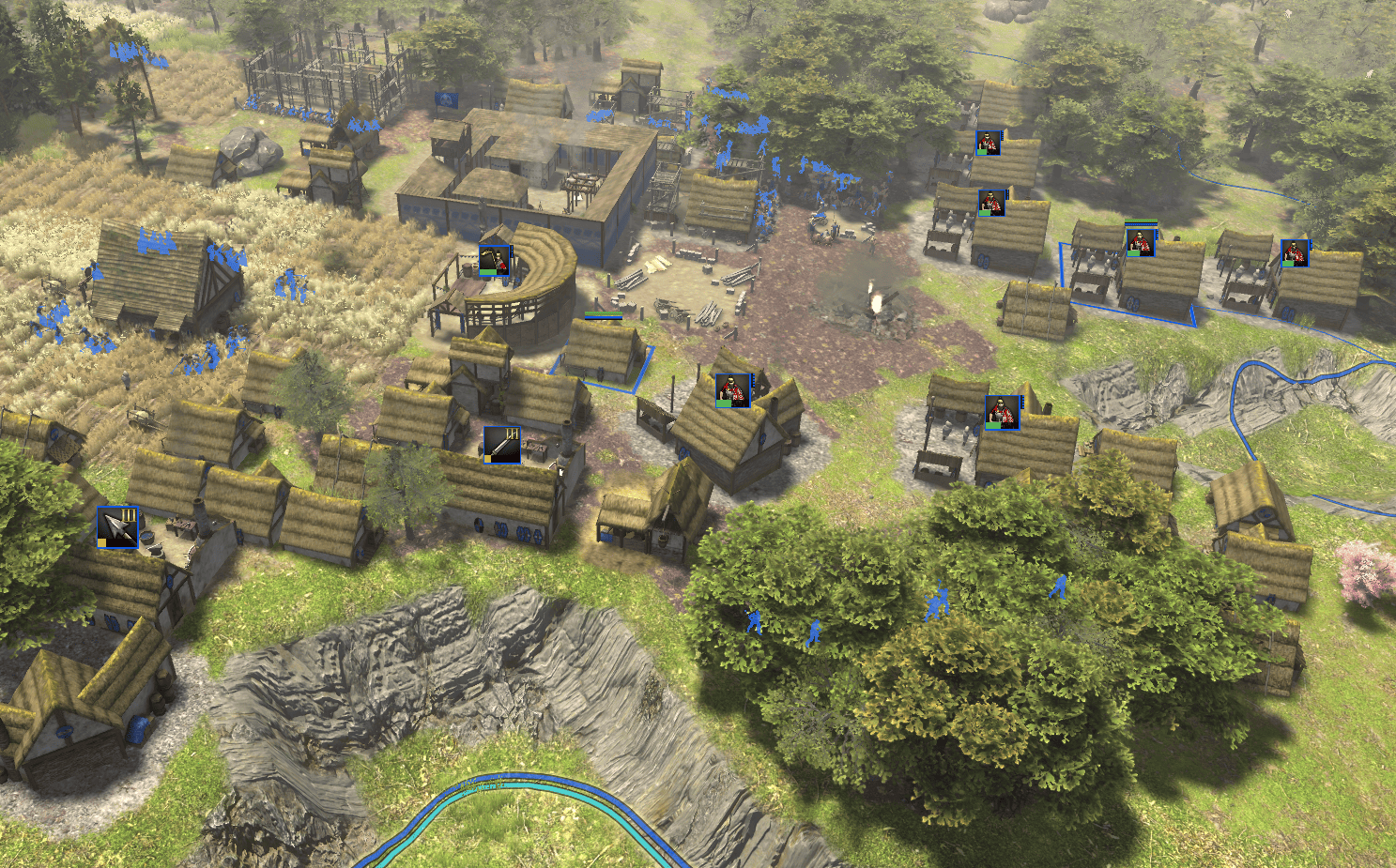
New Production Icons option can be toggled to show what each building is currently producing! Features : Display productions of own and allied buildings (or all if observer) Resizable Toggle on/off with hotkey Suggested feature by @Ginnungagap. Future potential additions: display a icon for idle buildings and maybe idle units too.
-
Great work, thanks @manowar! Ok picked up on Resignation Tribute, but only to prove you wrong.
- Yesterday
-
I was using other mods, but I just tried it without any other mods, and it still did it
-
ok but any other than that in combination ? I'm just wondering if game templates UI changes conflict with UI changes in another mod.
-
I was using the game templates mod
-
Thanks for working on this, @manowar. Those are great features,. Specially game templates
-
I missed this, but here you have some dude on YouTube doing it, imagine what a Sasanian archer could do And now I think it makes more sense than I was previously assuming (still not sure if enough): shooting 5 arrows can be thought of as shooting an arrow 5 times heavier (not really, it’s more uncomfortable, but let’s say so for the sake of simplified physics). Then, assuming (more on this later) that the bow transfers the same energy to the arrows in both cases, we have E=K=mv^2/2=5mu^2/2, where v is the speed of the single arrow, and u the speed of each of the 5 arrows. This means that u=v/sqrt(5)=v/2.24, which tells us that, while the kinetic energy is divided by 5, the speed u and, in consequence, the momentum mu (also important when evaluating delivered damage) get just a bit more than halved. On top of this, regarding the assumption that "the bow transfers the same energy to the arrows in both cases", this is actually even better, because bows transfer energy to heavier arrows more efficiently (for many reasons, one being that more mass accelerates slower, thus the energy transfer time is increased). In conclusion, if a Sasanian archer can do it comfortably (even more than in the video), the shots might be good enough, particularly 1) from close range against 2) a mass of 3) not heavily armoured people. Furthermore, 1) there’s a horse archer tactic that consists in closing in the distance quite a lot to increase the time (thus number) of effective volleys that can be performed, 2) the source I mentioned states that they were fighting against an army of 100 thousand, and 3) that they were the Abyssinians (and some allies), for which Stuart Munro-Hay in Aksum: An African Civilisation of Late Antiquity states that "no personal armour has yet been found, nor are there any surviving representations of soldiers, except from one most unusual source", in which "Persians are shown mounted or on foot, fully clothed with tunic and trousers, and armed with bows. Their adversaries wear only a small kilt, and what seems to be a sword-belt diagonally across one shoulder" (I'm not saying that they had no armour, but I’d guess most of the 100 thousand didn’t have heavy armor). I don’t know, I just gathered what I know, saw, thought, calculated, and found, and it does seem that shooting 5 arrows at the same time in certain situations might not be as ridiculous as it sounds (after all, a footnote in C. E. Bosworth's translation of History of the Prophets and Kings by Muhammad ibn Jarir al-Tabari states that "it is presumably related to the banjakiyyah of al-Jawaliqi, al-Mu'arrab: a volley of five arrows, mentioned in a context which speaks of the Khurisanians").
-
I don't use ModernGUI so I don't know how compatible these are. I just don't like how it moves my minimap from where I expect it. Yeah I am tempted to make a 'modowar' that includes several of these ideas in one mod. I tried to get these onto mod.io but no progress so far. And I personally would prefer an easier way to see the latest autociv etc Which other mods are you using as someone else spotted that too
-
Love it! If I may, could I suggest one more mod: something that compares the mods and mod versions available on mod.io with the ones actually installed on the user's PC and then indicates what has changed. There was once a mod for that but it is not updated unfortunately.
-
who wants to make a bet that atleast one of these will be gobbled up by moderngui? xD @manowar great work my MAN OF GREAT WISDOM AND EXCELLENCE
-
I was trying to click the load template, and only a small part on the left could be clicked. Really nice though, especially if you are changing mods, then you don't have to go through all the settings and change them
-
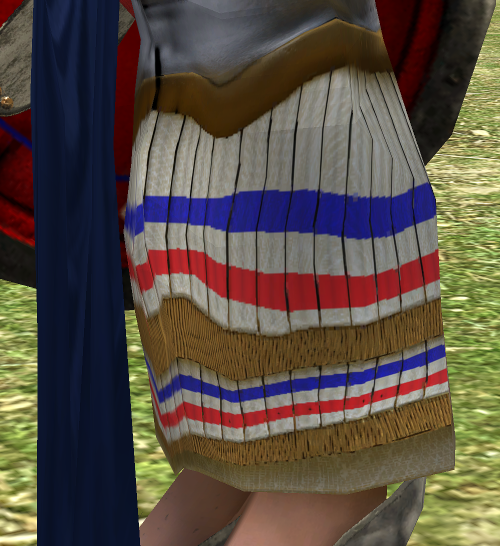
AAA, yes yes, i flip the texture once its baked at the end when the uv's doesn't cause any trouble. I was doing the test to avoid skin issues if the bake is done for every culture for every civ to match the head tone: by issues i mean detailed shapes that won't end deforming in the final process. This is a deformation because of the uv target:
-
Or to make it even easier I am attaching the zip files - though any updates will happen in the github repos. gametemplates-0.28.1.zip quicklobby-0.28.zip resignation-tribute-0.28.0.zip
-
Ok, thanks! I guess I should have looked
-
So the mod.json is in the gametemplates subfolder so if you downloaded ALL the code then you only need that subfolder. Under the releases section I have the zip downloads e.g. [this zip](https://github.com/jonnymccullagh/gametemplates/releases/download/v0.28.1/gametemplates-0.28.1.zip) so that is probably easier for you to use than downloading the whole git repo. To make it easier here are direct links to the zip files for each mod above: [Game Templates Zip](https://github.com/jonnymccullagh/gametemplates/releases/download/v0.28.1/gametemplates-0.28.1.zip) [Resignation Tribute Zip](https://github.com/jonnymccullagh/resignation-tribute/releases/download/v0.28.0/resignation-tribute-0.28.0.zip) [Quick Lobby Zip](https://github.com/jonnymccullagh/quicklobby/releases/download/v0.28/quicklobby-0.28.zip)
-
Version 1.5.1 is out
-
Hi @manowar! Just tried your Game Templates mod, there is not mod.json, and it wasn't showing up in the mod selection, how do we use it?
-
I have vibe-coded 3 mods that I have tested locally and that other players may find useful: Game Templates: Allows saving multiplayer game settings so it is easier to switch game types without missing a setting. https://github.com/jonnymccullagh/gametemplates Resignation Tribute: Allows you to send resources to allies when you resign. https://github.com/jonnymccullagh/resignation-tribute Quick Lobby: Adds a button to the main menu to get you to the lobby that little bit faster. https://github.com/jonnymccullagh/quicklobby I am also playing around with a player notes mod but I am still testing it.
-
Can't reproduce it now that I try anymore... But pretty sure it happened. Maybe was only in a27.
-
I can't reproduce that. But I noticed that the map isn't revealed after loading.
-

Adding storylines to scenarios and campaigns
Perzival12 replied to Vantha's topic in Game Development & Technical Discussion
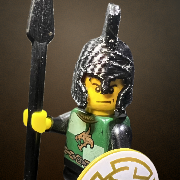
Could you add support for showing character portraits? That would add some personality to text-only dialogue, and would allow conversations/advice from different characters at once (for example, in addition to "General Grievous", your commander, and "Quentius Tretayus", your advisor, you could have "Enemy Soldier", who shouts "AAAAAHHHHHHH" ad you collapse a tower or kill the enemy commander or whatever.











-
Latest Topics
-

