vladislavbelov
-
Posts
1.411 -
Joined
-
Last visited
-
Days Won
24
Everything posted by vladislavbelov
-

0 A.D. 0.0.24b-alpha crashes under Windows 10
vladislavbelov replied to Ceres's topic in Bug reports
Could you try svn version (https://trac.wildfiregames.com/wiki/BuildInstructionsGettingTheCode)? -
0 A.D. 0.0.24b-alpha crashes under Windows 10
vladislavbelov replied to Ceres's topic in Bug reports
Are installed GPU drivers up-to-date? -
Experimenting with icons
vladislavbelov replied to Stan`'s topic in Eyecandy, custom projects and misc.
They have the same style but they don't share a single palette -
Experimenting with icons
vladislavbelov replied to Stan`'s topic in Eyecandy, custom projects and misc.
I think all our icons are unrelated in visual term. They don't have neither the same palette nor style. For it me it looks like random images. -
0 A.D. 0.0.24b-alpha crashes under Windows 10
vladislavbelov replied to Ceres's topic in Bug reports
Currently I don't need dumps, first I need to find an option that triggers the crash. @feneur could you remove the post limit? -
0 A.D. 0.0.24b-alpha crashes under Windows 10
vladislavbelov replied to Ceres's topic in Bug reports
Could you try to disable all options step-by-step except GLSL (GLSL should be always enabled)? -
Again, try disable other options first, non-glsl shaders will be removed.
-
With Vulkan our art isn't so slow since Vulkan allows to submit data via command lists - less app/driver time per each draw call. And all this stuff should be supported, have unified interface between new and old APIs.
-
That does work in general, but it won't solve the performance issue. Our art is unoptimized for old hardware/API, we can't have a lot of drawcalls there. That's true that a cut helps. But in our case it's not enough. We have no strict technical rules and tools to control the engine usage. Without strong cooperation the game won't be faster. All results will be publisheb on the page https://feedback.wildfiregames.com/results/.
-
===[COMMITTED]=== Macedonian wonder
vladislavbelov replied to Tomcelmare's topic in Completed Art Tasks
I'm worrying only about how many meshes on a visible scene at once. In case of wonder if it doesn't completely reuse existing textures for other buildings then the best implementation is to use a single mesh with a single texture with a maximal side not more than 2048 pixels (atm). -
===[COMMITTED]=== Macedonian wonder
vladislavbelov replied to Tomcelmare's topic in Completed Art Tasks
It depends on how it's going to be used. How many different meshes are going to use these textures. Will be these meshes always rendered together or they're unrelated. -
[POLL] Corpse Removal Option
vladislavbelov replied to Stan`'s topic in Game Development & Technical Discussion
The "Off" option has maximum performance. Supporting intermediate states means additional cost of support for graphics. We also could render only half of objects in reflection/refraction maps, but it also requires additional support. I don't mind for that solution. It won't help in the only case when many units are killed at the same time and many units have been already completed in queues. -
file_system.cpp(122): Function call failed: return value was -1
vladislavbelov replied to JPRuehmann's topic in Bug reports
Hi @JPRuehmann! Could you attach logs and system_info from the logs folder. You might find it for your system at https://trac.wildfiregames.com/wiki/GameDataPaths#Linux -
tutorial Add new resource on Summary screen
vladislavbelov replied to azayrahmad's topic in Tutorials & Guides
I don't remember, maybe some code is unified between tabs. So you need to use different widths for different tabs. -
[POLL] Corpse Removal Option
vladislavbelov replied to Stan`'s topic in Game Development & Technical Discussion
I notice the popping even with 200, when a battle is big enough, like 200vs200. Bigger battles make them even more noticeable. I can feel the irritation in your words. I'm not against feature, I'm against the intermediate numbers. Why? Because the current implementation adds coupling (which is bad) and adds visual degradation. Since we have nobody to be responsible for overall visual impression of 0 A.D. I'm worrying about that, since I'm doing graphics. It's a biasing, please do not present your opinion as a truth. Why do you need corpses if your computer isn't powerful enough for them? Why not icons with number of lost units? -
[POLL] Corpse Removal Option
vladislavbelov replied to Stan`'s topic in Game Development & Technical Discussion
Have you read the posts above? About inconsistent popping in a case of intermediate numbers? -
[POLL] Corpse Removal Option
vladislavbelov replied to Stan`'s topic in Game Development & Technical Discussion
I suppose you didn't get the point of the only on/off. -
tutorial Add new resource on Summary screen
vladislavbelov replied to azayrahmad's topic in Tutorials & Guides
You need to replace count="9" by count="10" in the following lines in gui/summary/summary.xml: <repeat var="x" count="9"> <object name="titleHeading[x]" type="text" style="ModernTopLabelText"/> </repeat> ... <repeat var="x" count="9"> <object name="Heading[x]" type="text" style="ModernTopLabelText"/> </repeat> ... <repeat var="x" count="9"> <object name="valueDataTeam[i][n][x]" type="text" style="ModernTopLabelText"/> </repeat> ... <repeat var="x" count="9"> <object name="valueDataTeam[i][x]" type="text" style="ModernTopLabelText"/> </repeat> ... <repeat var="x" count="9"> <object name="valueData[n][x]" type="text" style="ModernTopLabelText"/> </repeat> You might also want to adjust some padding/margin/width values in layout.js (in the same folder) to fit better on screen. -
tutorial Add new resource on Summary screen
vladislavbelov replied to azayrahmad's topic in Tutorials & Guides
Could you attach the full logs? Also do you have a minimal mod to reproduce the issue? -
[POLL] Corpse Removal Option
vladislavbelov replied to Stan`'s topic in Game Development & Technical Discussion
I see you just want to add the feature It depends how you look at it. Problem it solves: - No ugly corpses disappearing - See all lost units instead of few - Much more visible (because colored) than corpses to detected lost units (circles can be drawn using unit icon) Problems it adds: - Nothing -
[POLL] Corpse Removal Option
vladislavbelov replied to Stan`'s topic in Game Development & Technical Discussion
Look at them when terrain has maximum passable slope. -
[POLL] Corpse Removal Option
vladislavbelov replied to Stan`'s topic in Game Development & Technical Discussion
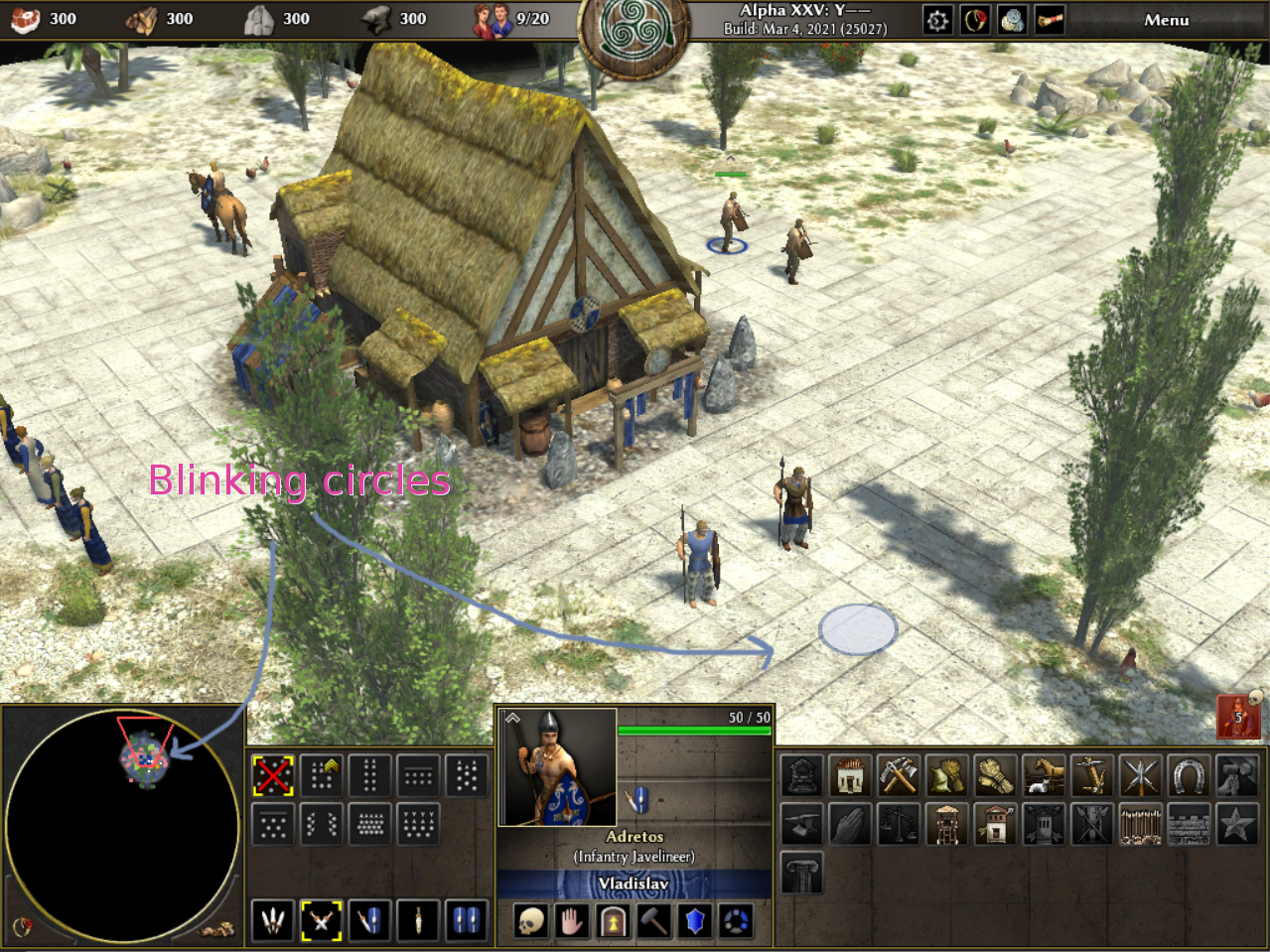
Blinking selections on minimap and terrain on the icon hover, and red icon with skeleton in bottom right.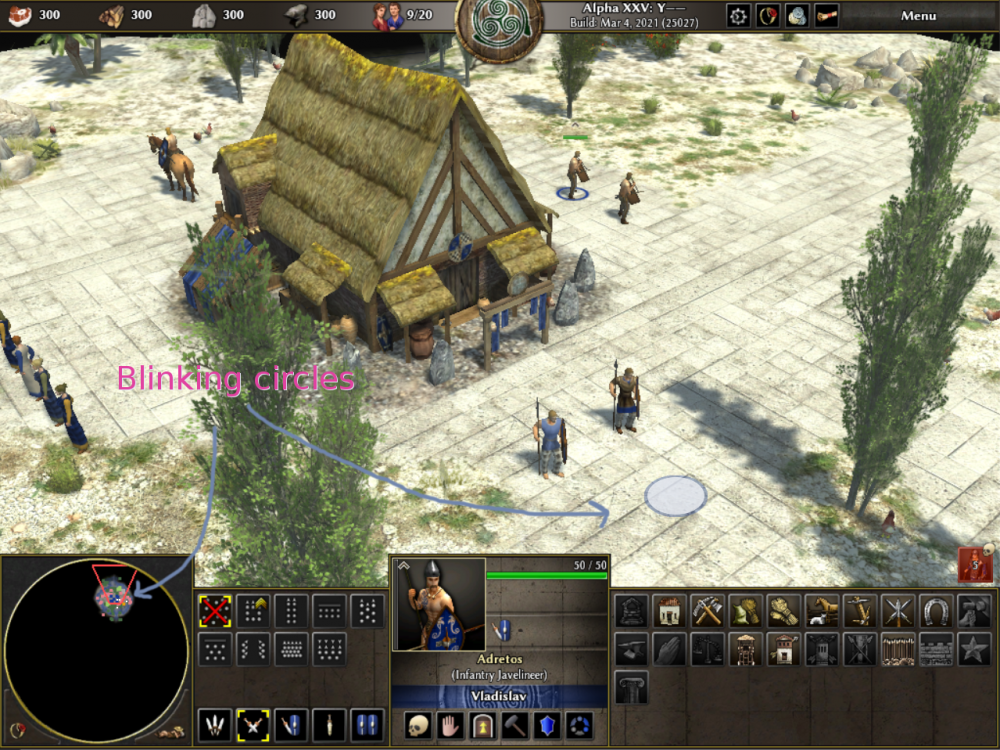
-
[POLL] Corpse Removal Option
vladislavbelov replied to Stan`'s topic in Game Development & Technical Discussion
It seems you're contradicting to yourself. Firstly you said "crucial to know what units you lost", which I understand as it's important to you (as other competition oriented players) to react timely on that. Now you say "But people want to see the corpses not 2d icons.". 2D icons is the fastest way in terms of performance to know about all units, not only about last X. But now your prefer visual style over competition. -
I believe you got my point. We have 1.5% with 4K and 17.5% with GL2.1, so no choice at the moment. But I hope to move toward 4K. Not quite true. We were talking about toasters and support in general. And we support them not because of UI.
-
[POLL] Corpse Removal Option
vladislavbelov replied to Stan`'s topic in Game Development & Technical Discussion
I feel a biasing in your opinion. Having intermediate numbers means inconsistent visual effect: you can't predict which unit will disappear. So your "crucial to know what units you lost" doesn't work always, only when you have no continuous battles or you have the pretty high setting. In our code it requires workaround to implement that. Also there is a better in terms of performance solution: showing 2D icons instead of "heavy" units.