
All Activity
- Past hour
-
 aowsajbw joined the community
 -
 miluiuha joined the community
 -
 jhgxpbxo joined the community
 -
 sedywxis joined the community
 -
 jcssnktm joined the community
 -
 znrugwte joined the community
 - Today
-
 utmhzwmb joined the community
 -
 zrlclztq joined the community
 -
PudimTranslate — chat translation for 0 A.D. Click a chat message to translate it. Click again to get the original back. Works in a match, in the multiplayer lobby and in the match setup screen. Any language, in both directions, with nothing to configure. You never pick a language pair: What was written is detected automatically. English, Spanish, German, Russian, Chinese, Portuguese — it does not matter, and it does not have to be the same language twice in a row. A room where three people type in three different languages just works. What you get back is whatever language your 0 A.D. is installed in. Playing in Spanish gives you Spanish; playing in Polish gives you Polish. The mod reads the game's own locale, so there is no setting to find and nothing to keep in sync. Built for players who want to play multiplayer without being locked out of the conversation. ⚠️ Read this first: the translator must be running before the game Translation needs a small companion program. Start it before you open 0 A.D., every time. That is not a style preference — it is how the game works. 0 A.D. indexes its data folders once, at startup, and never notices files that appear afterwards. If the translator is not already running when the game starts, the game cannot see the bridge at all and nothing will translate for that whole session. Closing and reopening 0 A.D. fixes it. So do not launch 0 A.D. the usual way. Launch it with tools/Play0AD.bat (or tools/Play0AD.sh on Linux and macOS), which starts the translator, waits for the bridge to be ready, opens the game, and shuts the translator down when you quit. One click, right order, nothing to remember. The first time you run it, Play0AD.bat creates a 0 A.D. Translator shortcut on your desktop, carrying the 0 A.D. icon so it sits recognisably next to the game's own shortcut. Use it from then on, in place of your normal 0 A.D. shortcut, and you are done — one click starts everything in the right order. The .bat file itself will always show the plain Windows script icon. That is not something a mod can change: Windows takes a .bat icon from the file type, not from the file, so only a shortcut can carry a custom one. That is precisely why the shortcut is created for you. Both the shortcut and the launcher work out where 0 A.D. is installed on their own — they look in the usual install locations, in the Steam libraries, and finally read the target of the Start Menu shortcut the installer left behind. The path found is remembered in tools/caminho_do_jogo.txt, next to the scripts, so the search happens only once. That file is machine-specific and is deliberately kept out of the repository, so nobody inherits somebody else's install path. If the game is somewhere unusual and the search fails, run it once with the path and it is remembered from then on: powershell -File tools\Play0AD.ps1 -Jogo "C:\your\path\to\pyrogenesis.exe" If you prefer to keep the two apart, run tools/PudimTradutor.bat, leave its window open, and only then open 0 A.D. yourself. Installation Download the repository (Code → Download ZIP, or git clone) and put the PudimTranslate folder inside your 0 A.D. mods directory: System Path Windows %APPDATA%\0ad\mods\ — or Documents\My Games\0ad\mods\ Linux ~/.local/share/0ad/mods/ macOS ~/Library/Application Support/0ad/mods/ If you are unsure, the game's own reference is at https://trac.wildfiregames.com/wiki/GameDataPaths. The folder must sit directly inside mods/, so that mods/PudimTranslate/mod.json exists — a common mistake is ending up with mods/PudimTranslate/PudimTranslate/. Then open 0 A.D., go to Settings → Mod Selection, pick PudimTranslate, click Enable, then Save Configuration and Start Mods. Nothing to install, on any system. The companion program exists twice — once in PowerShell, once in Python — and the launcher picks whichever your machine already has. That is not accidental duplication: the native coverage is complementary. System Launcher Uses Already installed? Windows tools\Play0AD.bat Windows PowerShell Yes, ships with Windows 10 and 11 Linux tools/Play0AD.sh Python 3 Yes, in practically every distribution macOS tools/Play0AD.sh Python 3 Yes, with the command line tools Each launcher falls back to the other runtime if the preferred one is missing. On Windows the .bat calls PowerShell with -ExecutionPolicy Bypass, which applies to that one call and changes no system setting. On Linux and macOS, give the .sh permission to run once with chmod +x tools/Play0AD.sh. The desktop shortcut is a Windows convenience and is simply skipped elsewhere. To update, replace the folder with the newer version and restart the game. How to translate a message Click the message. That is the whole thing. There is no button to find and no menu to open — the line of text is the button. The screenshots below happen to show English being turned into Portuguese, because that is the author's setup — but nothing in them is specific to that pair. In the multiplayer lobby, someone says hello in a language you do not read: Click that line and it comes back in your language, in green so you can tell at a glance what was translated and what is still as it was written: Click it again to get the original back. Nothing is lost. It works the same in the match setup screen, where most of the talking happens before a game. Here a whole conversation is in a foreign language: Click any lines you want. Each one is independent, so you can translate only what you care about: In a match it is the same gesture: click the chat line on screen. There the line also carries a tooltip, so hovering a translated message shows the original wording without switching it back. A few things worth knowing: While a phrase is being fetched the line shows translating…. It usually lasts a blink. If it says the translator is off, you opened the game without the translator running. Close 0 A.D., start it with the desktop shortcut, and try again. System notices ("== Someone joined.") do nothing when clicked, on purpose: 0 A.D. already shows those in your own language, so there is nothing to translate. A phrase already translated once is free forever — it is cached on disk, so repeats like gg or well played never hit the network again. Do not want to click at all? Set pudimtranslate.auto to true in the user config and every incoming message is translated as it arrives. This applies inside a match only — in the lobby and the match setup screen you still click the messages you want. Neither language is ever configured. The one you read is taken from your 0 A.D. install, and the one that was written is detected from the message itself — see the top of this page. Is it working? The translator opens in a window of its own and prints what it does. A healthy start looks like this, and a translated phrase shows up as a > line (what was said) followed by a < line (what came back): PudimTranslate - tradutor de chat pasta do jogo : D:\Documents\My Games\0ad ponte : D:\Documents\My Games\0ad\saves\campaigns idioma destino: pt (o jogo pode pedir outro) cache : 12 frase(s) ja conhecidas traduzindo para: pt > attack blue from the north, i need help < ataque o azul do norte, preciso de ajuda Leave that window open while you play. Closing it stops translation; the game keeps running. When something goes wrong The message says the translator is off. The game was opened before the translator was running. This is the one failure that cannot fix itself mid-session: 0 A.D. indexes its data folders once at startup, so if the bridge was not there at that moment, it stays invisible for the whole session. Close 0 A.D. and open it again with the desktop shortcut. The translator window flashes and disappears. Something in it failed. Run tools/PudimTradutor.bat on its own — the window stays open and shows the error instead of vanishing. Nothing happens when you click a message. If the line is a system notice (== Someone joined), that is deliberate — the game already shows those in your language. For anything else, check whether the translator window is still open. You updated the mod and nothing changed. 0 A.D. loads mod scripts only when it starts. Close the game completely and open it again. The desktop shortcut points somewhere stale after moving the mod folder. Run the launcher once from its new location and the shortcut fixes its own target. Why a companion program at all There is no way around it: the 0 A.D. GUI script engine has no HTTP — no fetch, no XHR. The only networking exposed to scripts is the XMPP lobby and mod.io, both in C++. A mod simply cannot call a translation service. What a mod can do is read and write files. So the mod writes the phrase to a file, the companion program translates it, and writes the answer back: mod --writes--> saves/campaigns/pudim_tr_req.json --reads--> PudimTradutor.ps1 --HTTP--> Google mod <---reads-- saves/campaigns/pudim_tr_res.json <--writes-------' No API key and no sign-up: it calls the same free endpoint the translate.google.com page uses. Translations are cached on disk, so a phrase already seen costs no network round trip. That folder is not a matter of taste. The GUI's ReadJSONFile/WriteJSONFile only accepts a closed list of paths — gui/, simulation/, maps/, campaigns/, saves/campaigns/, config/matchsettings.json and config/matchsettings.mp.json. Anything else answers Restricted access to …. Of those, saves/campaigns/ is the only writable user folder. It does not disturb campaigns: the game only lists *.0adcampaign there, and these files are .json. The response file is always exactly 64 KB, padded with spaces. The game's VFS remembers a file's size from when it indexed the folder, so a file that grows gets read truncated — a JSON cut in half. A fixed size keeps that remembered value correct forever. How it works, per screen In a match no button had to be invented. The game's own ChatOverlay already treats each chat line as a button — gui/session/chat/ChatOverlay.js sets ghost = !chatMessage.callback — and sizes the line to the exact width of its text. So attaching a callback makes the message clickable without covering the map or stealing clicks meant for units. In the lobby and the match setup screen the chat is a type="list", one item per message. There is no per-line button there, but there is selection, so the gesture ends up the same: click the message to translate it. Privacy The chat messages you choose to translate are sent to Google Translate. Nothing else leaves your machine, and nothing is sent until you click a message — unless you turn on pudimtranslate.auto, in which case every chat message that arrives during a match is sent as it arrives. System notices are never sent at all, and a phrase already in the on-disk cache is answered locally, without touching the network. Language The mod's own text (tooltips, notices) is Portuguese or English, following the game's language. License PudimTranslate is released under the GNU General Public License v3 or later — see LICENSE. All code is original — see NOTICE. PudimTranslate-main (2).zip
-
I said this because I think smalls things like that doesn't add any "uniqueness" but add some kind of inconsistency. Each civ should have a list of things that make them unique but it should be easy to describe on the civ summary, and everything else should follow a pattern.
-
We now try to release roughly at the same date each year. We don't wait till all issues with that milestone get implemented. We would push them back. Almost certainly there will be no new civ in the next release.
-
5 months ago @Arup created Issue #8843 (German Wagon (WAGNAZ) gives too much loot) and there is some Balancing/Design input needed: Current loot: 10 F, 10 W, 10 S, 10 M and 100 E @Atrik commented the same day:
-
Hello @ManasManushya, welcome to the Community! In the Match Setup, when selecting a competitor ('player') in the Player Placement, i.e. PetraAI, you can Configure AI by clicking the gear symbol and set the AI Difficulty from 'Sandbox' to 'Very Hard'. May it be, the difficulty level ist set to 'sandbox'? I'd recommend you to try out the AI Difficulty 'Very Easy'.
-
I get why you'd think that — a lot of mods are just reskins. But XIII Century AD really does change things: steppe civs have no farms (only livestock), and all their buildings can be packed up and moved. For Western civs, the Guild House gives +25% trade gain, and the Guildsman produced there boosts nearby units/buildings: +10% gather speed and +10% build speed within a 20m radius — and he can be garrisoned inside a building to further boost its efficiency. Eastern civs get the City Shop, which generates population and passive profit. Millennium A.D. adds completely new civs (Byzantines, Carolingians, Anglo-Saxons, Norse) with their own units, heroes, and even music. Delenda Est is a full overhaul with new mechanics. And Aristeia Bronziron adds ancient civs (Egyptians, Assyrians, Jews, Greeks) with unique mechanics: slaves/Conscript Laborers that gather resources faster but can't build; officers that boost nearby infantry; Egyptian statues that expand territory and obelisks that buff attack; Assyrian Royal Apartments that produce both citizens and guards. Even if some buildings are visually similar, the gameplay differences are real. And the best part — Aristeia and XIII Century are fully compatible. You can actually fight ancient Egyptians against medieval Europeans in the same match — I've tested it. All of these are very interesting. As for the empty civ overviews — that's probably a text cache bug. Try reinstalling the mod or verifying the files; the mods themselves work fine on 0.28.0. Yes, it's still the same RTS engine and based on 0 A.D., but these mods genuinely offer a different experience. Give them a proper try — you might be surprised! And if you love dynamic RTS with a historical setting, you'll get many pleasant hours out of these.
-
I was trying to make a map but for some reasons, The AI does nothing despite the fact that it was set as "Petra Bot".
-
Linux slowly dropping support for older hardware
fabio replied to Genava55's topic in Introductions & Off-Topic Discussion
Some stuff recently dropped: 486 support Herculues Monochrome ISA graphics cards Profibus driver ARCnet for ISA and PCMCIA None of them seems particularly useful nowadays... There is still support for the first Pentium, the original ATI Radeon and other obsolete hardware, likely not very useful today. -
okay but the civs like steppe people, east and westerners, and many many more civs, only have one or two bonuses. where as the han have like 20. i have civs whos civilizatio overview are empty. theres zero bonuses frmo playing multiole civs. and all the exact saME STRUCTURE TREES. borinnggg
-
@redshawks523, the Mod Selection page in the game provide a lot of mods with new civilizations and epochs. Tower Defence game Aristea Bronziron - Ancient World with Egyptians, Assiryans, Jews and so on. Milllenium A.D. - European civs (Anglo Saxons, Byzantines, Carolingians, Norse, Rus, Ummayads) XIII Century AD - Middle Ages: Eastern and Western Europeans, and Steppe people (something like Mongols). Delenda Est - overhaul mod with many different nations and new game mechanics. Recently I have checked it sucessfully on last 0.28.0 release. You can enjoyed it.
-
See also Capturing a Civic Center should enable training of Citizens #9104
-
I have installed the latest bug fix mod available in the game and can say that civilians are still unavailable in the Ptolemaic Military Colony...
-
are we close?
LeJardindEpicure replied to redshawks523's topic in Introductions & Off-Topic Discussion
Hi @redshawks523. As far as i know they were like 33% done on update 0.29 but, do not worry ! Thanks to its Open Source nature, you can start contributing to the game so the release comes faster ! Dont forget nobody get paid, the game evolves as fast as the contributors can work., the more the faster. -
looking at all the updates in past years.... seems LIKE 1.5 OR 2 UPDATES every year. are we close to another update? biorix is old news and i need some new civs. none of the mod civs will work for me. thanks
-
Your understanding is mostly on the right track. The XML handles a lot of the scenario and entity configuration, while JavaScript is used for triggers and scripted events such as waves and other gameplay actions. I’d recommend checking the scenario and map-making tutorials on the Wildfire Games forum, as they cover setting up mods and working with Atlas and scenario files. That should give you a good starting point before experimenting further with your own scenario.
-
 Free Fire changed their profile photo
 -
What do y'all think of adding Empress Lu Zhi for a hero? She was a very strong ruler, brutal even. And then, how she'd look in her Empress Dowager form:
- Yesterday
-
Thanks a lot!
-
 that is very exciting to hear. im eager to see what the new factions or changes are gonna be that could change/better the mod, nice to hear a response an keep up the good work p.s i changed my mind about the lizalfos, i think the current system is alright like you said but them getting they're tech would be pretty sweet if you ask me
 -
Thanks for the feedback; I would be grateful if you knew how I could improve that detail.
-
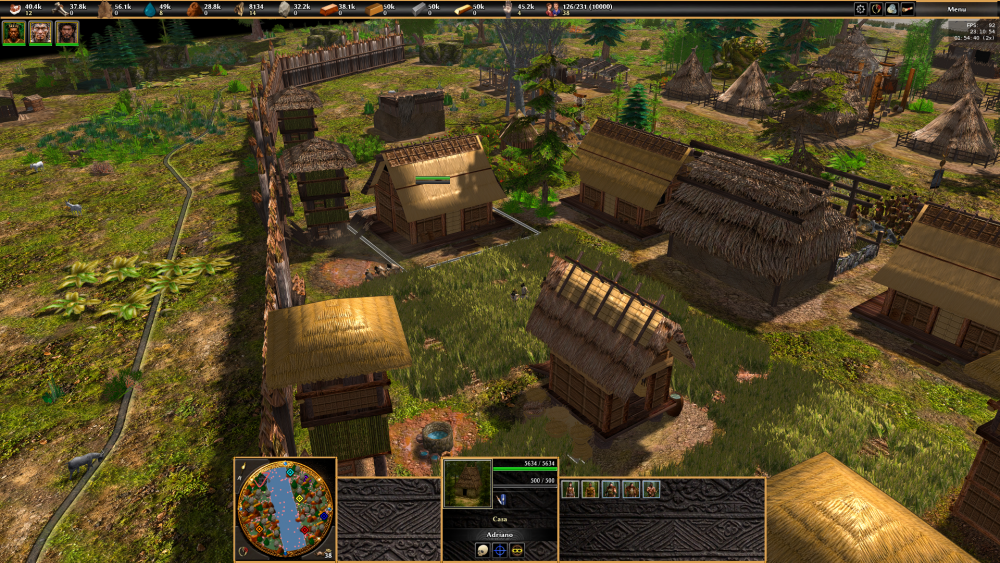
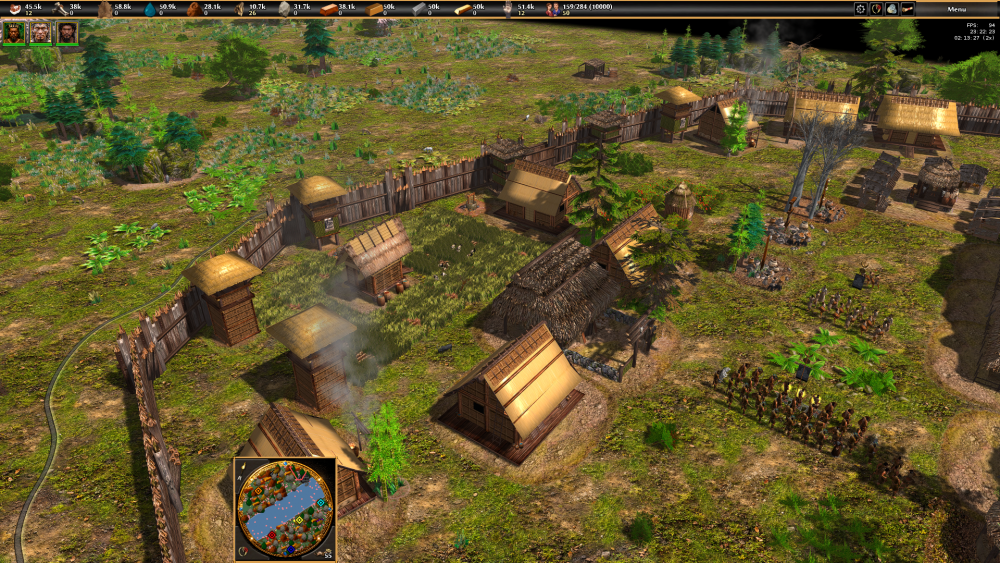
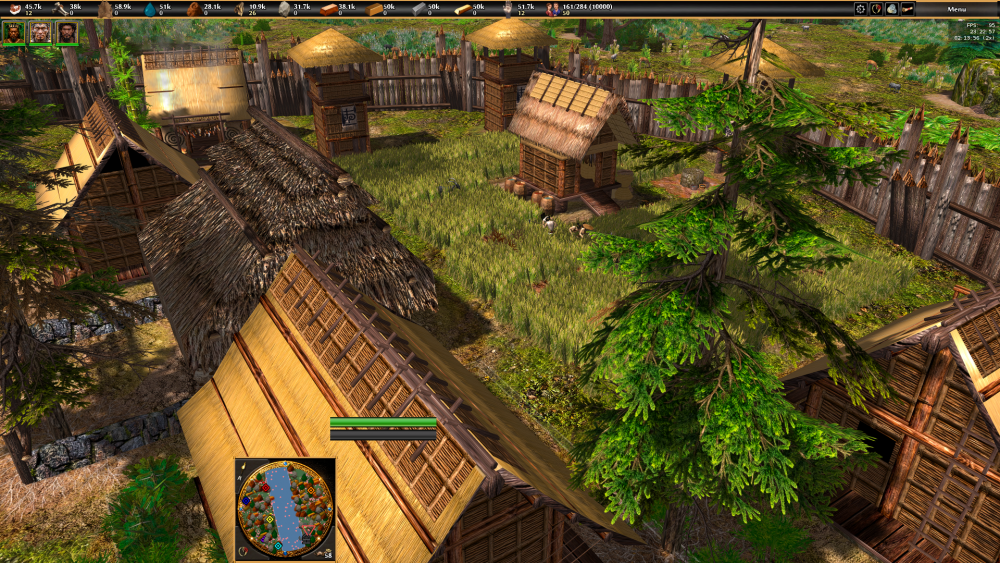
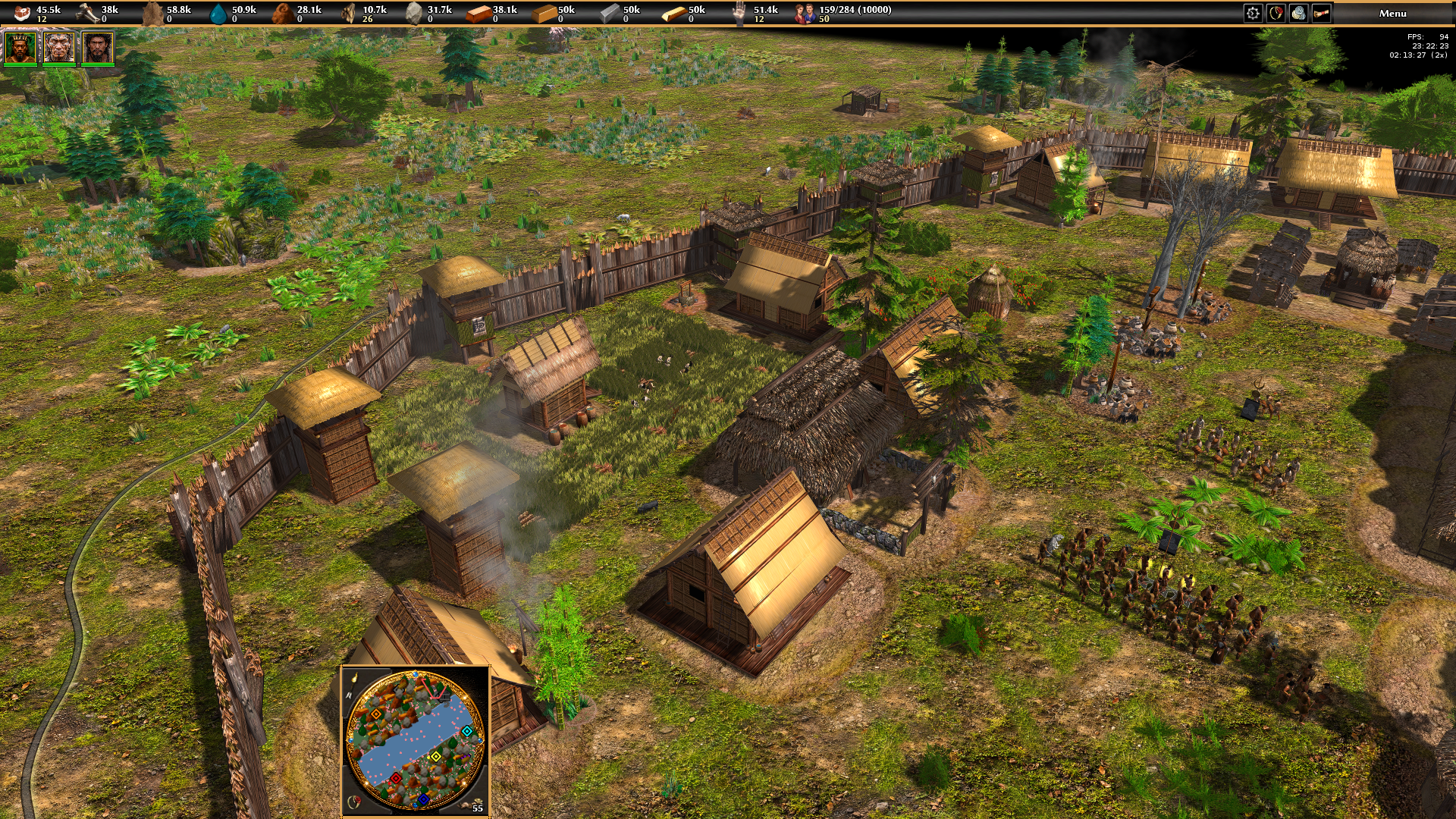
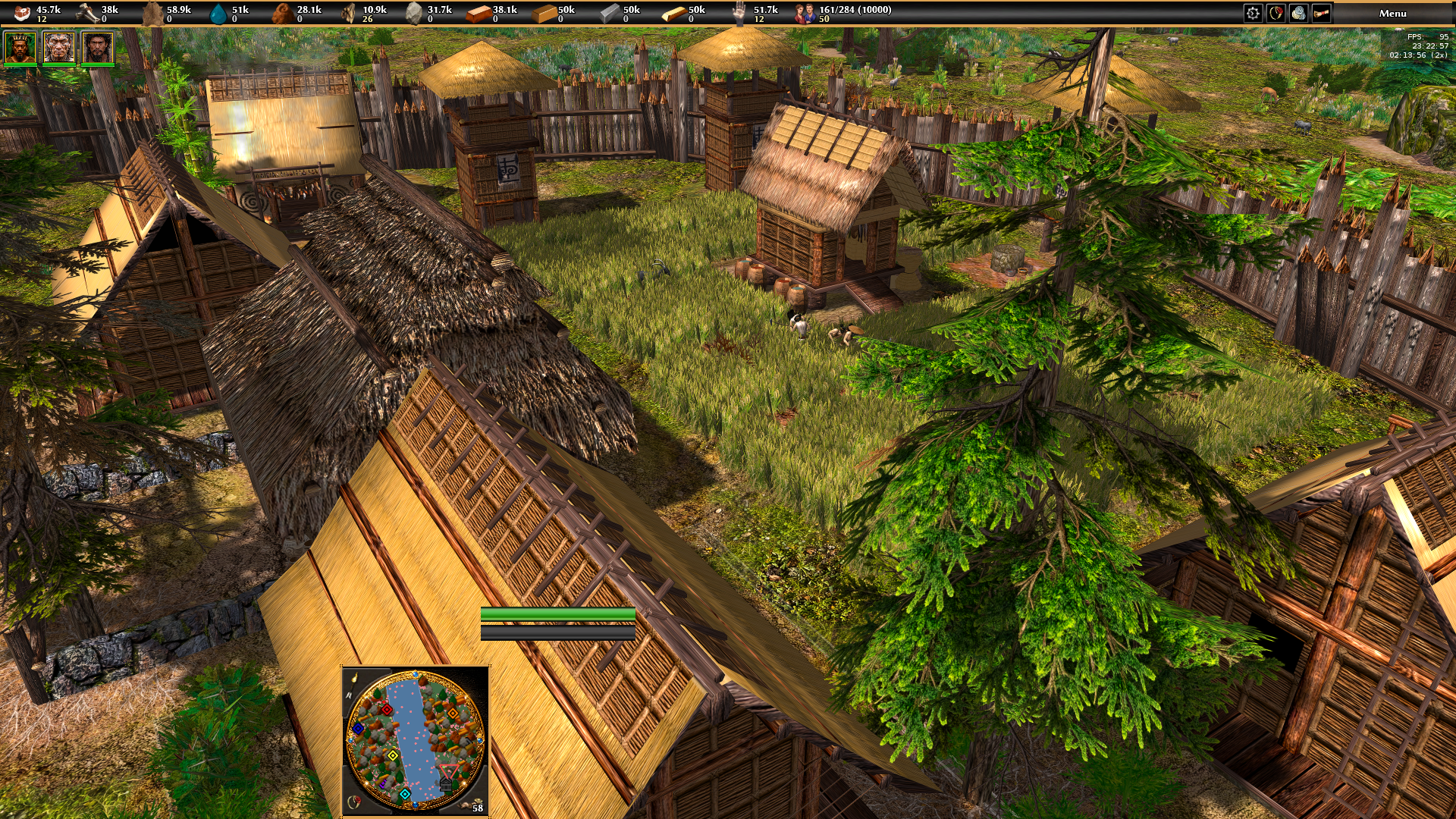
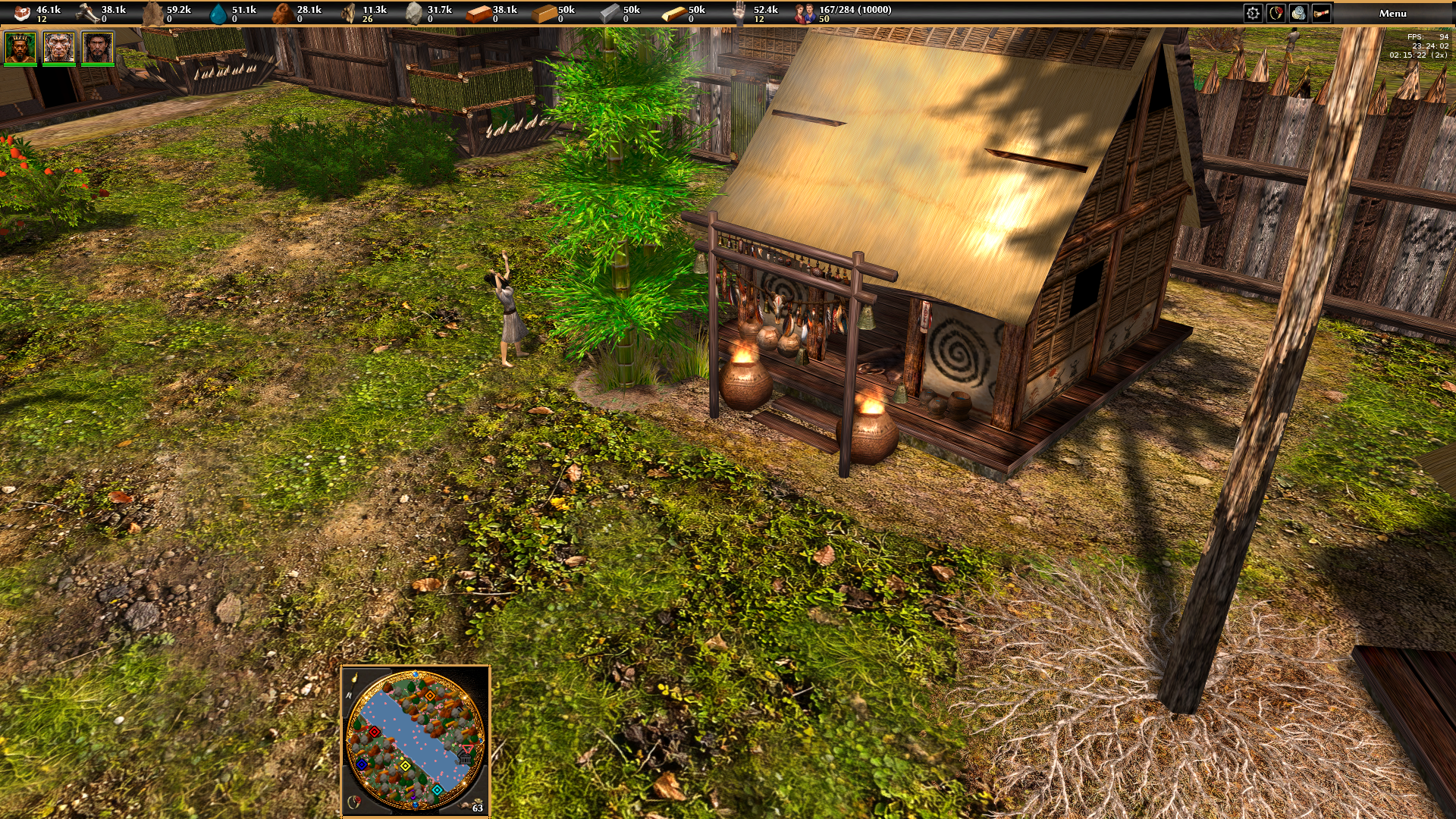
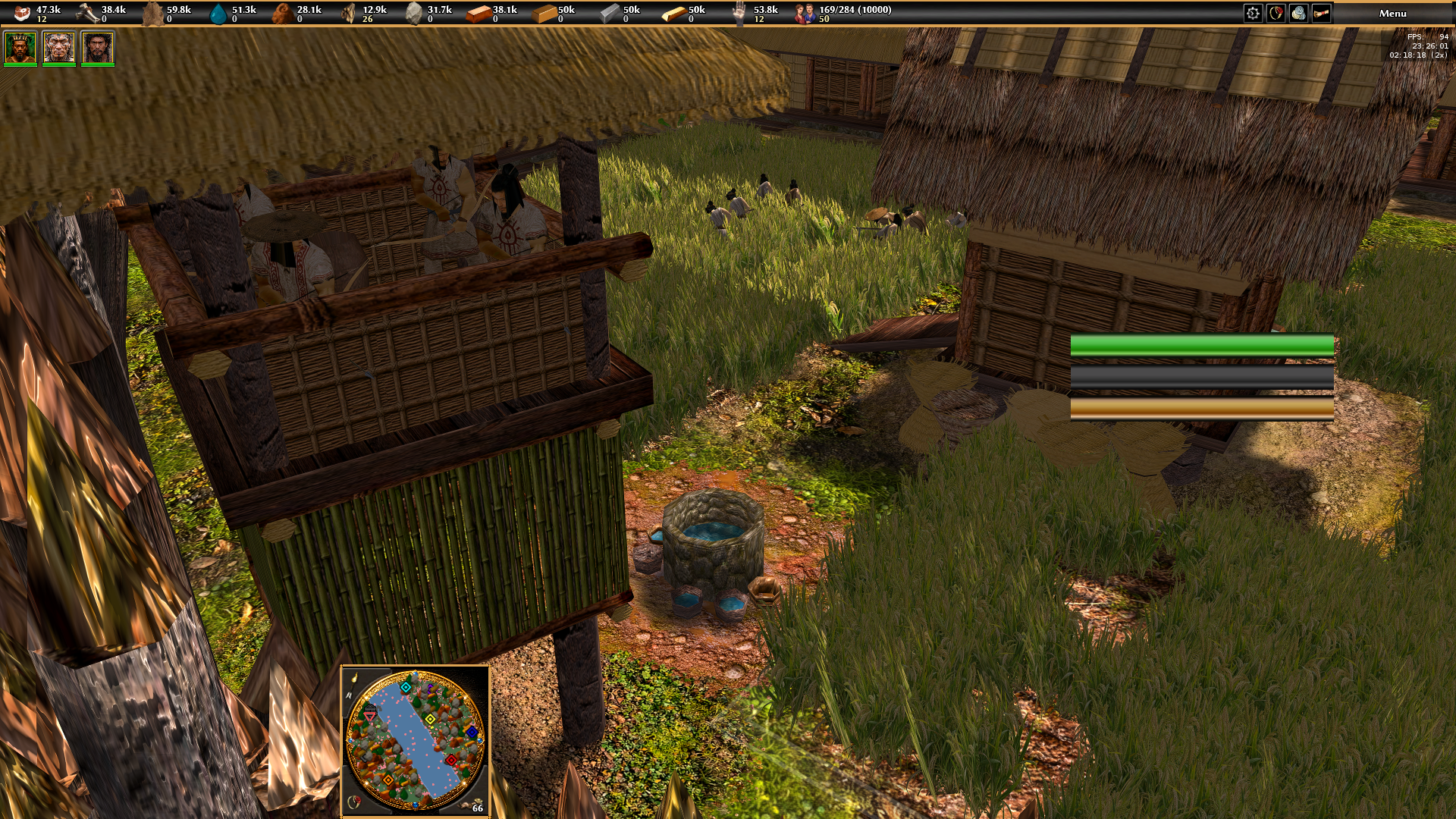
Looks amazing! I can't wait to try it out lol. My only critique is that the hay roofs look a bit too shiny; from a distance (like in your last picture) they look more like metal than hay.
-
Hi guys, I was thinking of trying to add icons in the tutorial instructions. But I get lost because 0 AD API has no intellisense for javascript. So what are the best ways I can learn the 0 AD's Javascript API?
-
thanks guys! now its working, now i will look forward for contributions.
-

Linux slowly dropping support for older hardware
Dunedan replied to Genava55's topic in Introductions & Off-Topic Discussion
I didn't question this use case, but there are other cases where old hardware is being used with modern kernels. Also for the case of using old hardware with old kernels, it doesn't matter if drivers get removed from the current Linux kernel. -
It is changed
-
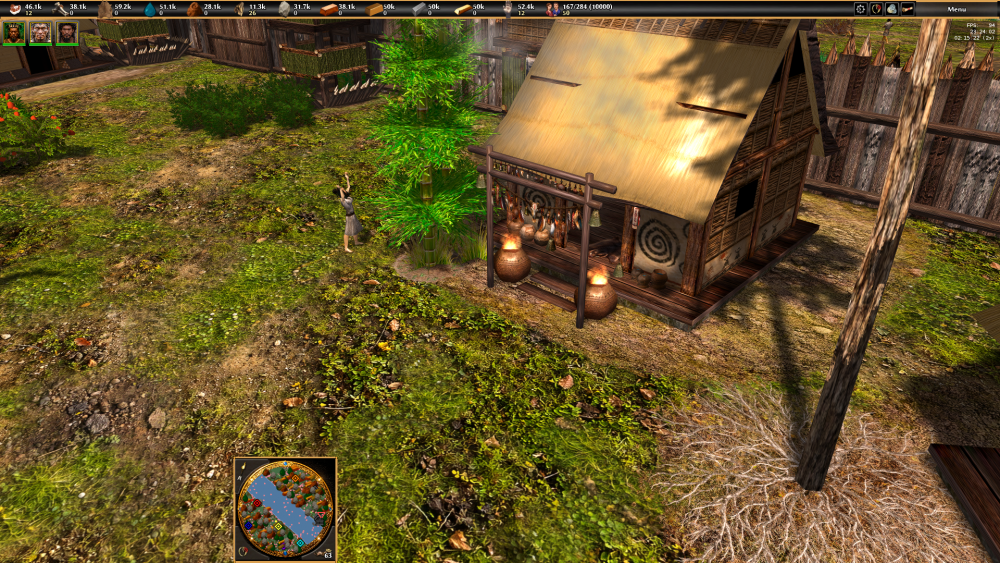
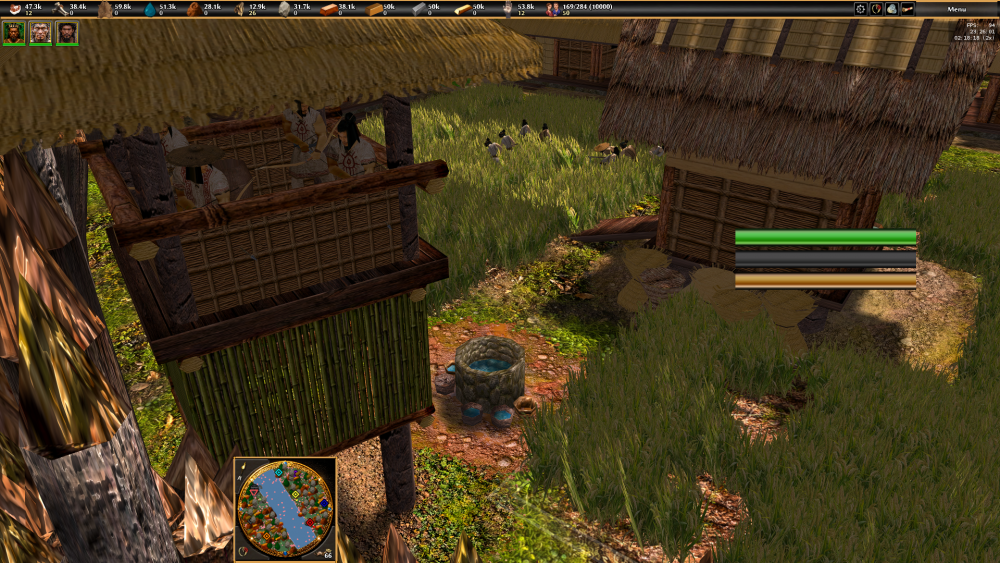
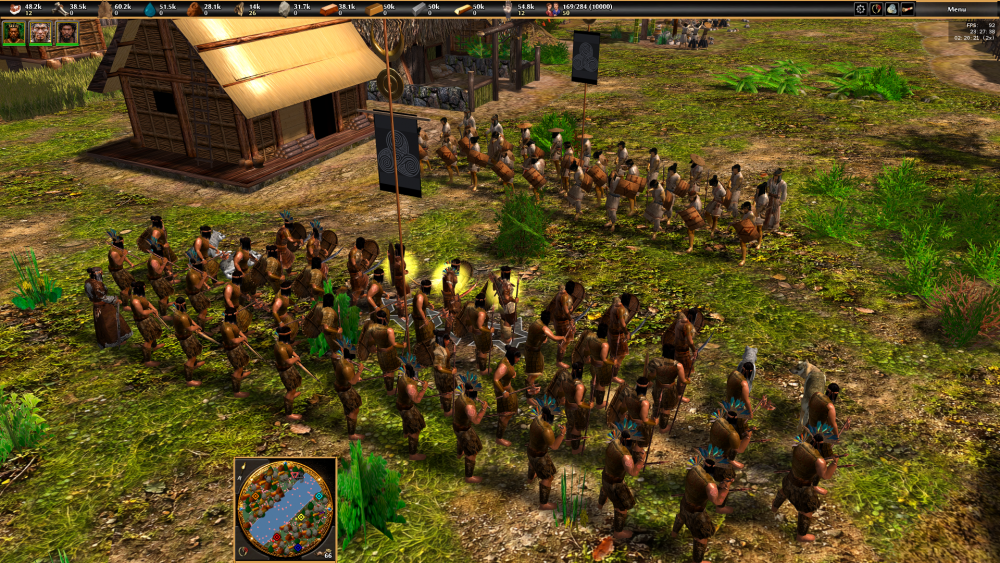
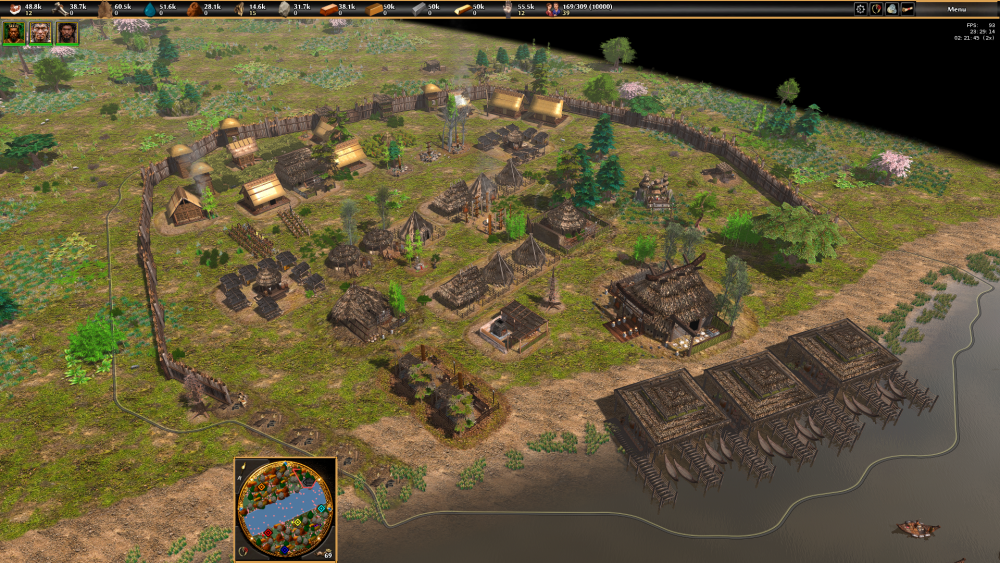
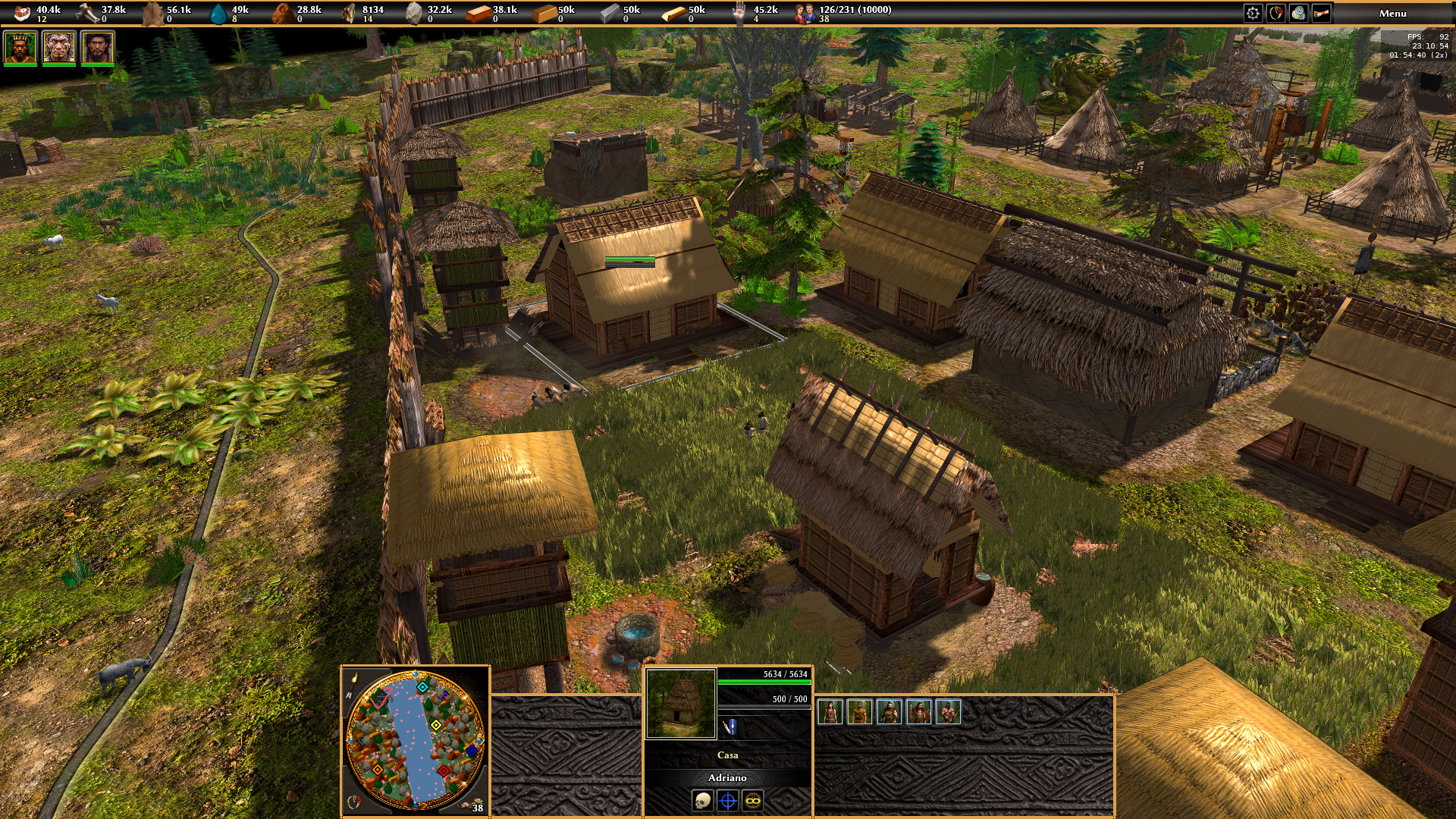
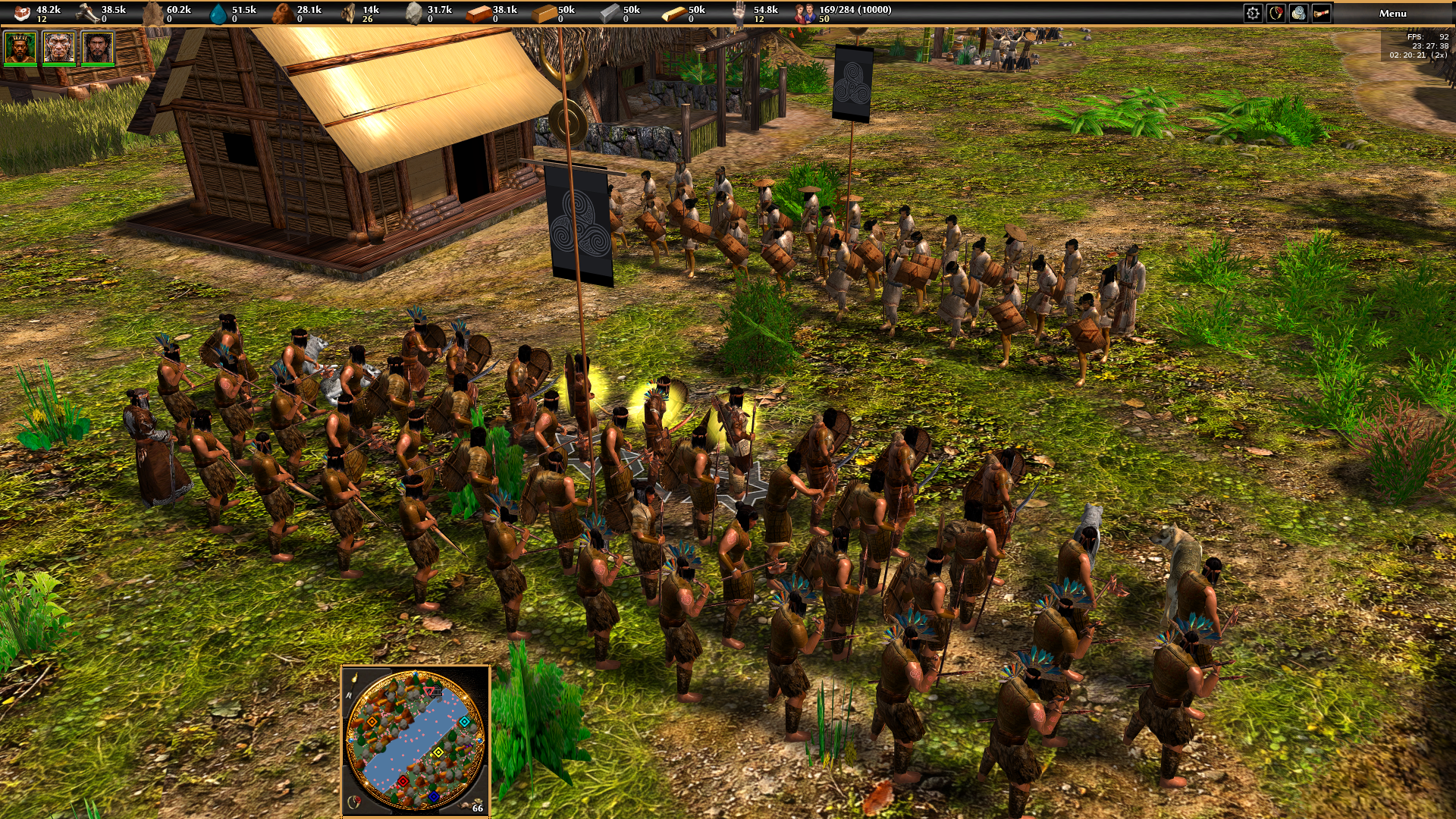
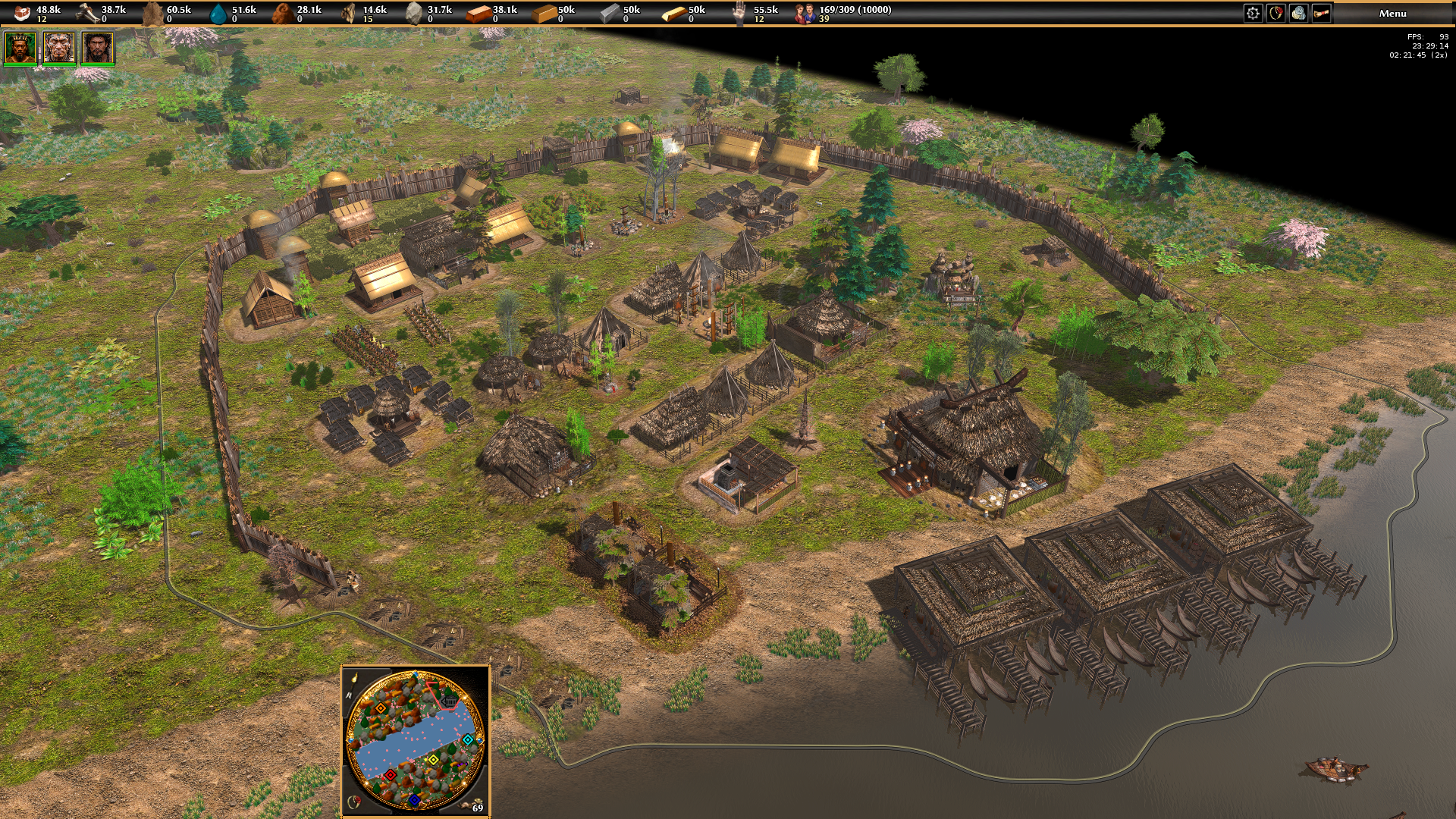
Hey everyone! I’m back with more news about my mod, World Rising! I’m currently working on implementing the Yayoi culture, and one of my main goals is to make players truly feel their civilization evolving gradually throughout the match. When you advance from the Jomon to the Yayoi, I currently plan to keep the buildings from the previous culture in your city. This way, progression won’t simply replace everything instantly. The old buildings will remain functional and will even be able to produce units from the previous culture. It will be entirely up to the player to decide when it’s time to destroy them, replace them with new Yayoi buildings, or even keep some of them. I want this transition to make each city tell its own story, mixing old and new elements as the civilization evolves. It’s completely up to the player to decide what to do with their city! The Yayoi buildings are still not all finished. Since this culture represents a more advanced period, I’m adding a lot more detail to the buildings, both in their architecture and in the smaller decorative elements. And personally, I think the results are looking incredible! =D There’s still a lot more to show, and I’ll be bringing you more development updates very soon. For now, enjoy these images! And please leave a comment! I’d really love to know what you think. Opinions, suggestions, criticism, and compliments are always welcome, as all of your feedback helps a lot with the development of World Rising. Thank you so much to everyone who has been following and supporting the project! More World Rising updates coming soon!












-
Latest Topics
-