Mentula
-
Posts
113 -
Joined
-
Last visited
-
Days Won
8
Everything posted by Mentula
-

mod LocalRatings mod - evaluate players' skills based on previous games
Mentula replied to Mentula's topic in Game Modification
You are welcome to post where you think is best. Codewise, a good improvement @ffm2 would be packing your mod as an extension of localratings. In practice, include (only) your additions in a mod, and add localratings as a dependency. It will simplify maintaining and distributing the code. It will also ensure compatibility with the base mod across versions. Up to you - but I think your work will benefit! -
@leopard the code may be similar, but LocalRatings (the mod) and Replay Pallàs are independent from each other. So, any change to the mod does not affect Pallàs. LocalRatings (the mod) has a filter menu where the minimim number of matches can be set, as well as other filters. Without having checked myself, I guess Replay Pallàs shows the results with a default combination of filters (as well as a default combination of weights). It probably makes sense that Pallàs uses one default choice: switching from a combination of filters to another implies recalculating the leaderboard in some cases (not when the minimum amount of matches is changed, but for other filters). LocalRatings (the mod) is already case-insensitive. This was implemented not long ago, so I assume Pallàs is based on an older LR version.
-
mod CustomColors mod - replace default player colors
Mentula replied to Mentula's topic in Game Modification
@Amberix the latest version of CustomColors (v 0.28.1) is for 0 A.D. 28, and the latest release link in the first post is already pointing to that. The description in the post was wrongly mentioning compatibility for 0 A.D. 27, because I forgot to update it. Now fixed. I plan (or rather, wish) to keep this mod compatible with future 0 A.D. versions. -
public Litterally, a must-have.
-
mod LocalRatings mod - evaluate players' skills based on previous games
Mentula replied to Mentula's topic in Game Modification
and also Accuracy depends on the parameter one intends to measure. I assume the comments above refer to "chances of victory" as the parameter that LR is supposed to measure. And I agree, LR is not accurate for that parameter, for the reasons below. The optimal predictor for victory is, trivially, victory/defeat ratio. Take this number, and you will have the highest possible accuracy. But LR does not even include the outcome of the game as a parameter, so it cannot accurately measure how good a player is at winning. Instead, the parameters that LR can measure (and therefore: the parameters LR can be accurate for) are the weights (see "Score Weights" in the LocalRatings Options menu) and any combination of those weights. or "Fortunately I can only see this" -
mod LocalRatings mod - evaluate players' skills based on previous games
Mentula replied to Mentula's topic in Game Modification
LocalRatings 0.28.1 is now available for installation via the game menu: Settings > Mod Selection > Download Mods Enjoy! -
Since mods are maintained by "private" users, who are not necessarily into the details of 0 A.D. development, any missing update to mods (or faulty code, or unclear installation instructions, or whatever can be related to mods) is solely a modder's responsibility. In this sense, I don't think this is something 0 A.D. (as a project) is lacking. I know it can be frustrating not to have our favourite mod promptly installed the same day a new 0 A.D. version is released, but as a user... just be patient, updates will come. I find that 0 A.D. devs are doing a good job to signal the changes that may impact mods from one version to another. Maybe modders (I totally include myself here) should be more alert to release dates. And of course, be clear on installation instructions, care about cross-compatibility with other mods, and other stuff that sometimes is done without precise or established guidelines.
-
mod LocalRatings mod - evaluate players' skills based on previous games
Mentula replied to Mentula's topic in Game Modification
Hi folks! LocalRatings was updated to version 0.28.1, compatible with 0 A.D. 28. Before making the mod available via the official downloader (Settings > Mod Selection > Download Mods) I would wait a few more days to have it tested, as some code re-work was needed to port the mod. Since I am not active in the lobby (sigh!) some of you may want to help testing it on R28; I appreciate any bug report. To test the mod, you can download the zip file and extract it into the mod folder (see here to locate the mod folder on your system); then activate the mod via Settings > Mod Selection. -
Thank you for the clarification @phosit I think the info you just provided should be added to this guide: https://gitea.wildfiregames.com/0ad/0ad/wiki/PortA27ToR28 And possibly to this guide too: https://gitea.wildfiregames.com/0ad/0ad/wiki/Modding_Guide Porting mods to R28 is not straightforward without this piece of information.
-
@phosit right, I was too quick. So, what works and what does not: ✔ gui/pregame/mainmenu~MyMod.append.js ✖ gui/pregame/mainmenu~MyMod.js The second approach has worked in all versions prior 28 - and this was "the" established practice, as far as I could see. It looks like the "append" keyword has a special meaning for evaluation of files (I tried with other keywords). Then I have two questions: Should modders be advised to rename all files of the form "module~MyMod.js" with "module~MyMod.append.js"? If so, could this be explicited somewhere? Probably not so relevant here https://gitea.wildfiregames.com/0ad/0ad/wiki/PortA27ToR28, but it would have helped.
-
@phosit try creating a file gui/pregame/mainmenu~MyMod.append.js with any content; this file is not loaded. Or do you get a different outcome?
-
That's the point. If the directory gui/pregame was loaded by the xml - like it was before: <script directory="gui/pregame/"/> then one could create a file named mainmenu~MyMod.js and do all sort of scripting therein (for example making proxies of existing functions). But this is not the case anymore for the pregame page. At first glance, this is the only page which changed behaviour. To make a comparison, session.xml is still loading the entire directory gui/session: <script directory="gui/session/"/> I wish I was! New release, new work for porting mods. I played my last game in 2023, but 0 A.D. is always in my heart.
-
Hi devs and modders, In 0 A.D. 27 and before it was possible to mod the pregame page by adding scripts to the gui/pregame folder. Example of applications are: adding items to the main menu; running startup scripts. Since commit 0fcc4f5fc5 the gui/pregame directory is not loaded anymore, in favour of loading the mainmenu.js file only. It is not clear how mod scripts can run in this page after this change. ✖ It is not an option to override mainmenu.js, mainmenu.xml, page_pregame.xml or other files. This will of course break the compatibility with other mods, as only the last loaded mod will execute the code. Maybe @phosit, do you have an idea? I am pinging you as the author of the change. Thanks.
-
Why isn't 0ad on Steam?
Mentula replied to MisterPimmler319's topic in Introductions & Off-Topic Discussion
Free Software can legally be sold (although I am not stating this is specifically the case of 0 A.D.) See this: https://www.gnu.org/philosophy/selling.en.html The word "Free" in "Free Software" can be misleading due to its ambiguous meaning. GNU and FSF clarify which interpretation should be given to the word "Free". Quoting from https://www.gnu.org/philosophy/free-sw.html.en: [...] think of “free” as in “free speech,” not as in “free beer.” -
What happened to A28? Naming?
Mentula replied to Seleucids's topic in Game Development & Technical Discussion
Here: https://gitea.wildfiregames.com/0ad/0ad/src/branch/release-0.28.0/ You probably looked at the main branch of the repo. -
GUI Session Panels problem adjusting icon spacing.
Mentula replied to Adriano0ad's topic in Help & Feedback
Hi @Adriano0ad, Here is a solution if you want to control the margin between buttons dynamically. No file replacement needed. If you want to change the margin for all panels: setPanelObjectPosition = new Proxy(setPanelObjectPosition, {apply: function(target, thisArg, args) { const vMargin = 3; // Vertical margin between buttons const hMargin = 3; // Horizontal margin between buttons target(args[0], args[1], args[2], vMargin, hMargin); }}); and place this code in a new file gui/session/unit_commands~MyMod.js. If instead, you want to change the margin for one/some panel(s) only (f.e. "Construction" panel): g_SelectionPanels.Construction.setupButton = new Proxy(g_SelectionPanels.Construction.setupButton, {apply: function(target, thisArg, args) { const ret = target(...args); // Run original function const vMargin = 3; // Vertical margin between buttons const hMargin = 3; // Horizontal margin between buttons const data = args[0]; setPanelObjectPosition(data.button, data.i + getNumberOfRightPanelButtons(), data.rowLength, vMargin, hMargin); return ret; }}); and place this code in a new file gui/session/selection_panels~MyMod.js. -
The topic here is not quality of code or variable names, but code obfuscation. The point in the license is Section 1 "source code". GPL authors clarify that "[...] Obfuscated “source code” is not real source code and does not count as source code. [...]". This is not sufficient to be compliant with GPL3, and not sufficient to qualify as FOSS. Obfuscated code violates Freedom #2 of Free Software as clearly explained here. But besides the "legal" part... if you are a developer who cares about free software (as autociv does), then you will also understand that distributing source code made intentionally hard to be understood is contrary to the purpose and principles of Free Software itself.
-
This would be a violation of autociv's license. And for good reasons, as explained here: https://www.gnu.org/philosophy/free-sw.html
-
I can answer, even if I'm not nani. Very important questions - which eventually can be rephrased as "why use proxies?". I hope the rest of this post will clarify. There are various reasons, I'll just state the two I find most important. One reason is compatibility with other mods. Imagine two mods overwriting the same init function: then, only the last loaded mod will work, whereas the first loaded mod will not work - not nice for users. Additionally: if you develop a mod, you expect to develop your code based on options.js from the public mod, right? But if this file is replaced by some arbitrary custom file, you can never know if your code will work properly. In other words, if you want your mod to be compatible with other mods, then you should let the other files exist, and not overwrite them. Another reason is compatibility with 0 A.D. itself. When a new patch or version of the public mod is released, it may happen that options.js gets changed too, as part of the update. If so, you (the mod developer) must take care of replacing that file too, and release a new version of your mod with the new file. And you have to do the same will all other files that have changed... dirty job indeed! Instead, if you build your mod around existing files, your code will (most likely) work straightforward - without having to check for all files that have changed and replace them one by one. So, what does it mean to build around existing files? And what should modders do? Answer is: use PROXIES! Javascript Proxies (similar to Python decorators - I seem to remember you like Python) ensure that modded objects wrap existing objects without overwriting them. An example: by using a proxy, you can run your custom init function after, before or around the original init function. And this is exactly what happens inside options~autociv.js! patchApplyN is a brilliant example of a proxy: it executes custom code around the original init function in options.js. You can find another concrete example of a proxy for the init function in options.js here. Most likely, it is caused by another mod which replaces existing objects/functions/variables/etc. - and if this is the case, you can gently ask the author to get acquainted with proxies.
- 517 replies
-
- 7
-

-

-

-
- hotkeys
- autoassign civ
- (and 9 more)
-
It is not the case for A27, but in the future it may happen that a new 0 A.D. version will change the metadata.json replay file structure, f.e. adding, removing or replacing data. Then, LocalRatings will need to update its logic too, to reflect the new metadata structure. In other words, future replays may not be compatible with today's replays - at least from data extraction perspective. There is also one more consideration: the "interpretation" of ratings may be different from version to version, due to balance adjustments and gameplay changes. For example, a parameter that was relevant in A26 may not be relevant in A27 anymore and viceversa. So the interpretation of ratings would change too. For these two reasons, I am in favour of distinguishing the two versions.
-
mod CustomColors mod - replace default player colors
Mentula replied to Mentula's topic in Game Modification
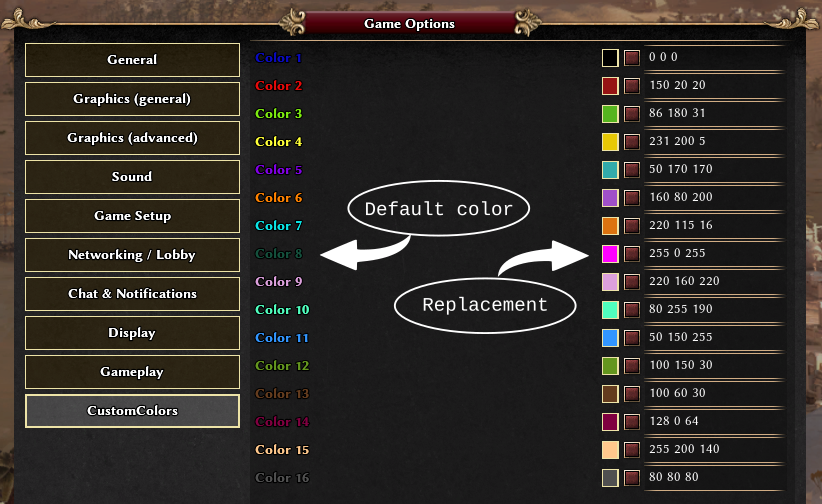
You can export/import your color scheme from/to local.cfg: [customcolors] 1 = "21 55 149" 2 = "150 20 20" 3 = "86 180 31" ... 16 = "80 80 80" or alternatively, from/to user.cfg: customcolors.1 = "21 55 149" customcolors.2 = "150 20 20" customcolors.3 = "86 180 31" ... customcolors.16 = "80 80 80" -
mod CustomColors mod - replace default player colors
Mentula replied to Mentula's topic in Game Modification
A mod should be agnostic about the existence of global variables outside the public mod (such as g_autociv_optionsFiles). It is clear where this issue comes from, @Atrik: your options.js file is a copy of options~boongui.js, which was last updated in 2021. Back at that time, autociv options were not compatible with other mods, so boonGUI had to implement this "dirty trick" (i.e. to include autociv's global variables) to function properly. Nowadays, this problem does not persist anymore: autociv supports option compatibility, so other mods (including yours) can be free from autociv's global variables. If you'd like me to send an update to your repo with a fix, please let me know. It can also be quickly amended by looking at nani's autociv code or other code (here or here) -
mod CustomColors mod - replace default player colors
Mentula replied to Mentula's topic in Game Modification
This workaround (i.e. changing the mod order) did not work in A26. It should work, but it didn't, possibly because of a bug. Not sure about A27. In practice, autociv (and other overwriting mods) took precedence over CustomColors (and other proxying mods) regardless of the order mods were loaded. This is why I asked nani for the fix -
mod CustomColors mod - replace default player colors
Mentula replied to Mentula's topic in Game Modification
Some mods overwrite existing options, instead of adding to them. We must ask authors to fix this behavior, as it breaks compatibility with other mods. It is clear from this code by @Atrik for example: g_Options, as well as the whole init() function, are overwritten. This is not good, as the original behavior will be "forgotten". I am surprised to hear it is an issue with autociv; I discussed with @nani in May '23 and he made a fix. A general recommendation to modders: use proxies to wrap functions, instead of overwriting them! See here for inspiration. -
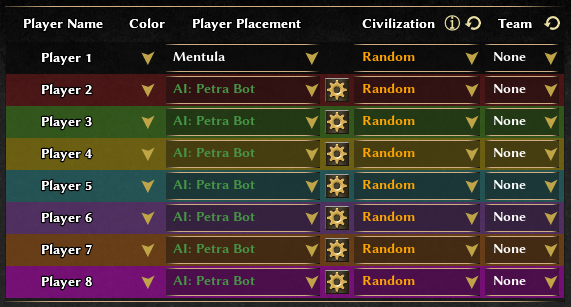
Dear all, Long ago (A24 was the current version) I made a mod to replace in-game player colors. It was never published on the forum, although it is publicly available on my GitLab. Better leaving a trace here on the forum than out in the internet wilderness. The mod is named CustomColors and the current version 0.28.1 is compatible with 0 A.D. 28. When I developed this mod, there were already other mods implementing color changing - and maybe it is still the case today, but the existing solutions were not satisfactory to me, as those mods replaced colors everywhere... including replay files! Hard-coding colors onto replay files has some disadvantages (noticeable f.e. when when sharing replay files with others or when playing replays). So I opted for a more flexible solution and the CustomColors mod was the result. Perhaps one day the possibility of customizing player colors will be a built-in feature of the game. Color replacement, in two screenshots Here is where colors can be changed: And here is how the result looks like: Installation Click here to download the latest release. Install following the official 0 A.D. guide: How to install mods? Alternative downloads: Latest Release (.pyromod) | Latest Release (.zip) | Older Releases Contribute The public repository is at this page. Everybody is very welcome to contribute, suggest, fork or simply give feedback. Have fun!