
All Activity
- Past hour
-
1xbet tr 1xbet tr .
-
 baza dannih kypit_uykr joined the community
 -
gitea - Error downloading object
guerringuerrin replied to DesertRose's topic in Game Development & Technical Discussion
@DesertRose Use a commit before 67ee5aaeb5, which is the one that introduced those files. I think you can use: 262c5c037e, Use promises to fetch net messages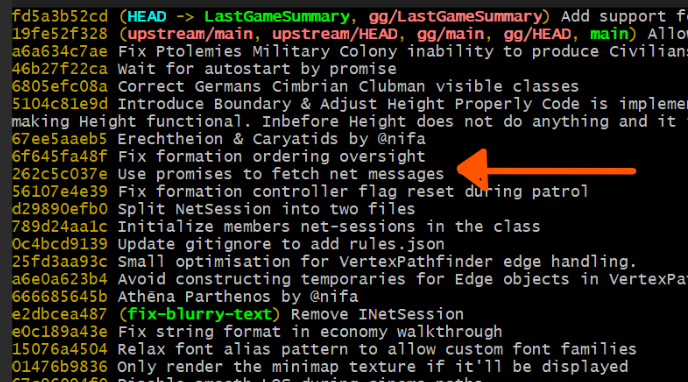
-
gitea - Error downloading object
guerringuerrin replied to DesertRose's topic in Game Development & Technical Discussion
I'm not sure what could happen if you remove them manually. Instead of that I would use git clean to delete untracked files: git clean -fdn To preview what files will be removed, and then: git clean -fd edit: at first glance those are the same files I have problems with some days ago. After cleaning the untracked files, I would suggest the following steps, which worked for me last time: Check where you are in the commit history: git log --oneline --graph Reset your branch to a known good commit (you just need to pick the right one): git reset --hard <commit> Update your remote branch with your local state: git push --force-with-lease your-remote-repo-name <your-main-branch> Then, update/sync the branch using the Gitea web UI (to avoid Git LFS-related issues). Then, git pull -

gitea - Error downloading object
Atrik replied to DesertRose's topic in Game Development & Technical Discussion
(I'm not very knowledgeable about this) Those are probably residual changes from when you did git lfs pull. But it got interrupted at the first asset actually in lfs. Just clear them, with git clean -fd should do. -

gitea - Error downloading object
DesertRose replied to DesertRose's topic in Game Development & Technical Discussion
Can I delete those locally? error: The following untracked working tree files would be overwritten by merge: binaries/data/mods/public/art/actors/props/structures/athenians/erechtheion_caryatids.xml binaries/data/mods/public/art/actors/props/structures/athenians/erechtheion_decor.xml binaries/data/mods/public/art/actors/props/structures/athenians/erechtheion_nature.xml binaries/data/mods/public/art/actors/props/structures/athenians/erechtheion_olive_tree.xml binaries/data/mods/public/art/actors/props/structures/athenians/erechtheion_props_a.xml binaries/data/mods/public/art/actors/props/structures/athenians/erechtheion_roof.xml binaries/data/mods/public/art/actors/props/structures/athenians/erechtheion_tile_c.xml binaries/data/mods/public/art/actors/structures/artifacts/statue_caryatid_medium_pedestal.xml binaries/data/mods/public/art/actors/structures/artifacts/statue_caryatid_small_pedestal.xml binaries/data/mods/public/art/actors/structures/athenians/caryatid.xml binaries/data/mods/public/art/actors/structures/athenians/caryatid_large.xml binaries/data/mods/public/art/actors/structures/athenians/erechtheion.xml binaries/data/mods/public/simulation/templates/gaia/ruins/metal_statue_caryatid.xml binaries/data/mods/public/simulation/templates/structures/athen/erechtheion.xml I certainly didn't change them. -
Works great! Thank you!
-
Map Type: Random Map Filter: Default
-
gitea - Error downloading object
guerringuerrin replied to DesertRose's topic in Game Development & Technical Discussion
@DesertRose Can you show what the output of git log --oneline is? edit: I guess for your edit that you managed to fix it. nice! -
gitea - Error downloading object
DesertRose replied to DesertRose's topic in Game Development & Technical Discussion
None of those work. It seems because I merged branches with the main repo it cannot be undone so simply. edit: git reflog git reflog --relative-date The second command is very helpful to make it more clear that the order is chronically DESCENDING. -.- - Today
-
 When I checked for the unusual high sniping activity I came to the conclusion that its a auto-clicker. There are a lot of games where this is prohibited and reason for bans. It's definitely the case that some players are using such mice and see no harm in it and it's the case that some players would like that such mice/features were not used. I don't like the current balance where one is incentivized to target the ranged units at the back (because they have less armor and deal much damage). Besides that, even if the balance were changed to my liking and melee were a high priority target, I think the feature of the target area could still be beneficial in situations. To take out healers, elephants, heroes or so. I think "sniping upgrade" could be a interesting upgrade. That doesn't upgrade any stat. but how well the army acts together in later games. Upgrade 1: Target the unit which requires the least amount of attacks within your range Upgrade 2: Be aware of where the other soldiers shoot and don't shoot more arrows on a unit than necessary. I know some game that had these as upgrades. Should be priced high though, as they are quite valuable.
 -
Apologies for what may be an idiot newbie question. I searched the forums but found no answer. I only play using "Single Player --> Matches". I like digging around in the available maps, and found one that I liked ("Wild Lake"), and played that several times. Then played other maps. But now I cannot find "Wild Lake" again. I assume I am filtering wrong. Any hints? Thanks.
-
 BoDe joined the community
 -
gitea - Error downloading object
guerringuerrin replied to DesertRose's topic in Game Development & Technical Discussion
And, if dropping your commits doesn’t work for some reason, you can also try resetting your local branch to a few commits earlier in the history. Then try steps 2 and 3 again. View the history to choose where to go with: git log --oneline Then: git reset --hard <commit-hash> Then: -
gitea - Error downloading object
Atrik replied to DesertRose's topic in Game Development & Technical Discussion
Ah, you edited the main branch of your repo.... The classical workflow would be to not make any of your edits there but on dedicated branches. Assuming we still want to use your main to rebase all local branches --since @guerringuerrin confirmed this worked for him, I'm guessing this was indeed due to something, probably rights, preventing you to pull lfs assets from 0AD's main repo storage-- here is what you could do: Drop all commits you did on main locally Force push your own main branch Try again to sync your main with 0AD's main using the web UI -
gitea - Error downloading object
DesertRose replied to DesertRose's topic in Game Development & Technical Discussion
Trying to sync in the web UI gives me this error message: Merge Failed: There was a conflict while merging. Hint: Try a different strategy. And all fixes for it I found are for conflicts with the same repo, not with a parent repo. A comment similar to git merge upstream/main doesn't seem to exist for git-lfs -

-
gitea - Error downloading object
guerringuerrin replied to DesertRose's topic in Game Development & Technical Discussion
Having this problem some days ago I did this and it worked -
 That I keep asking you to test out with me, yet you never do
 -
 Hello, the mod is now available on mod.io and through the mod downloader. In the future refrain from using 0ad>=0.28.0 as it causes issues (You cannot guarantee what will happen in the future)
 -
 if only we had a mod that did it already....
 -
gitea - Error downloading object
Atrik replied to DesertRose's topic in Game Development & Technical Discussion
@DesertRose I had the same issue. I think I fixed it by doing a git lfs pull as recommended by @Stan`, but it would only work doing so from my own fork. Sync your main branch's fork from the web UI, then use it to re-base any local branches. -
Wonder if all those new maps could be part of @andy5995's community maps mod
-
gitea - Error downloading object
Stan` replied to DesertRose's topic in Game Development & Technical Discussion
Try to to git-lfs pull maybe Basically the issue is that your fork needs to be updated, because new art assets were pushed on main. -
When I try to pull the changes made to my fork by sync it to 0ad:main I get the error: Downloading binaries/data/mods/public/art/meshes/props/caryatid.dae (101 KB) Error downloading object: binaries/data/mods/public/art/meshes/props/caryatid.dae (4758e69): Smudge error: Error downloading binaries/data/mods/public/art/meshes/props/caryatid.dae (4758e699101e3ab0b367bc4557a5fe155b395df3a28d3c3ecc3c5d7bb4b45565): batch response: Repository or object not found: https://gitea.wildfiregames.com/DesertRose/0ad-DR_fork.git/objects/batch Check that it exists and that you have proper access to it Errors logged to '/home/tre/git/0ad/0ad-DR_fork/.git/lfs/logs/20260321T085833.61052115.log'. Use `git lfs logs last` to view the log. error: external filter 'git-lfs filter-process' failed Have this error for a few days now. Is that an issue I can fix myself, or is this on the remote's side? I can't find any helpful info online.
-
Usually not, but yesterday I travelled over 900 km by train to vote in my country (my country usually don't accept to vote remotely). Anyway, please vote on this poll. Thanks for your time. https://strawpoll.com/3RnYXRMVWye
-
happy for you, nice that you can have a good sleeping schedule (I want to be this punctual for sleeping )




-
Latest Topics
-
