Leaderboard




Popular Content
Showing content with the highest reputation on 11/15/26 in Posts
-
Hello @Asher @Grautvornix, here is a summary of the Embassy phases and diplomatic release controls: Embassy Phases & Diplomatic Release Controls: Phase Requirements: The Embassy can be built starting in Phase II (Town Phase), while "Sponsor a Colony" (reviving a completely defeated ally) requires reaching Phase III (City Phase). "Grant Land & Infrastructure" Key: Allows the host to transfer ownership of a secondary Civic Center (or outpost) and its surrounding territory/buildings directly to the sheltered ally. "Release on Host's Land" Key: Frees the sheltered ally's units while keeping them confined strictly inside the host's fortified borders so they can safely rebuild under protection. "Release Permanently" Key: Grants full independence, allowing the restored ally to leave the host's territory and operate freely across the map.2 points
-
I agree with the fanatics part. Reducing armor (since they are naked) and health makes total sense. However i wont reduce the damage personnally but i would lower the pierce armor to 1. It makes sense to have them have super-fast high DPS units but with no survivability.2 points
-
Hi, @pixel24. I'm not sure if there is a changelog but you can scroll a bit it's thread and look for @Atrik's post with the news of every release. Or maybe he knows where to find them all in one place1 point
-
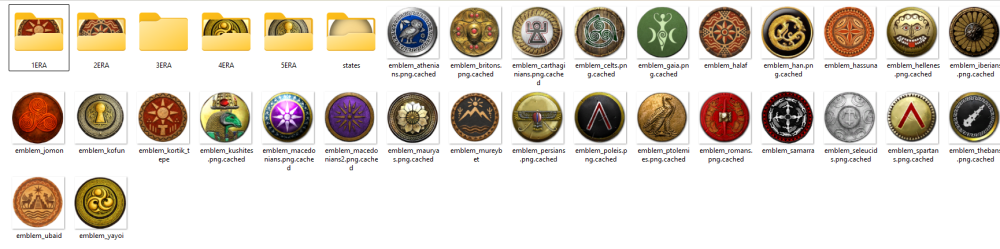
New cultures are already being implemented into World Rising! We're expanding our world even further, introducing new civilizations, buildings, units, and unique historical features. Each culture is being carefully developed with attention to historical detail, aiming to deliver an increasingly rich, immersive, and diverse gameplay experience. The world of World Rising continues to grow, and many exciting new features are still to come!
 1 point
-
Ah.. Well I guess you are right on campaign map, right click should just garrison the army. Basically here the city is just like your classical 0A.D. building. So to garrison you need to hold Ctrl+RightClick, as you would do to garrison a CC or any building in a game. It's true that because the campaign was built from ground, It didn't came to my mind that maybe some things could simplified with the hotkeys.1 point
-
@Grautvornix @Asher Hi, the test doesn't seem to have worked: the build failed with externally-managed-environment (PEP 668) and pyinstaller: command not found, even though the script still printed "Success!". :~/Téléchargements/atlas-tools-0.25.0$ bash build.sh atlas-tools build script build script version 1.2.0 =============================================== Collecting libs... error: externally-managed-environment × This environment is externally managed ╰─> To install Python packages system-wide, try apt install python3-xyz, where xyz is the package you are trying to install. If you wish to install a non-Debian-packaged Python package, create a virtual environment using python3 -m venv path/to/venv. Then use path/to/venv/bin/python and path/to/venv/bin/pip. Make sure you have python3-full installed. If you wish to install a non-Debian packaged Python application, it may be easiest to use pipx install xyz, which will manage a virtual environment for you. Make sure you have pipx installed. See /usr/share/doc/python3.12/README.venv for more information. note: If you believe this is a mistake, please contact your Python installation or OS distribution provider. You can override this, at the risk of breaking your Python installation or OS, by passing --break-system-packages. hint: See PEP 668 for the detailed specification. error: externally-managed-environment × This environment is externally managed ╰─> To install Python packages system-wide, try apt install python3-xyz, where xyz is the package you are trying to install. If you wish to install a non-Debian-packaged Python package, create a virtual environment using python3 -m venv path/to/venv. Then use path/to/venv/bin/python and path/to/venv/bin/pip. Make sure you have python3-full installed. If you wish to install a non-Debian packaged Python application, it may be easiest to use pipx install xyz, which will manage a virtual environment for you. Make sure you have pipx installed. See /usr/share/doc/python3.12/README.venv for more information. note: If you believe this is a mistake, please contact your Python installation or OS distribution provider. You can override this, at the risk of breaking your Python installation or OS, by passing --break-system-packages. hint: See PEP 668 for the detailed specification. error: externally-managed-environment × This environment is externally managed ╰─> To install Python packages system-wide, try apt install python3-xyz, where xyz is the package you are trying to install. If you wish to install a non-Debian-packaged Python package, create a virtual environment using python3 -m venv path/to/venv. Then use path/to/venv/bin/python and path/to/venv/bin/pip. Make sure you have python3-full installed. If you wish to install a non-Debian packaged Python application, it may be easiest to use pipx install xyz, which will manage a virtual environment for you. Make sure you have pipx installed. See /usr/share/doc/python3.12/README.venv for more information. note: If you believe this is a mistake, please contact your Python installation or OS distribution provider. You can override this, at the risk of breaking your Python installation or OS, by passing --break-system-packages. hint: See PEP 668 for the detailed specification. error: externally-managed-environment × This environment is externally managed ╰─> To install Python packages system-wide, try apt install python3-xyz, where xyz is the package you are trying to install. If you wish to install a non-Debian-packaged Python package, create a virtual environment using python3 -m venv path/to/venv. Then use path/to/venv/bin/python and path/to/venv/bin/pip. Make sure you have python3-full installed. If you wish to install a non-Debian packaged Python application, it may be easiest to use pipx install xyz, which will manage a virtual environment for you. Make sure you have pipx installed. See /usr/share/doc/python3.12/README.venv for more information. note: If you believe this is a mistake, please contact your Python installation or OS distribution provider. You can override this, at the risk of breaking your Python installation or OS, by passing --break-system-packages. hint: See PEP 668 for the detailed specification. error: externally-managed-environment × This environment is externally managed ╰─> To install Python packages system-wide, try apt install python3-xyz, where xyz is the package you are trying to install. If you wish to install a non-Debian-packaged Python package, create a virtual environment using python3 -m venv path/to/venv. Then use path/to/venv/bin/python and path/to/venv/bin/pip. Make sure you have python3-full installed. If you wish to install a non-Debian packaged Python application, it may be easiest to use pipx install xyz, which will manage a virtual environment for you. Make sure you have pipx installed. See /usr/share/doc/python3.12/README.venv for more information. note: If you believe this is a mistake, please contact your Python installation or OS distribution provider. You can override this, at the risk of breaking your Python installation or OS, by passing --break-system-packages. hint: See PEP 668 for the detailed specification. error: externally-managed-environment × This environment is externally managed ╰─> To install Python packages system-wide, try apt install python3-xyz, where xyz is the package you are trying to install. If you wish to install a non-Debian-packaged Python package, create a virtual environment using python3 -m venv path/to/venv. Then use path/to/venv/bin/python and path/to/venv/bin/pip. Make sure you have python3-full installed. If you wish to install a non-Debian packaged Python application, it may be easiest to use pipx install xyz, which will manage a virtual environment for you. Make sure you have pipx installed. See /usr/share/doc/python3.12/README.venv for more information. note: If you believe this is a mistake, please contact your Python installation or OS distribution provider. You can override this, at the risk of breaking your Python installation or OS, by passing --break-system-packages. hint: See PEP 668 for the detailed specification. =============================================== Building Mercator... build.sh: ligne 13: pyinstaller : commande introuvable Done =============================================== Building Post-Atlas... build.sh: ligne 17: pyinstaller : commande introuvable Done =============================================== Success! The executables can be found under the dist folder0 points