All Activity
- Past hour
-
Ok thanx, got it!
-
By any chance do you have a STL file of units ? so you can share with me ?
-
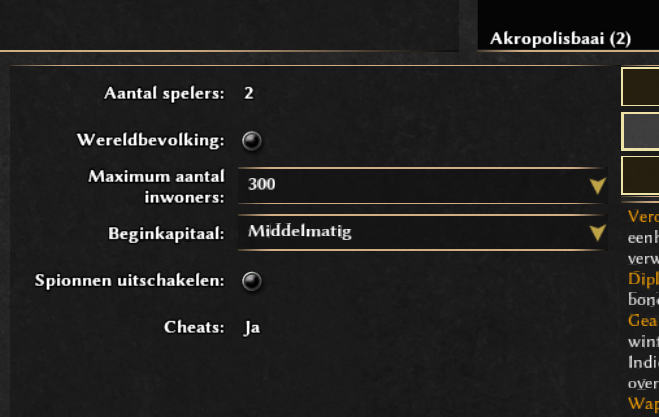
you can only select the number of players with random maps
- Today
-
Try another map. If you choose a map for two players ["(2)"] you can't change that.
-
The problem is, i have no dropdown menu to select more players...
-
I imagine you will need to pose the body mesh the way you want to with the armature and then import the props and combine them with the body mesh to make one mesh to print it. But, mind you, I'm no 3D printing expert.
-
It would be useful if in Ui we could see which bonuses were applied to some price/time
-
Engine.GetSimRate/SetSimRate from JS script
Vantha replied to CulturedCait's topic in Scenario Design/Map making
Yes, notifications are the best way to communicate stuff like this from the simulation to the GUI (and it works just as @phosit said). What kind of calculations? A "tick" in the GUI happens for each rendered frame, so the tick rate won't go up if you increase the sim rate (in fact, it'll probably go down a bit, since the game is busier with the simulation and has less time for rendering). -

Engine.GetSimRate/SetSimRate from JS script
phosit replied to CulturedCait's topic in Scenario Design/Map making
Yes, I think that is correct. But @Vantha has more knowledge. -

Sharing My Original Music and Sound Effects - Over 2000 Tracks
Eric Matyas replied to Eric Matyas's topic in Art Development
Hi Everyone, What a year...ugh. In these troubling times, I thought I'd finish out the year with a music track that maybe offers a little bit of hope: "THE MEADOW WE CALL HOME" (looping) You can listen to it here: https://soundimage.org/wp-content/uploads/2025/12/The-Meadow-We-Call-Home.ogg And download it here: https://soundimage.org/fantasy-13/ Have a safe New Years Eve. -
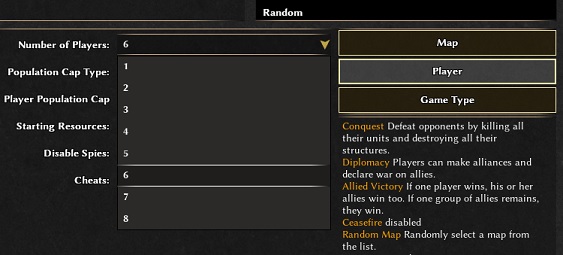
Hi @RemonK, welcome to the forums. In the match setup hit "Player" then you can make your selection.
-
 RemonK joined the community
 -
How do i add more players in singleplayer mode??
-
make sense, didn't check seleucids bonus
-
 JefferyStest joined the community
 -
I didn't really forget that. I've just assumed that those library versions were backwards-compatible (as they should be) and that he would need fewer libraries anyway since it's an older alpha release. The hardest to compile is Spidermonkey 38 mainly because it relies on python 2. Spidermonkey has very few minor versions that are ABI (backward compatible) sometimes they even break it in minor like 76.3 and .5
-
Must have XXIII(23) Ken Wood Linux only
Deicide4u replied to NewWorldHero's topic in Help & Feedback
I didn't really forget that. I've just assumed that those library versions were backwards-compatible (as they should be) and that he would need fewer libraries anyway since it's an older alpha release. But yes, that is one issue you inevitably hit while learning to compile. And this knowledge ia quite valuable in today's world. -
@Dunedan Good. If compiling older versions of 0ad is as you describe, there's another way. Probably easier than compiling. In Debian, version 23.1 of 0ad was available in Bullseye (11.x). 1. Install Debian 11 Bullseye on a USB stick just like you would on a hard drive. https://cdimage.debian.org/cdimage/unofficial/non-free/cd-including-firmware/archive/11.11.0+nonfree/amd64/iso-dvd/ Includes firmware. 2. Run the installed Bullseye from the USB stick on your computer. Of course, unless it's a recent computer that the Bullseye kernel (5.10.x) can't handle. 3. Since the Bullseye repository is already down (I think), 0ad and its dependencies (there aren't many) must be installed manually. https://packages.debian.org/bullseye/0ad The standard command: apt install 0ad will not work. 4. Download the following: http://ftp.de.debian.org/debian/pool/main/0/0ad/0ad_0.0.23.1-5+b1_amd64.deb http://ftp.de.debian.org/debian/pool/main/0/0ad-data/0ad-data_0.0.23.1-1.1_all.deb http://ftp.de.debian.org/debian/pool/main/0/0ad-data/0ad-data-common_0.0.23.1-1.1_all.deb 5. Try to install it: dpkg -i 0ad-data_0.0.23.1-1.1_all.deb dpkg -i 0ad-data-common_0.0.23.1-1.1_all.deb dpkg -i 0ad_0.0.23.1-5+b1_amd64.deb We're taking a look at what dpkg outputted. The first two packages should install correctly, unless some fonts are missing, in which case they need to be installed. https://packages.debian.org/bullseye/0ad-data-common The last command will be the hardest, as dpkg will output something like: "error – package xxx is missing". You'll need to download this package manually, install it, and try again: dpkg -i 0ad_0.0.23.1-5+b1_amd64.deb And so on until you succeed. After a few rounds of this, we have 0ad ver. 23.1 installed for good. Now you can run 0ad and finally put the Bullseye + 0ad USB stick away. Best regards. Happy New Year
-
Wonder if we could split it in multiple buildings with different purposes. Else that will be a scenario only actor.
-
You can look at the latest Release Candidates, else you need to clone the repo and pull the translations yourself.
-
If app image is a no go for you then you'll have to run the migration scripts on the maps. Stuff that handle renamed actors, modified xml and removed terrain types.
-
Thank you Stan. All good. Got the Reviewer status now and can change older strings but I can't tag them as Reviewed. Transifex is way better than Crowdin or Weblate. Is there a way to test the translation or do I need to wait for the next release?
-
What all of you seem to forget is that the instructions to compile a23 are quite different from the instructions to compile recent versions of 0ad and that the versions of some libraries a23 depends on aren't available on modern Linux distributions. In my opinion that makes compiling a23 on a modern Linux distribution quite complicated.
-
@NewWorldBohate You're exaggerating when you say compilation is difficult. The description on the website: https://gitea.wildfiregames.com/0ad/0ad/wiki/BuildInstructions#linux may be confusing, but that's because it describes compilation cases for various distributions. If you write down the commands, for example, on a piece of paper, it's not so bad. I can help you with that—you just have to want it and show some good will. Yes, compilation requires a lot of dependencies, which are normally unnecessary. But compilation can be performed on a Live system running from a DVD or USB drive (it must be the same version as the one you have installed on your PC). After completing the necessary steps, back up the necessary directories and shut down the computer. All the "mess" (as you wrote) is gone – you only have what you need. Transfer it to your PC and you're done. A small note about 0ad. You build the Live installation in a directory on an external drive, as this directory takes up a lot of space. The drive must have Linux partitions (ext4). If you connect a USB drive with a FAT32 or exFAT file system, for example, the build will fail because Windows file systems do not support symlinks. Best regards.
-
Editing directly in the XML files? Not very simple for most people. There are at least 8 python scripts in the pages you linked.
-

Must have XXIII(23) Ken Wood Linux only
Gönndolsalv replied to NewWorldHero's topic in Help & Feedback
what about updating your maps and scenarios to the current or next release? https://gitea.wildfiregames.com/0ad/0ad/wiki/PortA25ToA26 https://gitea.wildfiregames.com/0ad/0ad/wiki/PortA26ToA27 https://gitea.wildfiregames.com/0ad/0ad/wiki/PortA27ToR28 -

Must have XXIII(23) Ken Wood Linux only
NewWorldHero replied to NewWorldHero's topic in Help & Feedback
As feared this is turning into a nightmare fast. Ive tried a wine/proton version before. This is a big difference when playing a windows version thru wine/Crossover etc vs a installed version in Linux. Appimage also. Not good. I have dozens of customized scenarios/skirmishes. Again the compile option(s) ARE too hard and a mess to do. The build instructions in the link start by focusing on all the packages and additional software you need to even consider compiling in Linux, and its ridiculous as the Windows versions are completed in the basic .exe install packages where anything Linux are raw and have to go thru the compile nightmare. Obviously previous Linux (Mint) versions of 0AD pumped into all the Linux Mint repositories were completed in a .deb format, and now are no where to be found. Just for FYI- my current install is in the outdated Mint 20.3. Ive even taken a good image of the entire install, placed on a new SSD on the new PC build, and it, of course will not work as the drivers built in the 20.3 kernels are outdated and do not work with new CPU and chipsets.. Doesnt matter if you 'forcibly' and manually install and try any of the new kernels in 20.3, same result.









.thumb.jpg.b21ca1d0c15fb56b42c39b25a0a40815.jpg)
-
Latest Topics
-