Search the Community
Showing results for tags 'tool'.
Found 3 results
-
Having played around with Atlas and a post processor/analyzer/converter post Atlas (https://wildfiregames.com/forum/topic/169808-map-making-support-and-conversion-tool-post-atlas/?do=findComment&comment=762301 ) I thought it might be useful to add a few capabilities to Atlas without actually changing it. My initial concern was the difficulty (for my clumsy attempts of editing) to place walls with segments and turrets properly algined and without gaps. Hence, I started defining a tool that replicates the in-game way of placing walls by dragging and connecting rather than placing individual elements. For this the tool would manipulate the Atlas-generated xml-file and hand it afterwards back to atlas for further editing and final touch. Well, implementing this handover in both directions, Atlas --> tool and tool--> Atlas, certainly allows manipulating other simple things in a kind of co-editing mechanism. Important to note: ATLAS is and will remain the primary tool mastering all the map creation complexity. My tool tries to help offering a few workflows only preserving Atlas' role as the master editor. So currently the workflow can be like this: You define a maps basic parameters, game characteristics, player characteristics etc. - either in Atlas or the new tool (in this case with a handover to Atlas). Then Atlas is used to sculpt the terrain and place landscape items. The tool can read the xml file output by Atlas and visualize both in 2D plan view and in simplified 3D what has been placed where and for which player, listing all elements. If desired, a wall or palisade can be drawn like in the game and gates can be added by simple selection of a wall segment. The tool also allows placing entitites of all kinds selected from a list with little images representing what the entity looks like in game. I also allows searching for and replacing entities on the map, e.g. all aleppo pines by oaks. The game's rules where entities can actually be placed are explicitly applied (e.g. no house in the ocean or on a cliff slope). Handover back to Atlas for modification/manipulation finalizing, whatever. If finalized, it is certainly possibly to use post-Atlas tool to verify a map works Oh, and finally, I had to find a name for the tool (used to be "prep-Atlas" similar to "post-Atlas"), but then I thought I should be a bit more creative. With a probably a bit to much creativity enhancer made from grapes, I cam up with this silly story: A character in history used and improved historical maps and related all to the legendary King Atlas of Mauretania, said to have been a geographer and astronomer (potentially related/referring to the Greek mythodologic Titan Atlas). This occured many centuries later (in the 1590s) when the Flemish cartographer Gerard de Kremer (Merchant), latinized Gerardus Mercator, came up with a map collection in a book named "Atlas" referring to that King and/or Titan. Our tool also came much later than the Atlas tool and uses its maps and tries to improve a bit. Strictly speaking the name "Mercator" in this context is not at all related to the 0AD timeframe, but, hey, the game calls a roman trader rightfully "Mercator" as well) So here is another BETA version for people willing to test: mercator-0_12.0.zip README.md CHANGELOG.md
-
 Hi everyone, I’d like to share a small tool I made for anyone who wants to build their own AI for 0 A.D. GitHub: https://github.com/lilypoppybooks/PetraBot_Template The problem Starting a new bot from Petra usually begins with a tedious step: copy Petra, then rename it everywhere. Since R28 introduced JavaScript modules, you also have to fix about a hundred import paths. Miss a single one and your bot silently loads the original Petra code, or two derived bots overwrite each other in the game’s file system. The solution PetraBot_Template is an exact copy of Petra from Release 28, isolated in its own namespace, with no change in behavior. It comes with a small Python script that clones it under a new name: python3 clone_bot.py Alpha # creates PetraBot_Alpha.zip The script renames everything (mod, AI folder, imports) and keeps the license and credits intact. You get an independent, working bot ready to install, and several clones can play against each other in the same game. I've tested it over roughly 10 hours of games: I tested both land and naval maps across different game settings, repeatedly comparing the Petra bot, the PetraBot_Template, and the derived Petra. The result is that PetraBot_Template works and behaves exactly like Petra. Why? To make developing Petra-based bots easier. Instead of spending time on renaming, developers can focus on what matters: new ideas and new strategies. And since every bot starts from the same reliable base, it becomes simple to compare them fairly and to share results. Three gaps I see in Petra Petra is stable, but in my opinion three areas leave room for improvement: Naval strategy. Petra’s naval manager mostly handles trade, fishing, coastal defense and transport. The comment at the top of navalManager.js even lists sea scouting as an “ultimately” goal. On island maps, war fleets that take the initiative, sea control and coordinated landings would make a big difference. Politics, dialogue and intimidation. Petra already handles tributes and alliance requests, but its diplomacy is reactive and its messages don’t form a real dialogue. Imagine a bot with a diplomatic personality, one that can intimidate (demand a tribute and actually attack if refused), remember betrayals, or make calculated alliances. Exploration and strategy. Petra mostly picks its strategy from its own situation and reacts more than it anticipates. Early scouting, adapting to what was seen, choosing targets from gathered information and switching plans mid-game are all open fields. Each of these could be a project on its own, and the template makes it easy to start one. Links GitHub: https://github.com/lilypoppybooks/PetraBot_Template License: GPL-2.0-or-later, same as Petra. All credit for Petra goes to Wildfire Games and the Petra contributors. This project is not an official Wildfire Games project. If you build a bot from it, please share it here! I’d love to see clones play against each other and compare approaches. Feedback and suggestions are very welcome. petrabot_cycle.svg
.png.b1342342b75f945296f187c4d78b520a.png)
-
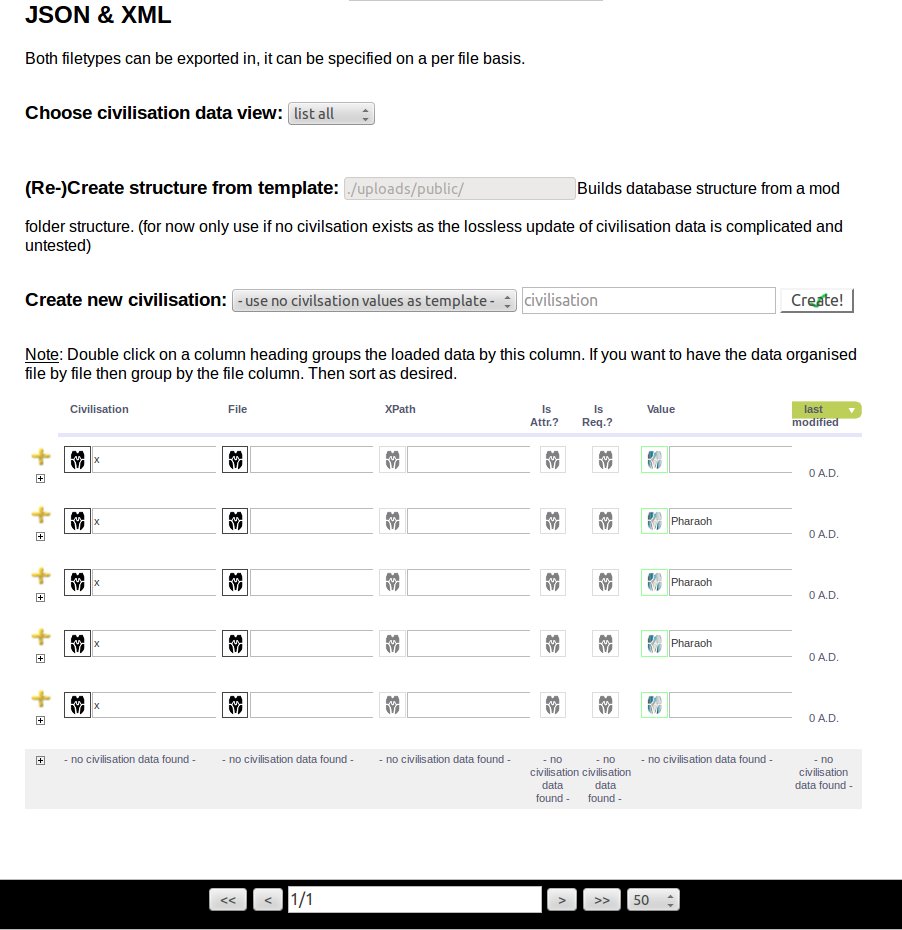
 I'm trying to set up a database for all civilisations (at least for mods as there chaos is great king). [This post will be updated.] Where to find: You see an old rusty gate with foreign inscripts. Pass through it. (the UI is not really functional yet, as no data exists) Terminology: - Leaf node: Mostly text. The final value. ----Civilisation----civilisation_file.xml:<root_element> <element attribute="leaf node"> leaf node.1 </element> ...<root_element>Functionality & Status:- Generate a civilisation or mod structure from an existing template, e.g. an existing civilisation or from a mod folder recursively (such that it has not to be created from scratch). - There is no fixed export filetype. Both JSON and XML can be output (to put into mods/<mod>/ folder). untested - The export target fileformat can be set on a per file basis. And changed even for already existing civilisation data. - Add new civilisation. - Rename civilisation, - Merge civilisations. - Add new File to civilization. - Rename file within all civilisations at the same time. - Move elements from one file to another. - Add new leaf element. (via xpath) - Insert/modify leaf node values. (good for researchers that don't have git or repository access) - Version control. not yet - Sorting (after Civ, File, XPath, or Leaf Value), - Grouping (after Civ, File, XPath, or Leaf Value), - Filtering (dynamic), - Option to apply changes to all occurrences in the whole database. <-- That's powerful, but also very dangerous if it goes wrong. - Option to modify equal values through out the currently filtered data rows.<-- That's quite useful as this way you can 1) filter the rows you wish to change. e.g. all occurrences of mesh_and_animation.v1.dae to mesh_and_animation.v2.dae within a certain civilisation.. - Updating the database civilisation structure by reading a template folder recursively when data already exists, creates new leaf elements automatically and shows in the civs that new elemets now have to/can be added/ are still empty and need to be filled. buggy Example: A new required element has been added, e.g. timetag/timerange. Now all civilisation data that not has this element yet, will have this added automatically (with dummy data, that can be changed thereafter). Targets: The target is researchers. Hopefully this later can be combined with a mercurial setup. I just have to add a button to allow researchers to commit their data.