zyli
-
Posts
106 -
Joined
-
Last visited
-
Days Won
2
Everything posted by zyli
-
@Frederick_1 Debian Sid already has 0AD version 0.28.0, but the dependencies require Debian 14 Forky. https://tracker.debian.org/pkg/0ad Under Debian 13.x Trixie, it can be compiled using the Debian method from Debian sources. The files (‘*dsc’, ‘*debian.tar.xz’, ‘*orig.tar.xz’) are at the bottom of the page: https://packages.debian.org/source/sid/0ad https://packages.debian.org/source/sid/0ad-data An interesting fact about ‘cbindgen’ – version 0.26 is sufficient for compilation (entry in the 0ad_0.28.0-3.dsc file): If you are interested in this method, let me know – I will describe how to do it. Best regards
-
@Frederick_1 What Debian? Saying you followed the instructions is imprecise, as they are very extensive. But let's get to the point. Compiling from the 0AD sources is simple and straightforward. A preliminary note: The compilation files take up a lot of disk space – mine is about 10 GiB. If you don't have that much space, compile on an external drive. Even a USB flash drive will work, as long as it's formatted with a Linux file system, e.g., ext4. If you use Windows file systems (e.g., fat32, exfat), compilation will fail. Checking required dependencies. dpkg -l build-essential cargo cmake curl libboost-dev libboost-system-dev libboost-filesystem-dev libcurl4-gnutls-dev libenet-dev libfmt-dev libfreetype-dev m4 libgloox-dev libicu-dev libminiupnpc-dev libnvtt-dev libogg-dev libopenal-dev libpng-dev libsdl2-dev libsodium-dev libvorbis-dev libwxgtk3.2-dev libxml2-dev llvm minisign python3 rustc zlib1g-dev If something is missing, we install it. Next – with user rights: cargo install --locked cbindgen@0.29.0 echo 'export PATH="/home/user_name/.cargo/bin:$PATH"' >> ~/.bashrc source ~/.bashrc Command list without unnecessary comments. Debian 13.3 Trixie. All commands as a user. After compilation, we are only interested in the 'binaries' directory. mkdir -p 0.28.0_Final cont 0.28.0_Final wget https://releases.wildfiregames.com/0ad-0.28.0-unix-build.tar.xz wget https://releases.wildfiregames.com/0ad-0.28.0-unix-build.tar.xz.sha256sum wget https://releases.wildfiregames.com/0ad-0.28.0-unix-build.tar.xz.minisig wget https://releases.wildfiregames.com/0ad-0.28.0-unix-data.tar.xz wget https://releases.wildfiregames.com/0ad-0.28.0-unix-data.tar.xz.sha256sum wget https://releases.wildfiregames.com/0ad-0.28.0-unix-data.tar.xz.minisig ls-al minisign -Vm 0ad-0.28.0-unix-build.tar.xz -P RWTWLbO12+ig3lUExIor3xd6DdZaYFEozn8Bu8nIzY3ImuRYQszIQyyy minisign -Vm 0ad-0.28.0-unix-data.tar.xz -P RWTWLbO12+ig3lUExIor3xd6DdZaYFEozn8Bu8nIzY3ImuRYQszIQyyy sha256sum -c 0ad-0.28.0-unix-build.tar.xz.sha256sum sha256sum -c 0ad-0.28.0-unix-data.tar.xz.sha256sum tar xpf 0ad-0.28.0-unix-build.tar.xz tar xpf 0ad-0.28.0-unix-data.tar.xz cd 0ad-0.28.0 cd libraries/ nproc # We'll see the number: N, e.g.: N=8 ./build-source-libs.sh -jN # So -j8 cd ../build/workspaces/ ./update-workspaces.sh -jN cd gcc/ make -jN cd ../../../binaries/system/ ./test ./pyrogenesis cp ../../build/build_version/build_version.txt . # Don't forget the dot at the end DONE If the compilation completes without errors with the final message: "Linking test," this is good. If for some reason you need to repeat the compilation, before issuing 'make', run the command: 'make clean'. Archive the 'binaries' directory and its contents and transfer it to another PC with Debian 13.x Trixie installed. But first, delete all '*.a' files from the 'system/' subdirectory. Leave only the '*.so' files and the 'ActorEditor', 'pyrogenesis', and 'test' files. Alternatively, leave the 'readme.txt' and the previously copied 'built_version.txt'. Do not touch the 'data/' subdirectory. The 'binaries' directory and its contents take up 5.0 GB of disk space. If '0ad' has never been run on this other computer in an earlier version, first check for the following packages: dpkg -l libenet7 libfmt10 libgloox18 libminiupnpc18 END Best regards
-
In Linux Mint, it works like this: mint@mint:~/0ad$ chrpath -l $(which pyrogenesis) /usr/games/pyrogenesis: RUNPATH=/usr/lib/games/0ad mint@mint:~/0ad$ ls -al /usr/lib/games/0ad total 11836 drwxr-xr-x 2 root root 120 Jan 12 18:53 . drwxr-xr-x 3 root root 60 Jan 12 18:53 .. -rwxr-xr-x 1 root root 14480 Dec 12 2020 ActorEditor -rw-r--r-- 1 root root 2206592 Dec 12 2020 libAtlasUI.so -rw-r--r-- 1 root root 1555328 Dec 12 2020 libCollada.so -rw-r--r-- 1 root root 8338440 Dec 12 2020 libmozjs38-ps-release.so mint@mint:~/0ad$ ls -al /usr/lib/x86_64-linux-gnu/libnvtt* lrwxrwxrwx 1 root root 16 Mar 31 2024 /usr/lib/x86_64-linux-gnu/libnvtt.so.2 -> libnvtt.so.2.0.8 -rw-r--r-- 1 root root 117576 Mar 31 2024 /usr/lib/x86_64-linux-gnu/libnvtt.so.2.0.8 After installing 0ad version 0.0.23.1 using method one.
-
@Hyperion I found some time and tried your method. I unpacked the packages libicu67, libjpeg62-turbo, libtiff5, libwebp6, libwxbase3.0-0v5, libwxgtk3.0-gtk3 -0v5 and copied the files from their ‘usr/lib/x86_64-linux-gnu’ directories to the ‘0ad’ directory created in ‘/usr/lib/0ad’. From the ‘control’ file of the ‘0ad_0.0.23.1-5+b1_amd64.deb’ package, I deleted the phrases "libicu67 (>= 67.1-1~), libwxbase3.0-0v5 (>= 3.0.5.1+dfsg), libwxgtk3.0-gtk3 -0v5 (>= 3.0.5.1+dfsg)", because otherwise this package could not be installed. The attempt to run 0ad failed. 0ad still searches for ‘libicui18n.so.67’ in the ‘/usr/lib/x86_64-linux-gnu’ directory, where there are thousands of system files. I tried copying these files to the ‘0ad’ directory created in ‘/usr/lib64/0ad’, ‘/usr/lib/x86_64-linux-gnu/0ad/’, and even later to ‘/usr/lib/games/0ad/’. The result was the same – after typing 0ad in the terminal: /usr/games/pyrogenesis: error while loading shared libraries: libicudata.so.67: cannot open shared object file: No such file or directory Apparently, something else needs to be set up somewhere. But I don't know what. Generally speaking, if this method worked, it would be more complicated than the first method I described in the post above. If anyone is interested, I am attaching a list of the terminal commands I executed. Best regards. raport_mint_22.2_Hyperion_method_FAIL_2026-01-12.txt.zip
-
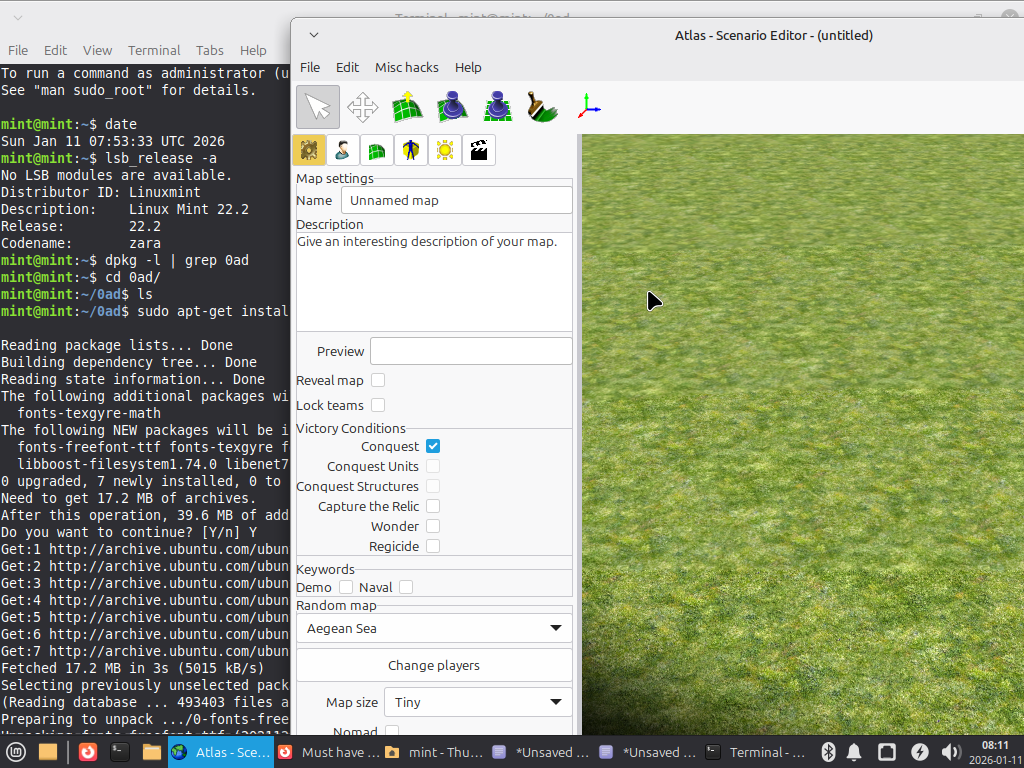
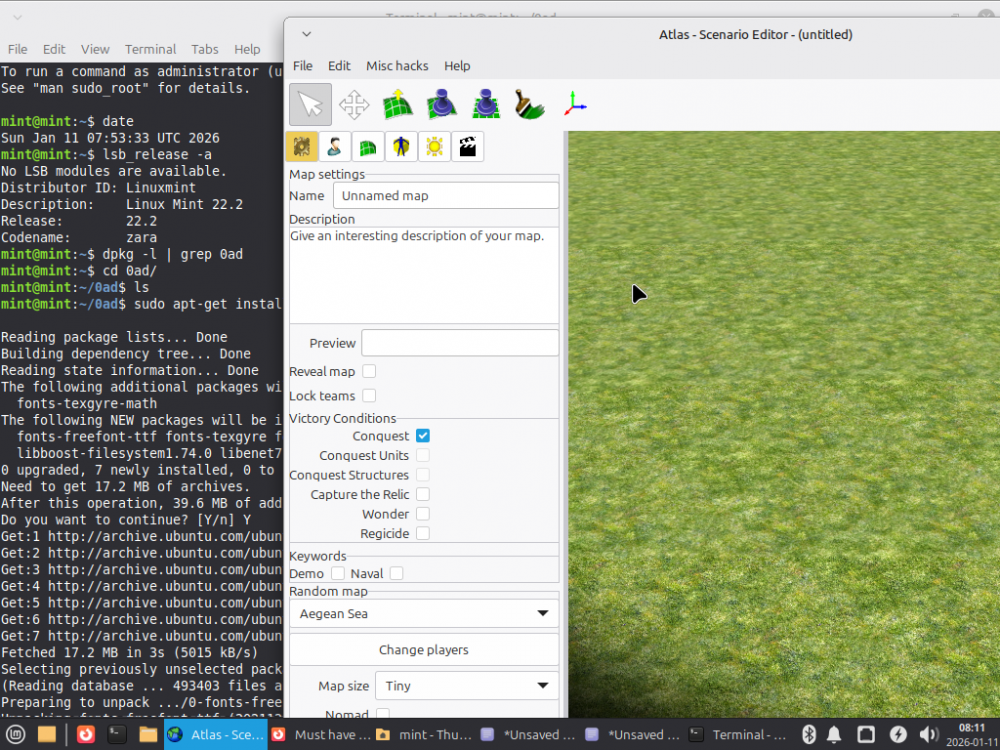
@NewWorldHero I also tried installing 0ad 0.0.23.1 using the second method – with repackaging. You're right. While the game itself works fine, the Scenario Editor won't start. In my opinion, the reason is that the ‘wx’ libraries (libwxbase3.2-1t64, libwxgtk3.2-1t64) are too new and 0ad ver. 0.0.23.1 does not understand them. Therefore, if you want to use the Scenario Editor in addition to the game, you must install it using the first method, i.e., with the libwxbase3.0-0v5 and libwxgtk3.0-gtk3-0v5 packages. If for some reason the modified "0ad_0.0.23. 1-55+b1_amd64.deb" package is still on your system, remove it and install the Bullseye package along with the following packages: libjpeg62-turbo libtiff5 libwebp6 libwxbase3.0-0v5 libwxgtk3.0-gtk3-0v5 Of course, at the end sudo dpkg -i 0ad_0.0.23.1-5+b1_amd64.deb In addition, I found a small error in the description of this method, namely that the ‘control’ file is in the ‘DEBIAN’ subdirectory. Therefore, in the description of the second method, instead of: sudo xed decompr/control It should be: sudo xed decompr/DEBIAN/control I will correct this in the above post. I am attaching two terminal command logs: 1. ‘raport_mint_22.2_methode_2_repack_2026-01-11.txt’ – how to install 0ad using the second method, of course the game works but the Scenario Editor does not start. and how I fixed it now: 2. ‘raport_mint_22.2_repair_2026-01-11.txt’ – we went back to method one – both the game and the Scenario Editor are working correctly. The fact that the system contains ‘libwx’ libraries in both ver. 3.0 and 3.2 should not bother anyone. Thank you for pointing this out and I apologize for my mistakes. Best regards. raport_mint_22.2_methode_2_repack_2026-01-11.txt.zip raport_mint_22.2_repair_2026-01-11.txt.zip
-
You write: After looking at what I wrote, I see that a space was inserted in the command where it should not be (method 1, point 2, unnecessary space before ‘deb’): It is: dpkg -i ... libtiff5_4.2.0-1+deb11u7_amd64. deb ... It should be: libtiff5_4.2.0-1+deb11u7_amd64.deb I apologize – this is probably the cause of the dependency issues. I will correct it in the above post. As for the script editor, it displays for me (Mint 22.2 Live). Maybe the ‘wx’ library was installed incorrectly because of this ‘libtiff5’? Show what the commands display: dpkg -l fonts-freefont-ttf fonts-texgyre libboost-filesystem1.74.0 libenet7 libgloox18 libnvtt2 libicu67 libjpeg62-turbo libtiff5 libwebp6 libwxbase3.0-0v5 libwxgtk3.0-gtk3-0v5 dpkg -C Best regards raport_mint_22.2_2026-01-11.txt.zip
-
Thank you for your reply. No need to confirm, as I have written a second reply and it is visible. Best regards.
-
I wrote it a second time – now you can see it. https://wildfiregames.com/forum/topic/139802-must-have-xxiii23-ken-wood-linux-only/?do=findComment&comment=616597 But why can't you see the first one?
-
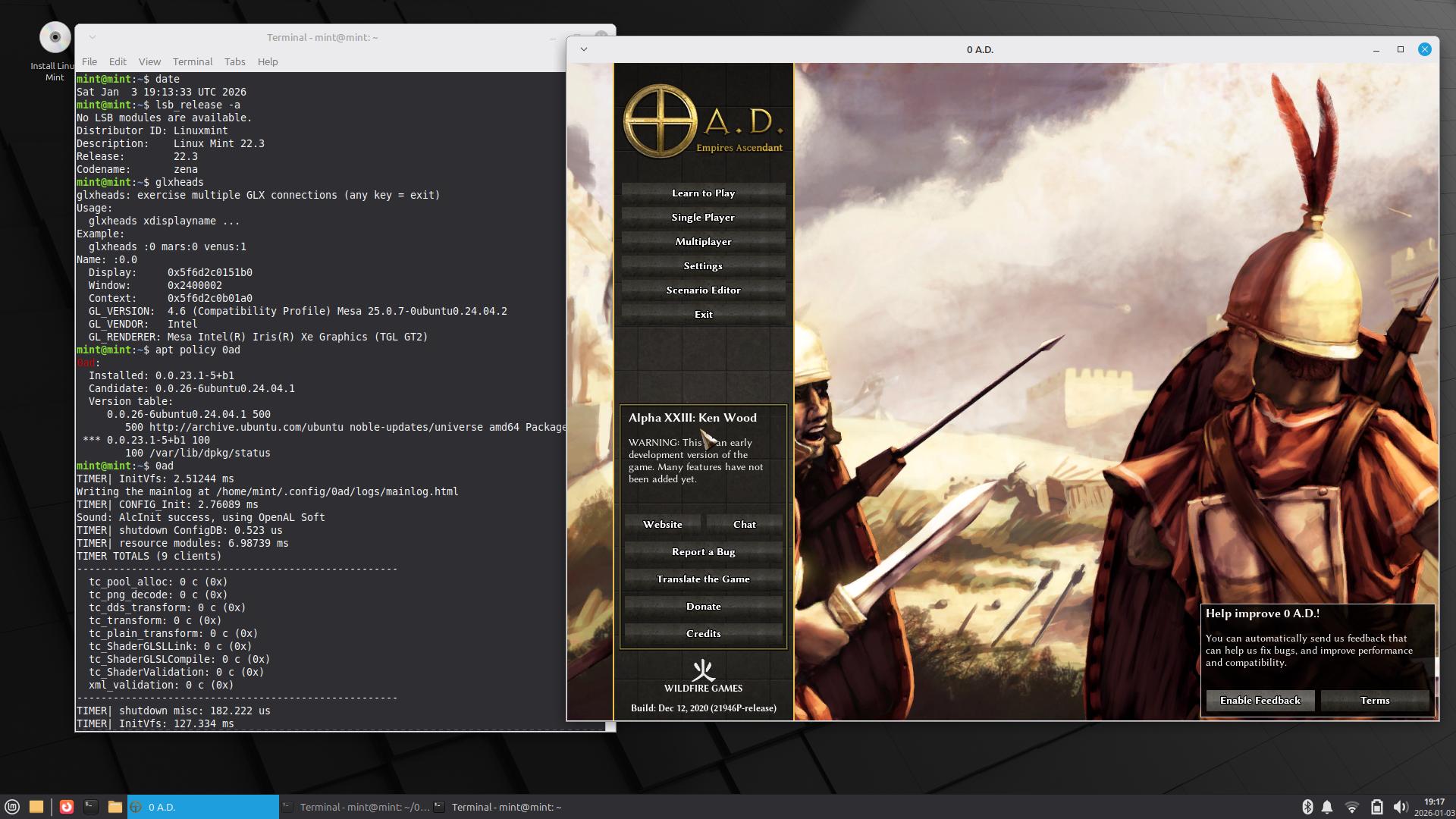
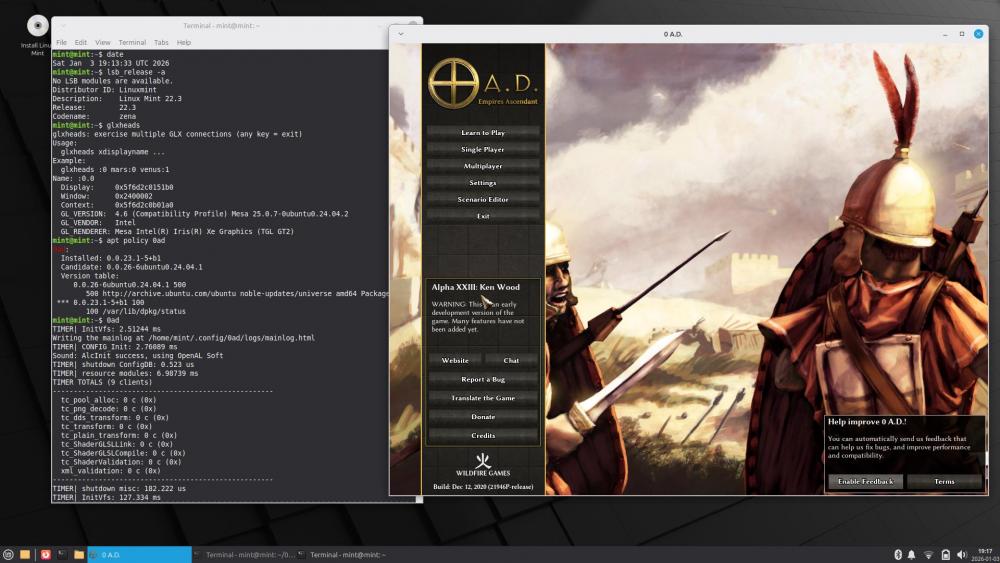
How to install 0ad ver. 0.0.23.1 on Linux Mint 22.3? In my opinion, there are two ways to do this. The description is a bit long, but what wouldn't you do for the success of 0ad? The first way --------------- Create a directory called ‘0ad’ and enter it. 1. First, install the dependencies available in Linux Mint (as root): sudo apt-get install fonts-freefont-ttf fonts-texgyre libboost-filesystem1.74.0 libenet7 libgloox18 libnvtt2 2. Now we will manually install the dependencies from Bullseye, as these versions are no longer available in Mint 22.x. First, we will download them: wget http://security.debian.org/debian-security/pool/updates/main/i/icu/libicu67_67.1-7+deb11u1_amd64.deb wget http://ftp.de.debian.org/debian/pool/main/libj/libjpeg-turbo/libjpeg62-turbo_2.0.6-4_amd64.deb wget http://security.debian.org/debian-security/pool/updates/main/t/tiff/libtiff5_4.2.0-1+deb11u7_amd64.deb wget http://ftp.de.debian.org/debian/pool/main/libw/libwebp/libwebp6_0.6.1-2.1+deb11u2_amd64.deb wget http://cz.archive.ubuntu.com/ubuntu/pool/universe/w/wxwidgets3.0/libwxbase3.0-0v5_3.0.5.1+dfsg-4_amd64.deb wget http://cz.archive.ubuntu.com/ubuntu/pool/universe/w/wxwidgets3.0/libwxgtk3.0-gtk3-0v5_3.0.5.1+dfsg-4_amd64.deb How did I find these links? Go to: https://www.debian.org/distrib/packages In the “Searching package catalogs” section below, enter 0ad and “Search.” When it appears, click on it (Trixie will be the default). Now click on the “bullseye” in the upper right corner (this option will no longer be available starting in September), and you will see: https://packages.debian.org/bullseye/0ad The required dependencies are listed below. You can either click on these dependencies or enter the name of the package in the upper right corner and click “Search.” For example, “libwebp6”+ Search, click “libwebp6” https://packages.debian.org/bullseye/libwebp6 At the bottom, click on “amd64” and a list of available servers will be displayed. I chose the first one on the right (de). https://packages.debian.org/bullseye/amd64/libwebp6/download Sometimes, when there are security fixes, it will display like this (only one server): https://packages.debian.org/bullseye/amd64/libtiff5/download The packages ‘libjpeg62-turbo’ and ‘libtiff5’ are required by the package ‘libwxgtk3.0-gtk3-0v5’, while ‘libwebp6’ is required by the package ‘libtiff5’. Some people call this dependency hell, and you can see how ‘apt-get’ can make installation easier. In Linux Mint 22.3, instead of these six packages, there are newer ones, namely: libicu74 libjpeg-turbo8 libtiff6 libwebp7 libwxbase3.2-1t64 libwxgtk3.2-1t64 We check if the files have been downloaded: ls -al Then install manually (as root): sudo dpkg -i libicu67_67.1-7+deb11u1_amd64.deb libjpeg62-turbo_2.0.6-4_amd64.deb libtiff5_4.2.0-1+deb11u7_amd64.deb libwebp6_0.6.1-2.1+deb11u2_amd64.deb libwxbase3.0-0v5_3.0.5.1+dfsg-4_amd64.deb libwxgtk3.0-gtk3-0v5_3.0.5.1+dfsg-4_amd64.deb We should not see any errors. The ‘dpkg -C’ command should not display anything. These packages have not overwritten or deleted anything – they are simply alongside the others in our system. We can uninstall them at any time and nothing will happen. So this is a weak FrankenMint. 3. Finally, we download the 0ad files from Bullseye: wget http://ftp.de.debian.org/debian/pool/main/0/0ad/0ad_0.0.23.1-5+b1_amd64.deb wget http://ftp.de.debian.org/debian/pool/main/0/0ad-data/0ad-data_0.0.23.1-1.1_all.deb wget http://ftp.de.debian.org/debian/pool/main/0/0ad-data/0ad-data-common_0.0.23.1-1.1_all.deb Then install them manually (as root): sudo dpkg -i 0ad-data_0.0.23.1-1.1_all.deb 0ad-data-common_0.0.23.1-1.1_all.deb 0ad_0.0.23.1-5+b1_amd64.deb We should not see any errors. The ‘dpkg -C’ command should not display anything. The item “0 A.D.” has appeared in “Menu – Games.” The ‘0ad’ directory is now unnecessary – we delete it. Unless we want to keep the downloaded files for future use. 4. We start the game by typing ‘0ad’ in the terminal. It is better to do this in the terminal than from the menu, because we can see the messages that 0ad displays during startup. Second method ----------------- How does ‘0ad_0.0.23.1-5+b1_amd64.deb’ know what dependencies need to be installed? A: It has this information stored “inside” – in the ‘control’ file. Just open the file in Archive Manager (File-roller, xarchive, or whatever you have) and find the ‘control’ file in ‘DEBIAN’. When you view it, you will see a line beginning with the word “Depends” and then, among others, ‘libicu67 (>= 67.1-1~)’, followed by 'libwxbase3.0-0v5 (>= 3.0.5.1+dfsg), libwxgtk3.0-gtk3 -0v5 (>= 3.0.5.1+dfsg)'. You will not see the ‘libjpeg62-turbo’, ‘libtiff5’, ‘libwebp6’ packages, as these packages will be downloaded by ‘libwxgtk3.0-gtk3-0v5’. Now just unpack the file ‘0ad_0.0.23.1-5+b1_amd64.deb’ using the following commands (in Mint, the text editor is “xed”, not ‘mousepad’ or “gedit”): mkdir decompr sudo dpkg-deb -R 0ad_0.0.23.1-5+b1_amd64.deb decompr/ sudo xed decompr/DEBIAN/control Now manually replace the phrase: "libwxbase3.0-0v5 (>= 3.0.5.1+dfsg), libwxgtk3.0-gtk3 -0v5 (>= 3.0.5.1+dfsg),“ with the phrase ”libwxbase3.2-1t64, libwxgtk3.2-1t64," In the “Source” and “Version” fields (at the top), replace ‘5’ with “55,” for example, to avoid confusion. Finally, we pack (also enter “55”): sudo dpkg-deb -b decompr/ 0ad_0.0.23.1-55+b1_amd64.deb Done. All dependencies except ‘icu67’ are from Mint. sudo apt-get install fonts-freefont-ttf fonts-texgyre libboost-filesystem1.74.0 libenet7 libgloox18 libnvtt2 sudo apt-get install libwxbase3.2-1t64 libwxgtk3.2-1t64 There is no way around ‘icu67’, we have to download it from Bullseye: wget http://security.debian.org/debian-security/pool/updates/main/i/icu/libicu67_67.1-7+deb11u1_amd64.deb sudo dpkg -i libicu67_67.1-7+deb11u1_amd64.deb Finally, download the two 0ad-data files and install them together with your new (55) 0ad file, as described in the first method. sudo dpkg -i 0ad-data_0.0.23.1-1.1_all.deb 0ad-data-common_0.0.23.1-1.1_all.deb sudo dpkg -i 0ad_0.0.23.1-55+b1_amd64.deb We only have one foreign package in the system – 'libicu67', of course 3 “0ad”. However, this method has one drawback. Due to the relatively recent versions of the 'libwx' libraries (3.2 vs. 3.0), the Scenario Editor will not launch. If you want to use the Scenario Editor, you must use the first method. Done. Best regards, PS. The Latin sentence you quoted is too harsh. I would end with a Roman proverb: Quote Perfectus Usus Facit
-
I wrote a post (quite a long one) – but it's not visible. The first line says: Posted 41 minutes ago (edited) · Hidden When I'm logged in, I can see it: https://wildfiregames.com/forum/topic/139802-must-have-xxiii23-ken-wood-linux-only/?do=findComment&comment=616592 What did I do wrong?
-
I use Mint 22.3 Live because it's easier – I don't waste time on installation. I'm not a daily Linux Mint user. If something works under the Live system, it will also work under the system installed on the disk. You say something is beyond your capabilities? Try it first, and you'll see how easy it is. You know how to install Linux Mint on your hard drive, right? That means you can also install it on a second drive (USB stick) connected to your PC. You just have to be careful where you install the boot program. And if you have trouble with that, disconnect the hard drive from your PC while installing on the USB stick. Best regards
-
@NewWorldHero You've spurred me into action. I managed to install 0ad ver. 0.0.23.1 on Linux Mint Live 22.3 (still in beta). I figured there's no point in bothering with 22.2 since 22.3 will be released soon. 0ad is from Bullseye, and some dependencies are also from Bullseye, the rest from Mint – it works for now. If you're interested, post on the forum, but first read: https://wiki.debian.org/DontBreakDebian The whole thing – from start to finish. This also applies to other systems, including Mint. By installing 0.0.23.1, I turned Linux Mint into Frankenstein Mint, which, in my opinion, can only be done for fun or for testing purposes. Best regards
-
@NewWorldHero I understand what you're writing as follows: I have Linux Mint 22.2. Why don't you tell me where the *deb 0ad file is in version 0.0.23? Of course, that would be the simplest. But it's IMPOSSIBLE. 0ad ver. 0.0.23 (0.0.23b, Debian 0.0.23.1) was released in May (December) 2018. https://releases.wildfiregames.com/ Linux Mint 22.2 was released in August 2025. https://pub.linuxmint.io/stable/22.2/ Linux Mint 22.2 is based on Ubuntu 24.04 LTS, Noble Numbat, released in April 2024. https://en.wikipedia.org/wiki/Ubuntu_version_history#Table_of_versions Six years passed between 2018 and 2024. Systems from 2024 no longer contain the package versions that 0ad 0.0.23 requires. Such old packages (boost, icu, and whatever else) cannot be installed on new systems. Therefore, it can't be done. The only thing left is to find an older distribution for which this version was available and install it on a USB flash drive as if it were a hard drive. Ubuntu 22.04 LTS Jammy includes 0ad already in version 0.0.25b https://packages.ubuntu.com/jammy/0ad I found such a distribution for you – Debian Bullseye 11.11, which, moreover, still has the repositories enabled. Speaking of which, the Bullseye repositories won't be disabled until 2026-08-31. https://wiki.debian.org/DebianReleases You'll easily be able to install both the system and 0ad 0.0.23.1 on a USB flash drive before the repositories are disabled. After installing, keep the USB flash drive in a drawer, and when you want to play, you take it out, start your PC, and play. When you decide that's enough, you turn off your PC, disconnect the flash drive, put it back in the drawer, and then start your Mint. And you can go on like this forever. Well, maybe not that long – until you replace your PC with one that Bullseye can't handle. Happy New Year!
-
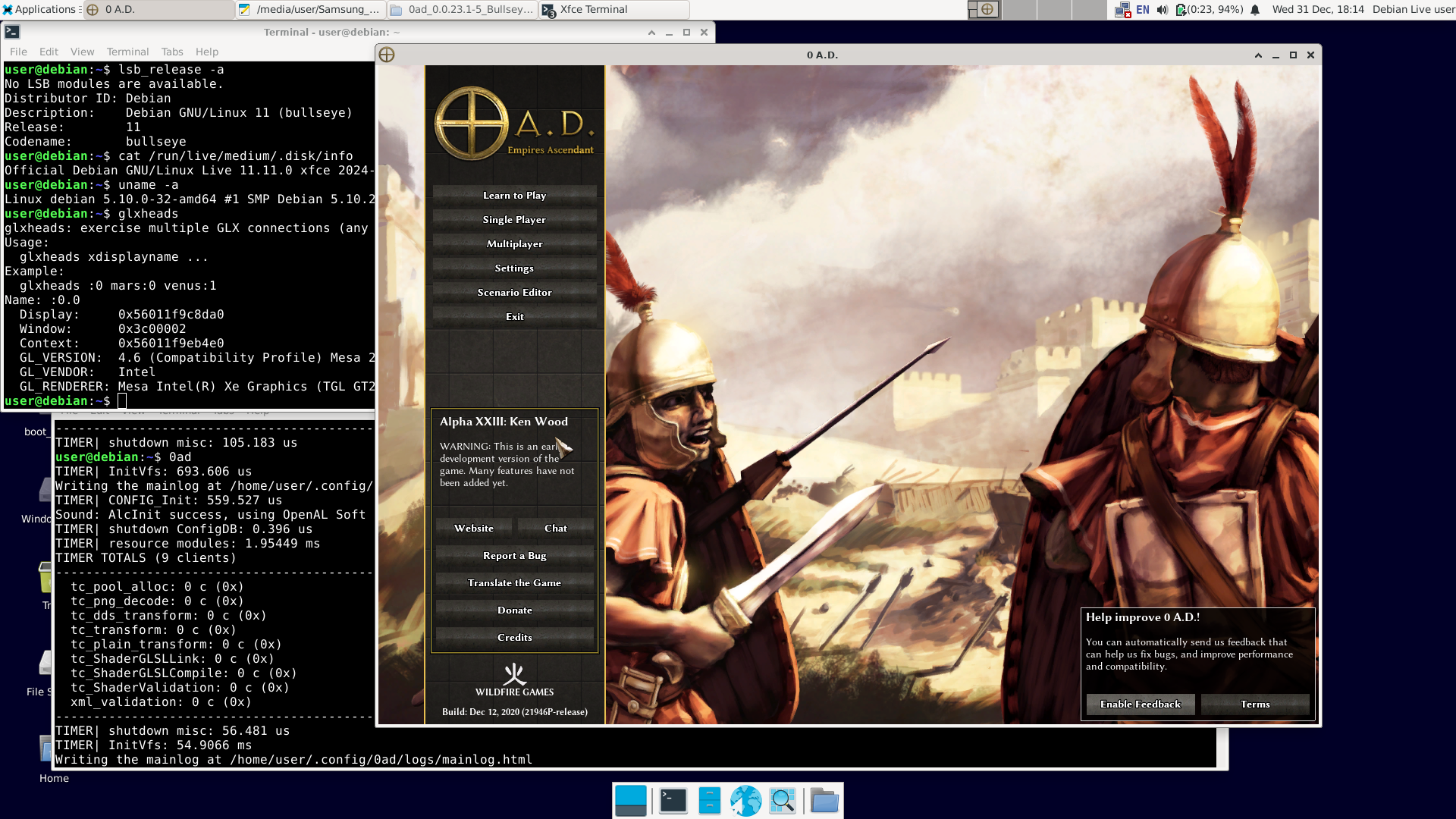
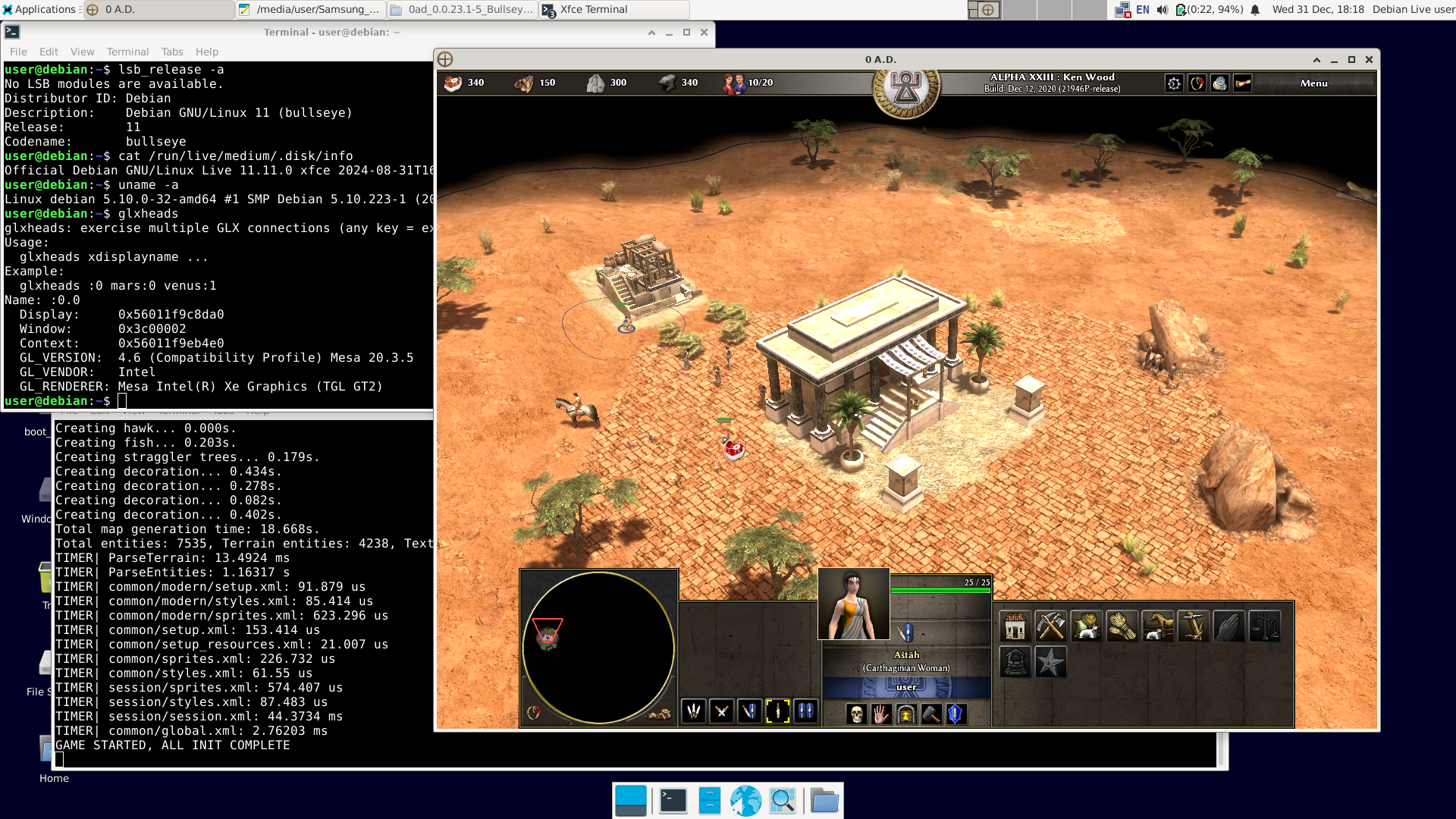
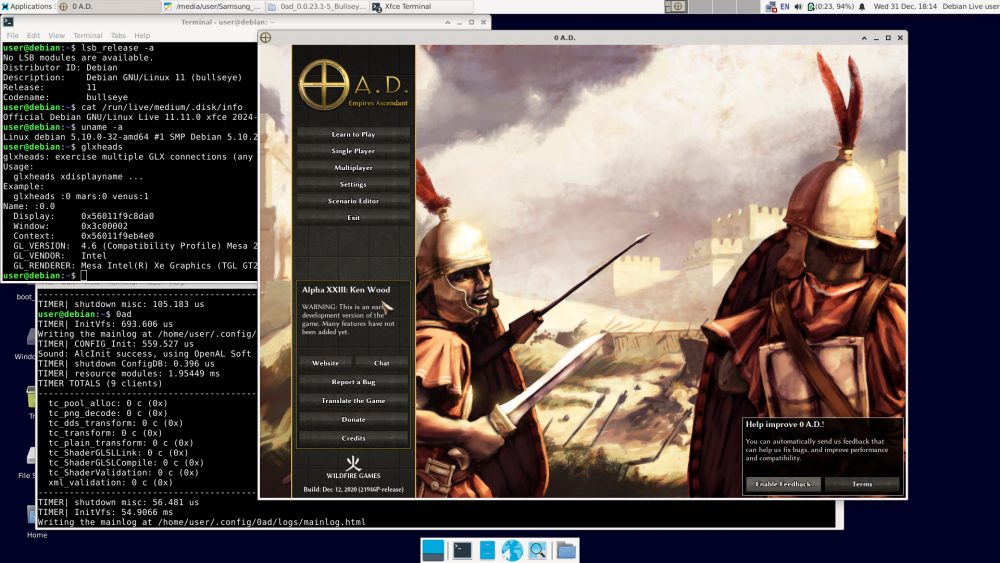
There have already been 12 posts, and "NewWorldHero" only wanted one answer: how to run the older version of 0ad – ver. 0.0.23 (Ken Wood). I figured out a way to do it: https://wildfiregames.com/forum/topic/139802-must-have-xxiii23-ken-wood-linux-only/?do=findComment&comment=616373 But I only figured it out, not tested it. It was bothering me. So I did this: 1. I downloaded Live Bullseye version 11.11 (+non-free) https://cdimage.debian.org/cdimage/unofficial/non-free/cd-including-firmware/archive/11.11.0-live+nonfree/amd64/iso-hybrid/debian-live-11.11.0-amd64-xfce+nonfree.iso 2. I copied it to a USB drive with Ventoy installed and booted it.. The laptop was even relatively new – Intel TigerLake (11th gen.) + Intel Xe. Debian booted, and Wi-Fi was available (Wi-Fi on Intel too). Good news: the Bullseye repositories are still available. You can use 'apt install'; you don't need to install anything manually. 3. After connecting to the network, I issued the command: apt-get update apt-get install 0ad I had to wait a while because one of the packages ('0ad-data_0.0.23.1-1.1_all.deb') is about 670 MiB. 4. After installation, in the terminal as a regular user, type '0ad' + Enter or click Menu – Games – 0ad. Done. I'm attaching the images. A short summary: user@debian:~$ cat /etc/debian_version 11.11 user@debian:~$ lsb_release -a No LSB modules are available. Distributor ID: Debian Description: Debian GNU/Linux 11 (bullseye) Release: 11 Codename: bullseye user@debian:~$ cat /run/live/medium/.disk/info Official Debian GNU/Linux Live 11.11.0 xfce 2024-08-31T16:39user@debian:~$ user@debian:~$ uname -a Linux debian 5.10.0-32-amd64 #1 SMP Debian 5.10.223-1 (2024-08-10) x86_64 GNU/Linux user@debian:~$ glxheads glxheads: exercise multiple GLX connections (any key = exit) Usage: glxheads xdisplayname ... Example: glxheads :0 mars:0 venus:1 Name: :0.0 Display: 0x56011f9c8da0 Window: 0x3c00002 Context: 0x56011f9eb4e0 GL_VERSION: 4.6 (Compatibility Profile) Mesa 20.3.5 GL_VENDOR: Intel GL_RENDERER: Mesa Intel(R) Xe Graphics (TGL GT2) user@debian:~$ dpkg -l | grep 0ad ii 0ad 0.0.23.1-5+b1 amd64 Real-time strategy game of ancient warfare ii 0ad-data 0.0.23.1-1.1 all Real-time strategy game of ancient warfare (data files) ii 0ad-data-common 0.0.23.1-1.1 all Real-time strategy game of ancient warfare (common data files) user@debian:~$ 0ad TIMER| InitVfs: 860.322 us Writing the mainlog at /home/user/.config/0ad/logs/mainlog.html TIMER| CONFIG_Init: 559.181 us Sound: AlcInit success, using OpenAL Soft TIMER| shutdown ConfigDB: 0.239 us TIMER| resource modules: 2.12809 ms TIMER TOTALS (9 clients) ... etc. Best regards. Happy New Year.
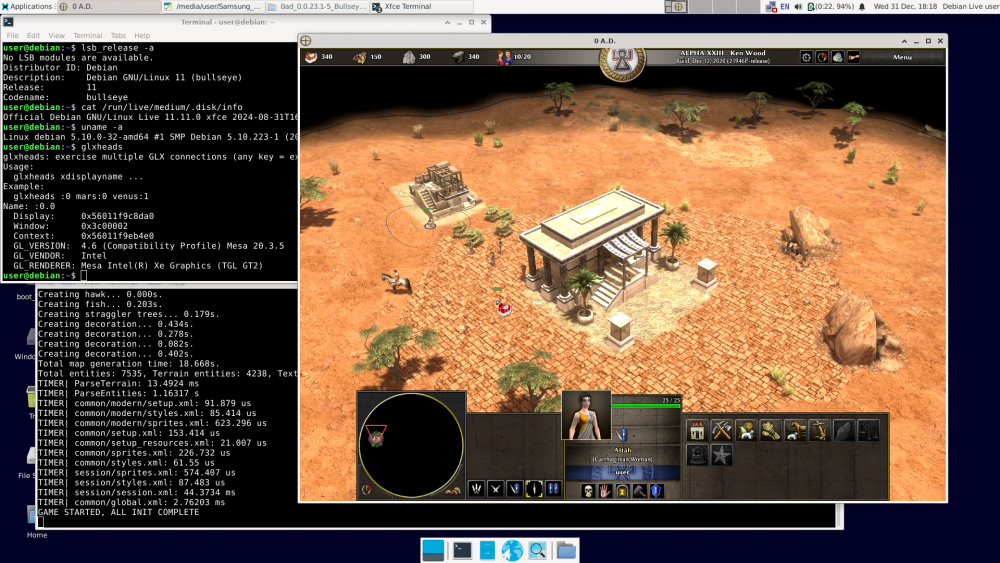
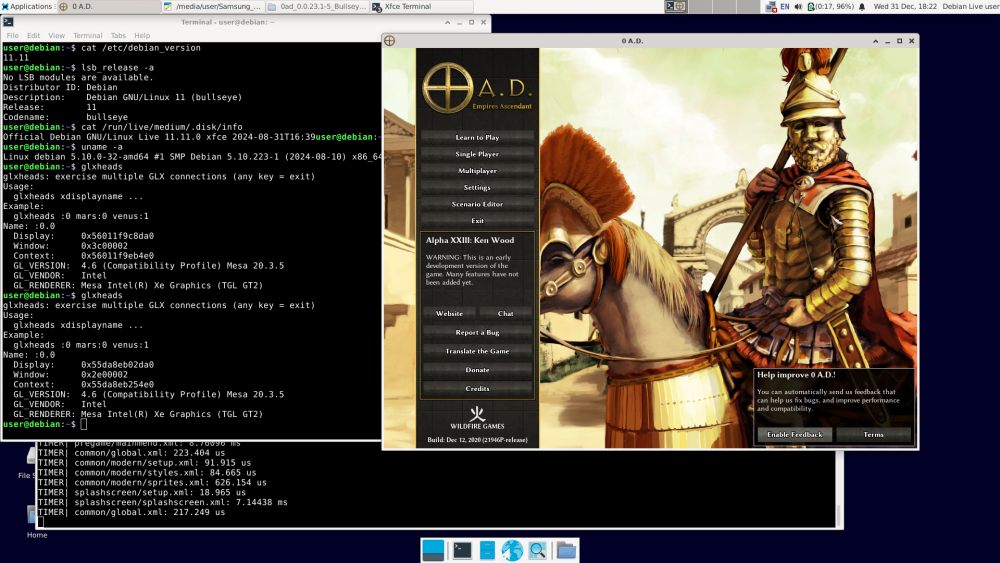
-
@Dunedan Good. If compiling older versions of 0ad is as you describe, there's another way. Probably easier than compiling. In Debian, version 23.1 of 0ad was available in Bullseye (11.x). 1. Install Debian 11 Bullseye on a USB stick just like you would on a hard drive. https://cdimage.debian.org/cdimage/unofficial/non-free/cd-including-firmware/archive/11.11.0+nonfree/amd64/iso-dvd/ Includes firmware. 2. Run the installed Bullseye from the USB stick on your computer. Of course, unless it's a recent computer that the Bullseye kernel (5.10.x) can't handle. 3. Since the Bullseye repository is already down (I think), 0ad and its dependencies (there aren't many) must be installed manually. https://packages.debian.org/bullseye/0ad The standard command: apt install 0ad will not work. 4. Download the following: http://ftp.de.debian.org/debian/pool/main/0/0ad/0ad_0.0.23.1-5+b1_amd64.deb http://ftp.de.debian.org/debian/pool/main/0/0ad-data/0ad-data_0.0.23.1-1.1_all.deb http://ftp.de.debian.org/debian/pool/main/0/0ad-data/0ad-data-common_0.0.23.1-1.1_all.deb 5. Try to install it: dpkg -i 0ad-data_0.0.23.1-1.1_all.deb dpkg -i 0ad-data-common_0.0.23.1-1.1_all.deb dpkg -i 0ad_0.0.23.1-5+b1_amd64.deb We're taking a look at what dpkg outputted. The first two packages should install correctly, unless some fonts are missing, in which case they need to be installed. https://packages.debian.org/bullseye/0ad-data-common The last command will be the hardest, as dpkg will output something like: "error – package xxx is missing". You'll need to download this package manually, install it, and try again: dpkg -i 0ad_0.0.23.1-5+b1_amd64.deb And so on until you succeed. After a few rounds of this, we have 0ad ver. 23.1 installed for good. Now you can run 0ad and finally put the Bullseye + 0ad USB stick away. Best regards. Happy New Year
-
@NewWorldBohate You're exaggerating when you say compilation is difficult. The description on the website: https://gitea.wildfiregames.com/0ad/0ad/wiki/BuildInstructions#linux may be confusing, but that's because it describes compilation cases for various distributions. If you write down the commands, for example, on a piece of paper, it's not so bad. I can help you with that—you just have to want it and show some good will. Yes, compilation requires a lot of dependencies, which are normally unnecessary. But compilation can be performed on a Live system running from a DVD or USB drive (it must be the same version as the one you have installed on your PC). After completing the necessary steps, back up the necessary directories and shut down the computer. All the "mess" (as you wrote) is gone – you only have what you need. Transfer it to your PC and you're done. A small note about 0ad. You build the Live installation in a directory on an external drive, as this directory takes up a lot of space. The drive must have Linux partitions (ext4). If you connect a USB drive with a FAT32 or exFAT file system, for example, the build will fail because Windows file systems do not support symlinks. Best regards.
-
Yes, I have a replay. The map is Elephantine. replays_2025-12-24_0001.7z
-
Everything was fine, until suddenly… Petra error. Ver. 0.28.0, 7386a5d514 Mainly: Debian 13.2, SVN compilation ('svn update' commands, etc.). Best regards and Merry Christmas. interestinglog.html_2025-12-24.7z mainlog.html_2025-12-24.7z
-
Before you start experimenting, back up your important data, or better yet, create a system image using Clonezilla. From what I've seen, the PuerOS documentation is very poor, and there's no information about updating releases—you have to guess. So either they didn't bother to write it or there's something wrong with the updates. Or maybe I was looking in the wrong place? In either case, be careful. Good luck. Regards.
-
I now understand that you prefer PureOS because it's "Pure." I was surprised that you were interested in flatpak – on the one hand, "Pure" and on the other, flatpak – but let's leave that aside. Just because Pure hasn't released an updated ISO image for two and a half years doesn't mean they're not doing anything. I looked at their repositories: https://repo.pureos.net/pureos/pool/main/ You can see that they're releasing newer packages there: https://repo.pureos.net/pureos/pool/main/b/base-files/ There's also 0ad: https://repo.pureos.net/pureos/pool/main/0/0ad/ Therefore, I suspect you didn't read the PureOS documentation about how to update releases. PureOS is based on Debian, and I suspect it also uses Debian release codenames. You're probably stuck on Bullseye – hence the version 0.23.0 available. https://packages.debian.org/bullseye/0ad I would try this: I would check the entries in the '/etc/apt/sources.list' file – if the word 'bullseye' is there, that's the cause. In that case, you should update sequentially: bullseye -> bookworm -> trixie, rather than straight to trixie. But to be sure, I would read the PureOS documentation. If this update were successful, I would download three files: 0ad, 0ad-data, and 0ad-data-common (version 0.27.1-3 from Debian trixie-backports): https://packages.debian.org/trixie-backports/0ad and I would install them manually (dpkg -i file.deb). I would then have the latest 0ad for PureOS – but this is just my guess, as I've never used PureOS. In summary – first, issue the following commands: cat /etc/os-release cat /etc/apt/sources.list Regarding your question, I believe there are currently no Linux distributions that meet Richard Stallman's rules. Which distribution doesn't use proprietary firmware? Best regards Postscriptum --------------- PureOS does not use Debian's code names, but its own: Amber, Byzantium, Crimson, and Dawn. https://repo.pureos.net/pureos/dists/ Dawn is probably the equivalent of Debian's sid (perpetually unstable). So you need to read up on it. My guess: you have Amber, but you should have Crimson. Check it out.
-
According to https://en.wikipedia.org/wiki/PureOS In my opinion, it's time to choose something else. This is what the 0ad versions supported by Linux distributions look like. https://repology.org/project/0ad/versions I suggest stable Debian 13.1 Trixie: https://cdimage.debian.org/cdimage/release/13.1.0/amd64/iso-dvd/ https://packages.debian.org/trixie-backports/0ad Regards.
-
Thank you for the information. Regards.
-
I'm compiling 0ad on Debian ('svn update' commands, etc.). The version hasn't changed for a while now (October 18th?). I see: According to '0ad/trunk/build/build_version/build_version.txt': Similarly, in '~/.local/state/0ad/log/userreport_hwdetect.txt'. However, on the website https://gitea.wildfiregames.com/0ad/0ad, there are new commits almost daily (last one: cb58116270). I also found this: https://gitea.wildfiregames.com/0ad/0ad/src/branch/release-0.28.0 Hence my questions: Does this mean that version 0.28.0 will be released soon? But the numbering was supposed to be different – 28.0?
-
Release Preparation of A27.1
zyli replied to Itms's topic in Game Development & Technical Discussion
Replay2025-07-13_0001.zip -
Release Preparation of A27.1
zyli replied to Itms's topic in Game Development & Technical Discussion
Compilation: 0 A.D.0.27.1-rc2, Debian 12.11 Bookworm (+rustup) To me, everything works as expected, only "Petra" informs: Regards